Participant
February 22, 2017
Answered

Adobe Stock Troubles

  • February 22, 2017
  • 2 replies
  • 285 views

I see from some other posts here that folks are having a mite of trouble like I am - untangling from Adobe Stock.  I went through 4 hours of heck yesterday trying to undo my account, including interactions with PayPal representatives, and have still not resolved the problem - HOW DO I CANCEL ADOBE STOCK AFTER MY 10 "FREE" IMAGES"?

Adobe Systems, this seems like a problem that is directed to you, and that you need to solve on behalf of your user community.

Anyone else agree?
This topic has been closed for replies.
Correct answer Brad Lawryk

- Go to www.adobe.com and log in with your Adobe Id used for Adobe Stock

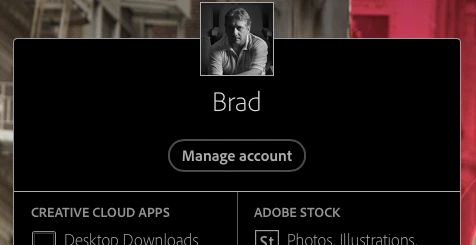
- Go to 'Manage Account'

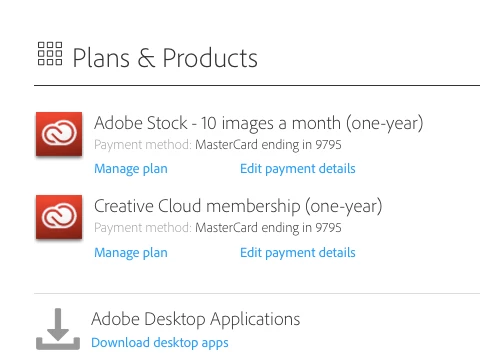
- Under 'Plans & Products' you will see your Adobe Stock Subscription

- Click on 'Manage Plan'

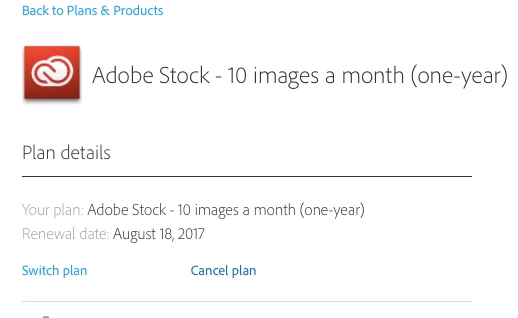
- Click on 'Cancel plan'

- Follow prompts ...... and done.

2 replies

Beverley Gray
Inspiring
February 22, 2017

As the renewal payment had not processed successfully you may not have had the option to cancel your plan via account management.  I've done it for you as you were within the cancellation period.

Kind regards

Bev

diesledonAuthor
Participant
February 22, 2017

Thank you Bev!  I was getting nowhere with the folks on the phone.  Much appreciated.

Brad Lawryk
Brad LawrykCorrect answer
Legend
February 22, 2017

- Go to www.adobe.com and log in with your Adobe Id used for Adobe Stock

- Go to 'Manage Account'

- Under 'Plans & Products' you will see your Adobe Stock Subscription

- Click on 'Manage Plan'

- Click on 'Cancel plan'

- Follow prompts ...... and done.