
michelles68402784
Participant
April 4, 2019
Answered

ai file downloads as text

  • April 4, 2019
  • 1 reply
  • 466 views

I have tried twice with same (bad) results to download ai file #149729640.

It downloads as text in an unknown language. It makes no difference whether I try to open it in illustrator or place in illustrator or InDesign.

I did see other questions on this and apparently it is a corrupted file, with no fix on my end.

Adobe moderator, if you see this, I would appreciate it if you could credit my Adobe Stock account for this download.

Thank you,

M Spurlock
    This topic has been closed for replies.
    Correct answer Abambo

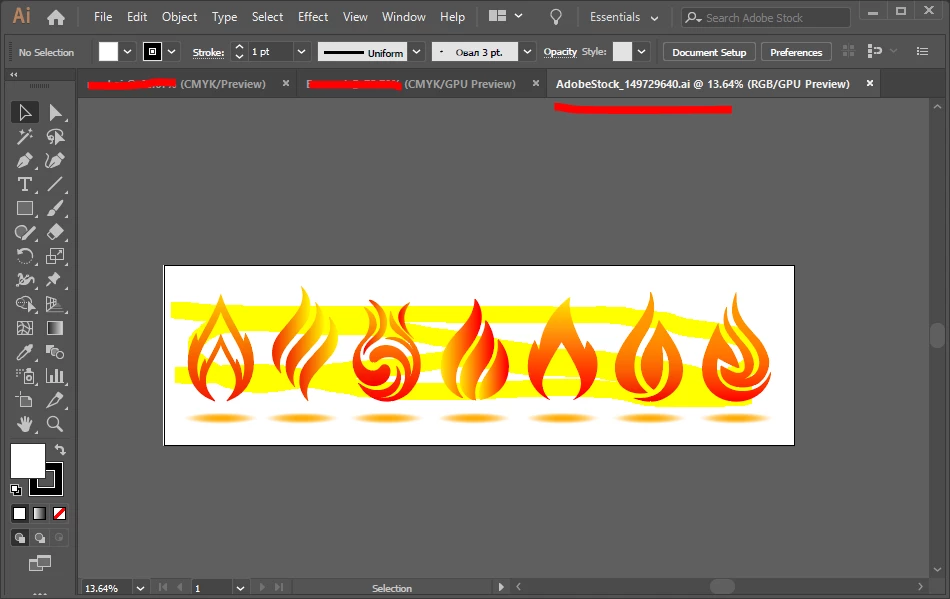
    Downloads as a great Adobe Illustrator file:

    1 reply

    Abambo
    Community Expert
    AbamboCommunity ExpertCorrect answer
    Community Expert
    April 4, 2019

    Downloads as a great Adobe Illustrator file:

    ABAMBO | Hard- and Software Engineer | Photographer
    michelles68402784
    Participant
    April 8, 2019

    Thank you for your response, Abambo.'

    Once I saw your answer, that the file was not corrupt, I had my son open the file and downsave to cs 4 for me. (He has Adobe Cloud) That worked, and I was then able to place into my inDesign file.

    I tried to go back to my original post to mark as correct, but couldn't figure it out. Feel free to mark it as answered for me.

    Sincerely,

    Michelle

    Michelle Spurlock

    Abambo
    Community Expert
    Community Expert
    April 8, 2019

    michelles68402784  wrote

    Once I saw your answer, that the file was not corrupt, I had my son open the file and downsave to cs 4 for me. (He has Adobe Cloud) That worked, and I was then able to place into my inDesign file.

    Hi Michelle,

    Placing in Indesign works as soon as a PDF preview is included. Unfortunately the preview included with this asset is only the text giving you the instructions in Russian to deal with the missing PDF content:

    This is an Adobe® Illustrator® file that was saved without PDF content. To place the file in other applications or open it in them, you must re-save it in Adobe Illustrator with the option "Create PDF-compatible file" enabled. This option is located in the Illustrator Source Format Options dialog box, which is displayed when you save an Adobe Illustrator file using the Save As command.

    It would indeed be much more useful to include the PDF content.

    ABAMBO | Hard- and Software Engineer | Photographer