
aliciad81872649
Participant
March 3, 2017
Answered

Checkerboard Background BUT Not Transparent

  • March 3, 2017
  • 2 replies
  • 4484 views

I bought an image of a bubble on Adobe Stock...it is transparent in the image...with a checkerboard background...so in normal circles this means the background is transp. 

However, I see there is no such thing as a trans image inot Adobe Stock. This image is in AI/EPS format if that helps.

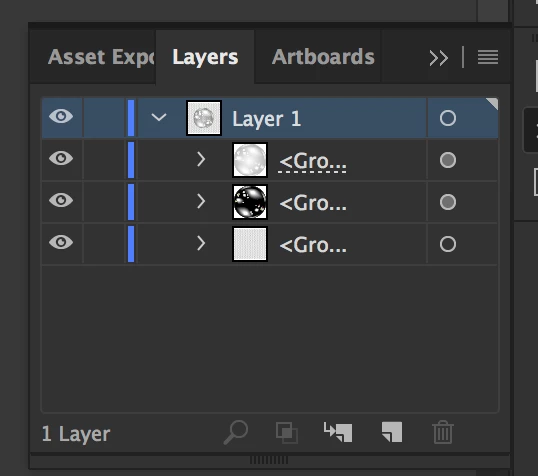
I am using Illustrator CC. I only see 1layer in the layers panel.

Please tell me if I have any options or I've wasted time and money on a stupid bubble checkerboard design.
This topic has been closed for replies.
Correct answer Brad Lawryk

When I go to the LAYERS menu, it shows as only 1 layer. I tried to see if it was hidden etc and nothing works. I am still new to Illustrator but have searched tutorials etc to see if there is something I am not doing.


In the layer panel, click on the small arrow beside 'Layer 1' to expand it. Then click on the eye icon in the bottom layer to turn off the checkered layer.

2 replies

aliciad81872649
Participant
March 6, 2017
Brad Lawryk
Legend
March 6, 2017

When you open it in Illustrator and delete the layer with the checkerboard pattern it doesn't work for you?

Abambo
Community Expert
Community Expert
July 19, 2022

Greetings, I just licensed file# 338054755. My situation is when I turn off the background the images become black. My ai version is 26.3.1 64 bit. I have unsuccessfully tried all suggestions with no luck. Please advise.
Thank you.


That's how these effects work. For "light effects" to work, you need a (darker) background. The reason for this is that the artwork needs to interact with a background to give the effect as described.

ABAMBO | Hard- and Software Engineer | Photographer
Brad Lawryk
Legend
March 3, 2017

What is the image number?