
Participant
October 6, 2018
Answered

Download Adobe Stock images to my computer

  • October 6, 2018
  • 2 replies
  • 11206 views

I'm trying to download some of my licensed adobe stock photos to my computer to use in other graphics programs.

So far, I can only access them via programs in my CC account. (I have to open an adobe program access the library, drag image to canvas and save the file).

Are they or can they be stored on my computer? If so, how can I download them to my computer?
Correct answer twaritar3263062

Hi Nelson,

Thanks for reaching out to the Adobe Stock community.

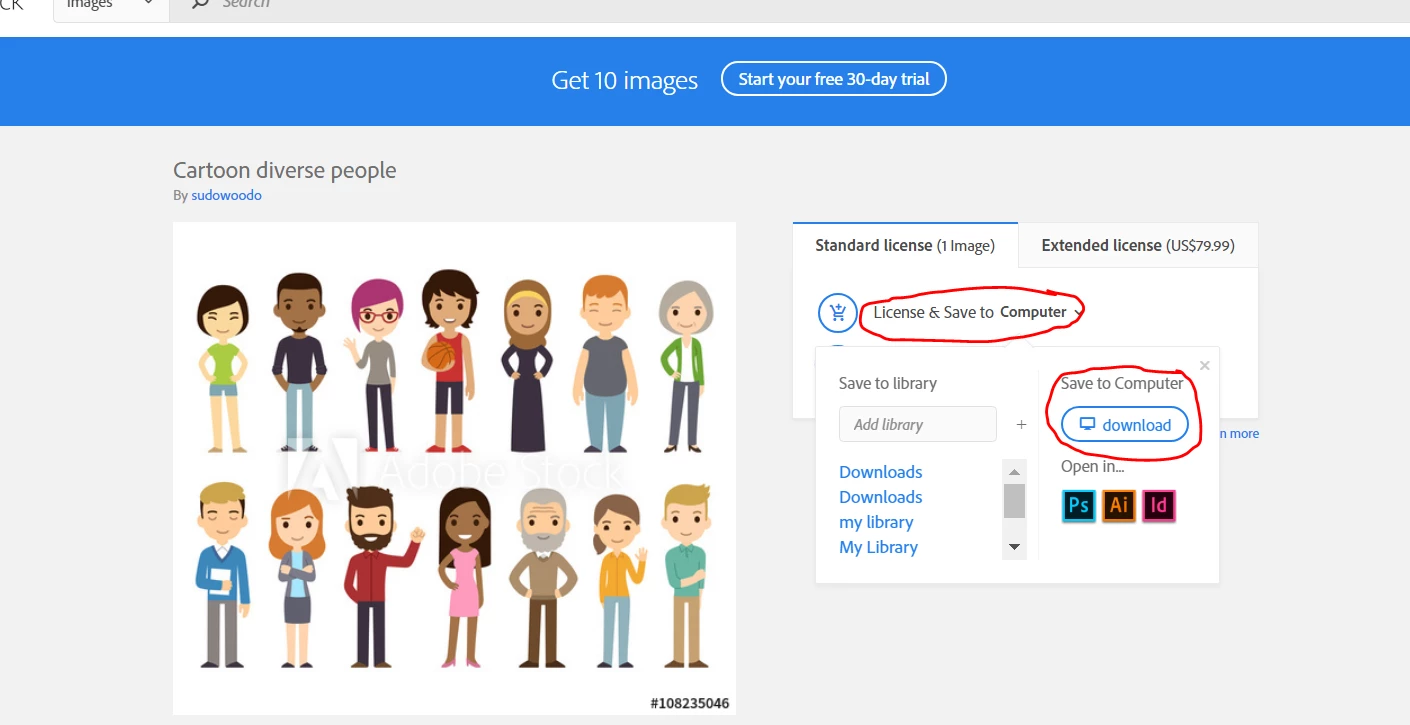
If you want to store the assets from Adobe Stock on your computer, please open the image and click on the "License and Save to Computer" option and then click on download under the "Save to Computer" option.

Please see the screenshot below:

Hope this information helps!

Feel free to update this thread in case of any additional questions.

Regards,

Twarita

2 replies

twaritar3263062
Community Manager
twaritar3263062Community ManagerCorrect answer
Community Manager
October 8, 2018

Hi Nelson,

Thanks for reaching out to the Adobe Stock community.

If you want to store the assets from Adobe Stock on your computer, please open the image and click on the "License and Save to Computer" option and then click on download under the "Save to Computer" option.

Please see the screenshot below:

Hope this information helps!

Feel free to update this thread in case of any additional questions.

Regards,

Twarita

WendellaBee
Adobe Employee
Adobe Employee
October 8, 2018

Hi NM,

Are you able to download them from License History on the Stock website?

EBQ