peterr66412272
Participant
July 2, 2018
Answered

Filter artwork cmyk vs rgb

  • July 2, 2018
  • 2 replies
  • 758 views

Hello..... is there a way to filter out vector artwork designed in CMYK VS RGB modes?

    This topic has been closed for replies.
    Correct answer joon.Stock

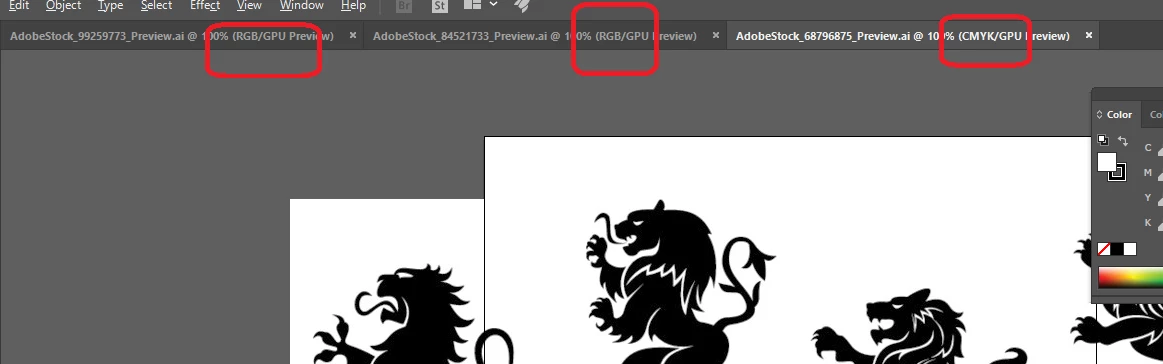
    While we don't yet have filter that distinguish CMYK & RGB, I would like to suggest you to download preview file of vector you like and check to see if preview is built for the type you wanted.  This way, you won't have to go thru hassle of licensing unwanted vector files.  Preview will show whether the file is CMYK & RGB - meantime, I will discuss type of filter with product owner in coming days.

    Thank you,
    2 replies

    joon.StockCorrect answer
    Participating Frequently
    July 3, 2018

    While we don't yet have filter that distinguish CMYK & RGB, I would like to suggest you to download preview file of vector you like and check to see if preview is built for the type you wanted.  This way, you won't have to go thru hassle of licensing unwanted vector files.  Preview will show whether the file is CMYK & RGB - meantime, I will discuss type of filter with product owner in coming days.

    Thank you,

    peterr66412272
    Participant
    July 3, 2018

    Great, thank you for the suggestion.

    I think it would be a great thing to have when searching for artwork

    to license is to be able to select art for print or art for web.

    Thank You, Peter.

    -- Please contact me either by phone or email response to confirm receipt

    of this message. --

    California Banner And Sign

    1670 Pacific Coast Hwy. Harbor City, CA 90710

    Ph. (310) 539-6369

    Fax (310) 539-0417

    peter@calbanner.com <peter@californiabannerandsign.com>

    www.CalBanner.com

    NOTICE TO RECIPIENT: If you are not the intended recipient of this e-mail,

    you are prohibited from sharing, copying, or otherwise using or disclosing

    its contents. If you have received this e-mail in error, please notify the

    sender immediately by reply e-mail and permanently delete this e-mail and

    any attachments without reading, forwarding or saving them. Thank you for

    your cooperation.

    On Tue, Jul 3, 2018 at 3:19 PM, joons25060067 <forums_noreply@adobe.com>

    twaritar3263062
    Participating Frequently
    July 2, 2018

    Hi Peter,

    Thanks for reaching out to the Stock community.

    Would you mind letting us know the file format you have and the application which you are using to get this result so that we can further assist you?

    Regards,

    Twarita

    peterr66412272
    Participant
    July 2, 2018

    I make signs for a living.

    I have many products digitally printed in CMYK.

    When I have purchase art from Adobe and other sites in the past

    I generally do not have any issues. But most recently some vector art

    purchased

    from Adobe Stock are vectors designed in RGB. The color shifts when

    converted

    to CMYK can be drastic, therefore I would prefer to filter out any art work

    designed

    in RGB so that I can have predictable results and that I do not waste my

    money.

    Thanks in advance,

    Peter.

    -- Please contact me either by phone or email response to confirm receipt

    of this message. --

    California Banner And Sign

    1670 Pacific Coast Hwy. Harbor City, CA 90710

    Ph. (310) 539-6369

    Fax (310) 539-0417

    peter@calbanner.com <peter@californiabannerandsign.com>

    www.CalBanner.com

    NOTICE TO RECIPIENT: If you are not the intended recipient of this e-mail,

    you are prohibited from sharing, copying, or otherwise using or disclosing

    its contents. If you have received this e-mail in error, please notify the

    sender immediately by reply e-mail and permanently delete this e-mail and

    any attachments without reading, forwarding or saving them. Thank you for

    your cooperation.

    On Mon, Jul 2, 2018 at 1:26 PM, twaritar3263062 <forums_noreply@adobe.com>

    Participating Frequently
    July 3, 2018

    if converting is what you are looking for:

    https://helpx.adobe.com/photoshop/using/converting-color-mod…

    Best regards,