
Wabber_HM
Inspiring
February 4, 2025
Answered

How do I prevent image downloads from going into a Library?

  • February 4, 2025
  • 1 reply
  • 1389 views

I was downloading images today and now every time I download a stock image, it gets automatically added to an old CC Library I never use in my account. I used to be asked if I wanted to save downloads to a library but now it just does it automatically. I don't see the option to change this anymore. I tried deleting site cookies and cache but it still persists. For now, I've made a placeholder Library where they should keep downloading into where I can delete later, but it's a bit of a nuisance right now.


Edit: It's not moving the images to the Library I specified either, so something seems to be broken.
Correct answer Abambo

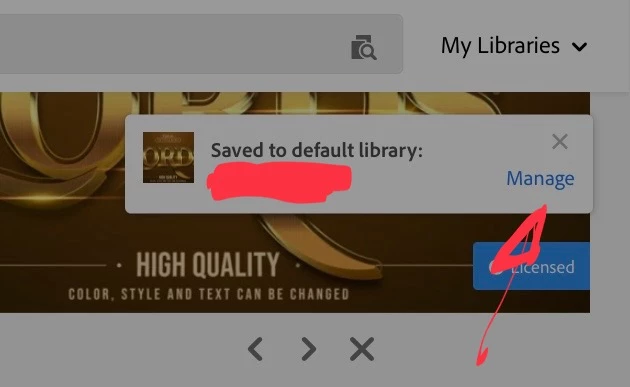
You license an asset, you get in the upper right corner a screen saying it has been saved in the default library. You click Manage.

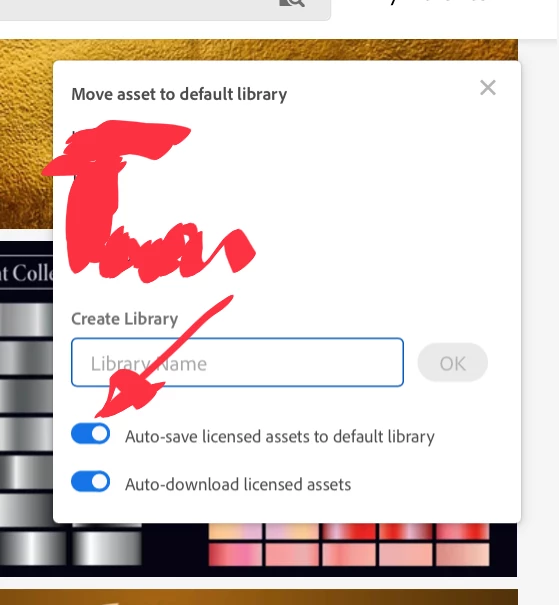
You can change there the default library, and the asset gets moved. Or you disable the Autosave or you disable the Auto-download. Or you create a new library that acts as default, until changed.

1 reply

Abambo
Community Expert
Community Expert
February 6, 2025

Hm, when I disable the library, they do not go to the library. 

ABAMBO | Hard- and Software Engineer | Photographer
Wabber_HM
Wabber_HMAuthor
Inspiring
February 12, 2025

Where do I disable Library? I do actually use the library feature, especially within the Adobe apps. I just don't really need one-off stock photo downloads getting saved into some default Library I don't use.

Abambo
Community Expert
Community Expert
February 12, 2025

Desktop, Windows 10, Firefox. This hasn't changed since the last time I noticed those additional options except perhaps browser versions.


The additional controls do not appear to exist in the HTML, so it's not getting hidden or anything like that.


I'm using Firefox too. Windows 10 too. I will check tomorrow if the screen is also missing some part. 


In the meantime, you could try the following:

  • Reduce the zoom factor of the browser, allowing for a bigger virtual screen.
  • Disable browser extensions, especially add blockers.
  • Delete cache and cookies.
  • Try a different browser.


The setting is sticky and linked to your account, not the browser. So setting once will be good until you want to change it again.

ABAMBO | Hard- and Software Engineer | Photographer