
Participant
March 13, 2018
Answered

How to download from library

  • March 13, 2018
  • 1 reply
  • 566 views

Hi-- I tried the Abobe stock for one month. I actually accidentally downloaded two images before I could figure out the right thing to click for a preview. However I then decided to save my remaining ten images to my library so I could use them later. I cancelled Adobe Stock because I don't need any more images. But how do I download the images I bought and put in my library?
    This topic has been closed for replies.
    Correct answer Sheena Kaul

    Hi Stephen,

    I believe you're trying to download the images that you've licensed when your subscription was active.

    You can absolutely download the files which you've licensed as they remain in your license history forever and you can save them locally on your machine or on CC libraries.

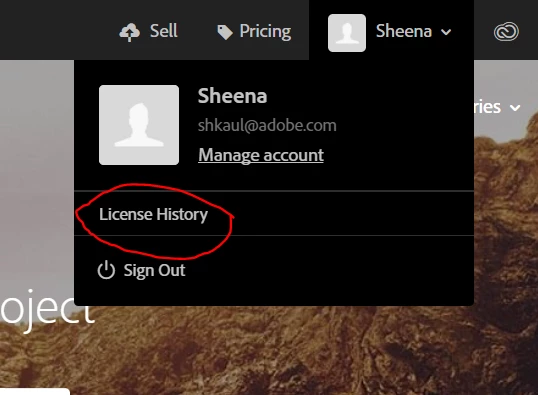
    Please login with your Adobe ID to stock.adobe.com and on the top right section you will find the option of license history as encircled in the screenshot below:

    Once you click on this option, it will open the page with all the file IDs that you've licensed and you can click on the File number to open that image again and click on the download button.

    Let me know if that helps!

    Regards,

    Sheena

    1 reply

    Sheena Kaul
    Community Manager
    Sheena KaulCommunity ManagerCorrect answer
    Community Manager
    March 13, 2018

    Hi Stephen,

    I believe you're trying to download the images that you've licensed when your subscription was active.

    You can absolutely download the files which you've licensed as they remain in your license history forever and you can save them locally on your machine or on CC libraries.

    Please login with your Adobe ID to stock.adobe.com and on the top right section you will find the option of license history as encircled in the screenshot below:

    Once you click on this option, it will open the page with all the file IDs that you've licensed and you can click on the File number to open that image again and click on the download button.

    Let me know if that helps!

    Regards,

    Sheena