
Participant
May 26, 2019
Beantwortet

Tried to buy credit package - error

  • May 26, 2019
  • 1 Antwort
  • 520 Ansichten

Hello Adobe and forum,

I just tried to purchase a 150credit package for Adobe Stock.
After clicking "Sichere Bestellung aufgeben" (it's German), I got a red error message at the top saying payment could not be confirmed and I should try again with different credit card information. I tried several times with different card info and paypal accounts. Always got the error message.
How can I buy credits?

Thank you for your help.


Edit:
I just went to check my Paypal account and saw THIS!
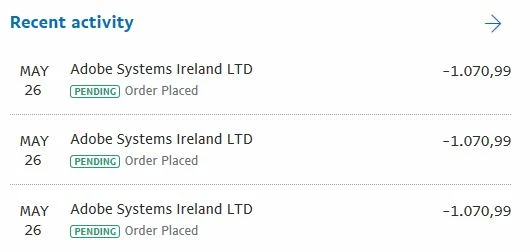
This is definitely not what I wanted. Nor was it in any way clear that my order was successful. On the contrary - the error message (which I did not record) clearly stated, that something went wrong and I should try again. I'm slightly irritated now, as this is something I'd expect from a fraud website, not from adobe. Please help me fix this.

Message was edited by: Daniel Schreiber

    Dieses Thema wurde für Antworten geschlossen.
    Beste Antwort von daniels62799956

    Weiterer Lösungsansatz: Cookies und Cache löschen.

    Eine weitere Ursache könnte ein restriktiv konfigurierter Firewall- oder Proxy-Server sein.

    Und anschließend bleibt noch Contact Customer Care !


    Nach Gesprächen mit PayPal und Adobe war Kreditkartenbestellung heute dann möglich.
    PayPal hatte die Zahlung wohl ungewöhnlich gefunden und sie wurde vom System blockiert. Ich denke, der Fall ist damit erledigt, sofern all die als "Pending" vorgemerkten Zahlungen nicht irgendwann doch von Adobe eingelöst werden sollten. Sieht so bedrohlich aus, auf dem Kontoauszug. Danke für die Hilfe, Abambo.

    1 Antwort

    Abambo
    Community Expert
    Community Expert
    May 26, 2019

    Hast Du auch versucht einen anderen Browser zu nutzen?

    ABAMBO | Hard- and Software Engineer | Photographer
    Participant
    May 26, 2019

    Ja. Chrome & Firefox, aktuelle Versionen.

    Abambo
    Community Expert
    Community Expert
    May 26, 2019

    Weiterer Lösungsansatz: Cookies und Cache löschen.

    Eine weitere Ursache könnte ein restriktiv konfigurierter Firewall- oder Proxy-Server sein.

    Und anschließend bleibt noch Contact Customer Care !

    ABAMBO | Hard- and Software Engineer | Photographer