


- Home
- Stock
- Discussions
- Re: We need the option to exclude AI generated art...
- Re: We need the option to exclude AI generated art...

Copy link to clipboard
Copied
This is an example what I get when I search Illustrations for a phrase:
https://stock.adobe.com/hu/search/images?filters%5Bcontent_type%3Aphoto%5D=0&filters%5Bcontent_type%...
TLDR: The results are polluted with AI generated content by up to 90%.
Unusable right now.


 3 Correct answers


Thank you for bringing this to our attention. Adobe Stock asks contributors to tag their content as generative AI & we’re exploring additional labeling and filtering improvements for Stock buyers.



Use -ai as a search criteria. This will filter out all conforming AI assets. Also, when you are looking for photos and vectors, filter specifically for those. Generative AI is required to be in the Illustration section.
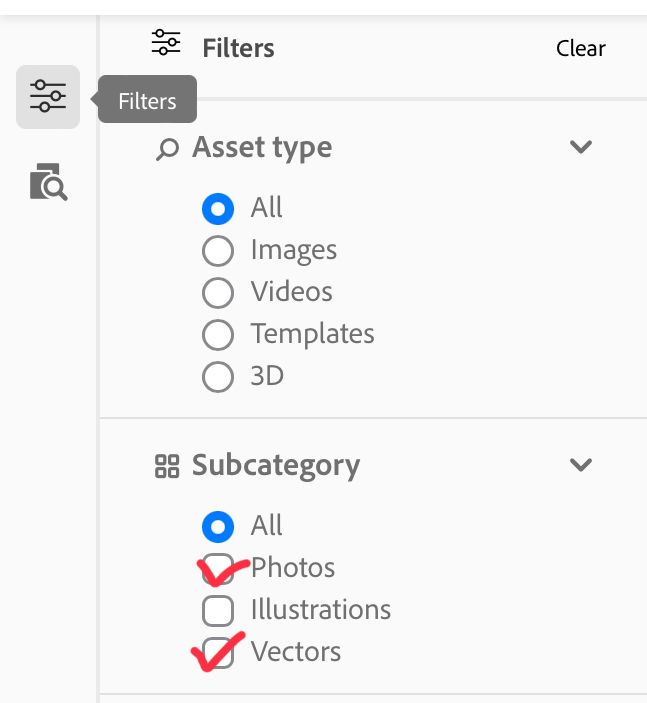

The filter already exists and has for quite some time. Scroll down on the filter label on the left side of the screen where you can choose to see all images, AI images only or No AI images.
 12
Replies
12
12
Replies
12

Copy link to clipboard
Copied
Thank you for bringing this to our attention. Adobe Stock asks contributors to tag their content as generative AI & we’re exploring additional labeling and filtering improvements for Stock buyers.

Copy link to clipboard
Copied
Please just let us filter out generative AI images, or better yet ban them from the site. It can't be that hard to implement if contributors are already tagging AI content - which there's no point in them doing if we can't then use those tags to filter this content out (what is there to explore about doing this?).
These images are completely useless as stock and pollute search results so badly that as the issue rapidly gets worse it is noticeably slowing down my workflow as it gets harder and harder to find anything good, which was the main advantage of paying for adobe stock in the first place over going somewhere free.
They just aren't useful to anybody, and if for some reason somebody actually wants a generative AI image they can just go generate it themselves. It objectively lowers the quality of adobe stock as a service for everyone that they're here.

Copy link to clipboard
Copied
YES! Absolutely 100% agree - this stuff is over saturated in every way and looks dated already! Unusable and is massively lowering the quality of Adobe Stock…

Copy link to clipboard
Copied
Welcome to the future.
Community Volunteer | If you can't fix it, hide it.
--------------------------------
Why did Little Miss Muffet step on the spider? Because it got in her whey.

Copy link to clipboard
Copied
I absolutely agree with this. I will not use Ai-generated art and want to be able to exclude it from the search. I'm not happy that Adobe has decided to allow Ai in the stock library. Please add a filter.
Copy link to clipboard
Copied
Use -ai as a search criteria. This will filter out all conforming AI assets. Also, when you are looking for photos and vectors, filter specifically for those. Generative AI is required to be in the Illustration section.
Copy link to clipboard
Copied
Sadly that is not a solution.
This is what your suggestion looks like in practise:
https://stock.adobe.com/hu/search/images?filters%5Bcontent_type%3Aillustration%5D=1&filters%5Bconten...
Still infested with AI still unusable if you're looking for illustration.
If I search on Envato for Graphics (the equivalent of illustration here) ot a single AI generated content comes up.
AI should not be in illustration or should be able to completely turn them off.
Anyway thanks for trying to come up with a fix.
Copy link to clipboard
Copied
AI is in illustrations as by Adobe's requirement. All AI that is not in illustrations is in violation of the requirements and should be removed (which means someone would need to report here the asset). All AIs are required to have certain keywords, but not all contributors are adding them. Moderation is improving and sending those assets back to start, but approved assets, especially approved assets before December 6 (the date of the AI requirements announcement) are not getting deleted, except is customers complain.
I know that it is a difficult situation for all users, but except giving tips to exclude conforming assets, we do have little leverage. I, too, would wish Adobe to go through the database and suspend nonconforming accounts until their assets are in conformity. 😞

Copy link to clipboard
Copied
Yeah, This is a huge issue! Adobe shouldn't be letting AI-generated content on their platform at all. I'm paying big money for real stock images. If I wanted AI-generated content I'd just generate it with my openAI subscription! why the hell would ANYONE want to pay for AI-generated stock images?
Remove this trash from the library or alow us to filter it out!
Copy link to clipboard
Copied
The filter already exists and has for quite some time. Scroll down on the filter label on the left side of the screen where you can choose to see all images, AI images only or No AI images.
Copy link to clipboard
Copied
Sarcasm on: "I don't think Adobe Stock should be allowing photographs on Adobe Stock. All photographers do is point their cameras and click a button. Anyone can take their camera and photograph what they need. Why pay for it?" Sarcasm off.
Community Volunteer | If you can't fix it, hide it.
--------------------------------
Why did Little Miss Muffet step on the spider? Because it got in her whey.
Copy link to clipboard
Copied
You answered to an old thread from the beginning of 2023. In between, there is very much that has happened. You can filter out the generative AI assets, without a problem. Check this: https://community.adobe.com/t5/stock-discussions/filtern-nach-inhalten-ki-ausschlie%C3%9Fen/m-p/1438...
I've locked this thread, as it is outdated. The correctly marked answers were correct at the time, when the initial question has been asked.


Get ready! An upgraded Adobe Community experience is coming in January.
Learn more
 AdChoices