
peter.green
Participating Frequently
August 3, 2018
Answered

Adobe Stock image filtered as Vector isn't really a vector image.

  • August 3, 2018
  • 1 reply
  • 1489 views

I recently licensed an image that I wanted to modify in Illustrator. I filtered on Vector, verified the image type was .AI/.EPS, and licensed it. When I opened it in Illustrator, the file is actually just an image with a clipping mask applied, so it's useless to me. I can't find a way to return an image, which I can understand. Is there a way to report an image that doesn't do what is expected like this? If I wanted to hand draw or image trace, I would have just done that from the get go - I was looking for a headstart.

Thanks!

Peter
This topic has been closed for replies.
Correct answer WendellaBee

That file that you're showing is the one I licensed when the other one didn't work. The problem (non-vector) asset is file #65170436.


Create New > Place Copy

1 reply

WendellaBee
Adobe Employee
Adobe Employee
August 3, 2018

Hi P.G.,

Please confirm that you are using Place Copy and not dragging the thumbnail to your work area. Drag and drop will give you an image with no layers.

EBQ

peter.green
Participating Frequently
August 3, 2018

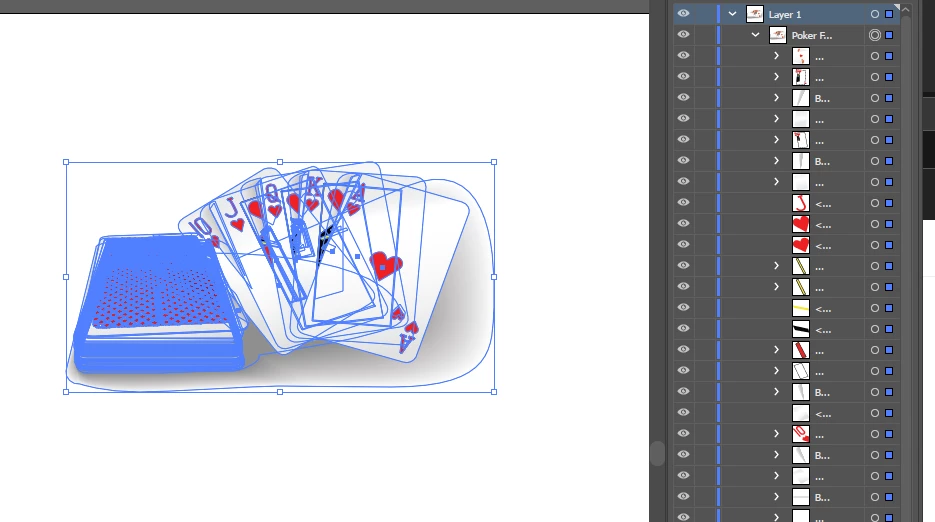
I am directly opening the original .AI file in Illustrator. Expanding the Layer palette, there are two items - a rasterized image and a clipping path masking that image. There is no vector art at all in the file. Link to the image on Stock: Poker Flush Hearts Cards Deck - Buy this stock vector and explore similar vectors at Adobe Stock | Adobe Stock

WendellaBee
Adobe Employee
Adobe Employee
August 3, 2018

Hi P. G.,

Yep, that's what I thought. If you create a new file within Illustrator and then open the Libraries Panel and select Downloads you'll see the file you licensed. From there open the context menu and select Place Copy. You'll see all of the components of the file selected and after you place the file you'll see multiple selectable layers in the Layers Panel.

Let me know if I'm not understanding what you're trying to do.

EBQ