


Inspiring
August 29, 2021
해결됨

Any advice of how to manage resources in SD and make it remember where they are ?

  • August 29, 2021
  • 1 답변
  • 856 조회

Any time I open  my old sbs files I have to click "no" million times  and pray evrything would be  working.

Something older than a 3-4 months and it's zero chance.

Autosaves  are usually not working  because all bitmap links is missing.     Every sbs I do asks for location of some weird  other sbs  files I did like maybe 5 years ago but never used since.  Thankfully saying "no" doesn't change a bit usually.    Half of my SSD  is filled by some SD junk files and I am affraid of touching them.   

Few times got my system SSD  turning brick after sudden power off.  Evrything had been restored  from backup just fine except SD . It's usually a disaster  . Nothing of your custom tools ever works anymore.


Neither Blender nor 3dmax have ever made me such troubles.  So any advice please of how to set evrything related right in SD or just a safe strategy to save and backup.
 

이 주제는 답변이 닫혔습니다.
최고의 답변: Luca Giarrizzo

Hello,


Thank you for the additional information.


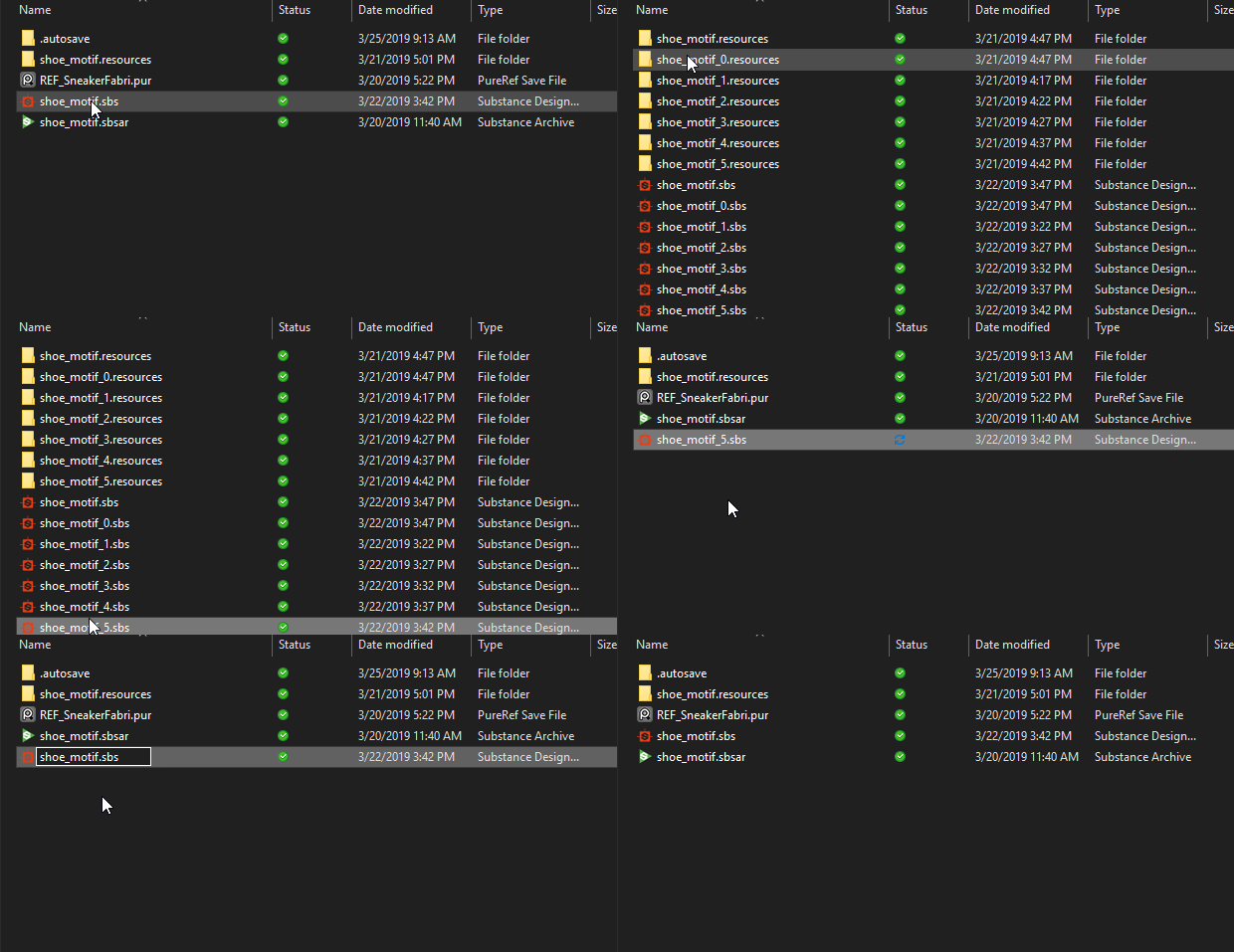
To clarify: autosave files should be restored by replacing the original Substance 3D file in place – i.e. renaming them to the original's name and moving them at the original's location.


By default, dependencies stored in the same location or in a subfolder of the same location as the Substance 3D file are saved using relative paths. This means the file needs to stay at the same location relatively to these dependencies.


Relative paths are useful for moving entire projects across systems. You can change this behaviour and use absolute paths exclusively in the General section of the Preferences window. Using absolute paths means the Substance 3D file can be moved around without breaking dependencies, but the dependencies need to keep their exact location – including drive letter – if you move your project.


Regarding the Substance 3D file dependencies accumulating in a project, there is currently an issue where two files loaded in a same session can become a dependency of one another in some cases. We intend to improve the management of dependencies in the future.


Try to restore autosave as instructed above, and let me know if this helps preserving dependencies. I appreciate your patience!


Best regards.


1 답변

Luca Giarrizzo
Community Manager
Community Manager
August 30, 2021

Hello @kirkr5689,


Thank you for reaching out to us with this issue. Let us assess the situation accurately:

  • What prompt are you clicking No on several times? Is it a dialog regarding an update to your packages or a warning for a missing dependency (i.e. some package or resource could not be found)?
  • Are you able to restore the original files for the missing bitmaps to their original location as referenced in the Substance 3D files (SBS)?
  • As soon as another package is used in your project, Substance 3D Designer saves a reference to this package as a dependency. You can use the Dependency Manager too see a list of dependencies, relocate packages which were not found and remove dependencies to packages which are not used. The Dependency Manager can be accessed by clicking RMB on a package in the Explorer panel and selecting the Open Dependency Manager option
  • What are the junk files your referring to? Are they autosave files?
  • Did the issues appear only after an SSD failure?


I appreciate your patience, and will do my best to help you!


Best regards.


Luca Giarrizzo | Quality Engineer - Substance 3D Designer | Adobe
kirkr5689작성자
Inspiring
August 30, 2021

Yes. almost evry bitmap I "link"  is missing in autosave sbs .  Showing empty bitmap node black ot 100% transparent if color ones.

It's something puzzling me a lot .  Because all those bitmaps are staying where they were and I have to go to autosaves a lot because of frequent  crushing.

Luca Giarrizzo
Community Manager
Community Manager
August 31, 2021

Hello,


Thank you for the additional information.


To clarify: autosave files should be restored by replacing the original Substance 3D file in place – i.e. renaming them to the original's name and moving them at the original's location.


By default, dependencies stored in the same location or in a subfolder of the same location as the Substance 3D file are saved using relative paths. This means the file needs to stay at the same location relatively to these dependencies.


Relative paths are useful for moving entire projects across systems. You can change this behaviour and use absolute paths exclusively in the General section of the Preferences window. Using absolute paths means the Substance 3D file can be moved around without breaking dependencies, but the dependencies need to keep their exact location – including drive letter – if you move your project.


Regarding the Substance 3D file dependencies accumulating in a project, there is currently an issue where two files loaded in a same session can become a dependency of one another in some cases. We intend to improve the management of dependencies in the future.


Try to restore autosave as instructed above, and let me know if this helps preserving dependencies. I appreciate your patience!


Best regards.


Luca Giarrizzo | Quality Engineer - Substance 3D Designer | Adobe