
Exit
  • Global community
    • Language:
      • Deutsch
      • English
      • Español
      • Français
      • Português
  • 日本語コミュニティ
  • 한국 커뮤니티
0

How to import Matplotlib and Numpy to plot functional graphs in Pixel Processor?

New Here ,
Jan 20, 2022 Jan 20, 2022

Hi, Texture/Material Gurus.

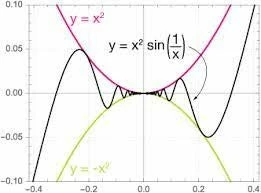
By the help of Substance Designer's Python Editor, I'm trying to draw/plot some complex sine waves such as "Squeeze Theorem / Sandwich Theorem" shown below:
1759437B-7228-4C86-85DB-CAB5FDA2954C.jpeg

[squeeze theorem example]

I'm trying to somehow use Matplotlib in SD's Pixel Processor to plot diverse functional graphs.


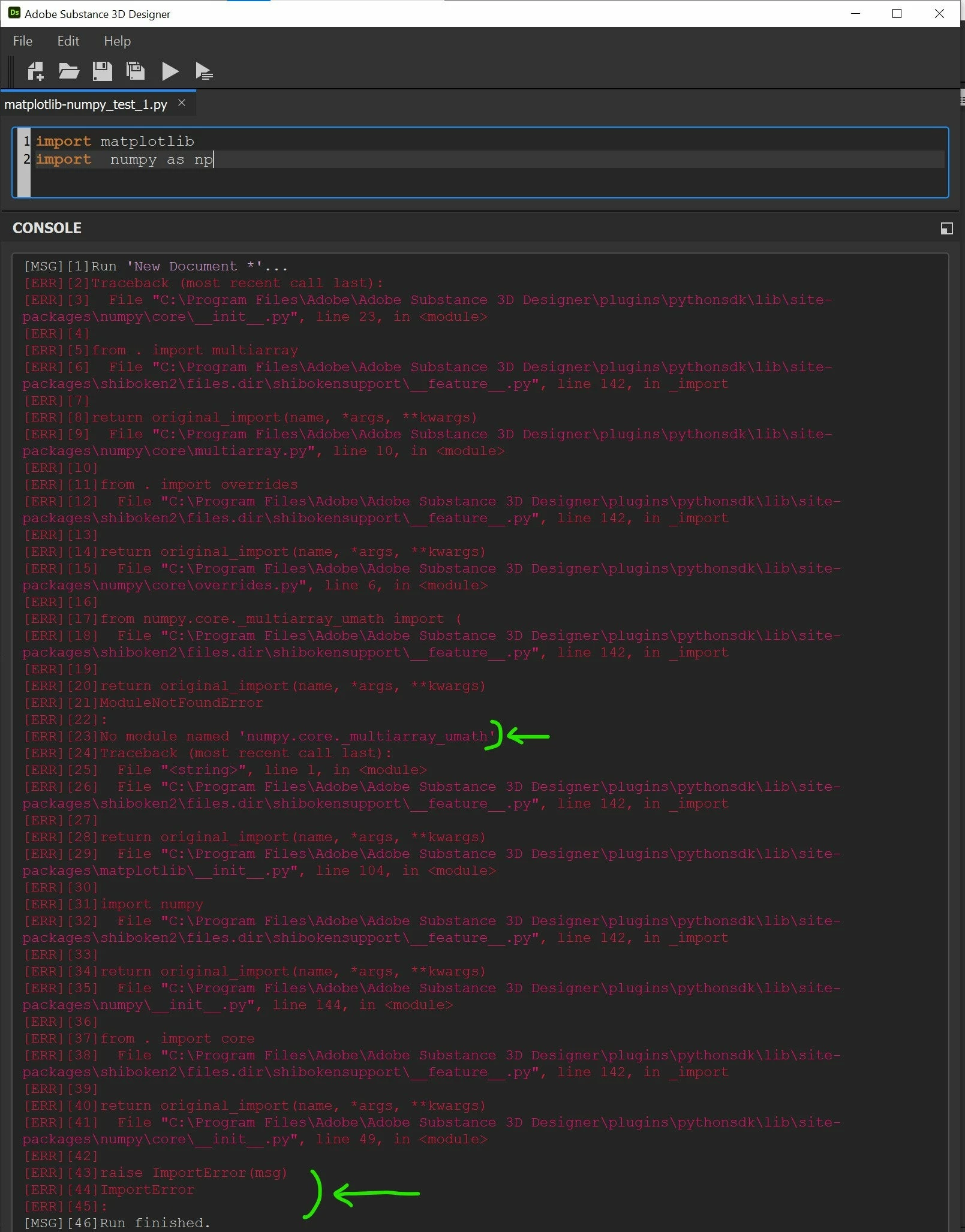
But, a week-long intensive googling has failed to find a solution to import external or 3rd party Python libraries or api to Substance Designer. Its internal Python Editor keeps prompting error logs like this:
A0304505-0923-4E80-89D8-35FAA6D7E76D.jpeg


[Numpy & Matplotlib are installed in the right directory. But, Substance Designer's Python Editor can't read\/recognize Numpy??]


On my PC, I've installed all most every existing Python functional graph-drawing Libraries, such as Matplotlib, Numpy, Turtle, Tkinter, Sympy, Pysound, Graphviz, Plotly, etc. in the right directory/path recognizable for SD as a test.

But, it seems like SD doesn't read or recognize those libraries, escpecially Numpy (which, I guess, the core library for the other major graph visualizing Libraries)

Is there any way to make Substance Designer successfully import Numpy and Matplotlib?

Please save me from this cliff,

Thank you!

TOPICS
How to , Import & Export , Scripting , Substance Graph , Substance Model Graph
492
Translate
Report
Community guidelines
Be kind and respectful, give credit to the original source of content, and search for duplicates before posting. Learn more
community guidelines
Adobe Employee ,
Jan 20, 2022 Jan 20, 2022

Hello,


You may add the directory where the Python modules are installed to the PYTHONPATH environment variable, to make it discoverable by Designer's own Python interpreter.


If the module still cannot be imported at that point, you can force the module discovery with the following:

my_module_path = os.path.join(os.environ["PYTHONPATH"], "my_module")

if my_module_path not in sys.path:
    sys.path.append(my_module_path)

import my_module


I hope this helps!


Best regards.


Luca Giarrizzo | Quality Engineer, 3D & Immersive | Adobe
Translate
Report
Community guidelines
Be kind and respectful, give credit to the original source of content, and search for duplicates before posting. Learn more
community guidelines
New Here ,
Jan 21, 2022 Jan 21, 2022

Thank you for your reply, Luca.

(My os is Windows 10)

I tried my best to refer to you in my code as follows:

import sys
    sys.path.append('C:\Program Files\Adobe\Adobe Substance 3D Designer\plugins\pythonsdk\Lib\site-packages')

numpy_path = os.path.join(os.environ['C:\Program Files\Adobe\Adobe Substance 3D Designer\plugins\pythonsdk\Lib\site-packages'], 'my_numpy')

if numpy_path not in sys.path:
    sys.path.append(numpy_path)
    
import my_numpy


But, it prompted an error like below:

[MSG][1]File saved: 'G:/OneDrive/Desktop/moduleimport_test_1.py'
[MSG][2]Run 'moduleimport_test_1.py' (G:/OneDrive/Desktop/moduleimport_test_1.py)...
[ERR][3]  File "G:/OneDrive/Desktop/moduleimport_test_1.py", line 2
[ERR][4]    
[ERR][5]sys.path.append('C:\Program Files\Adobe\Adobe Substance 3D Designer\plugins\pythonsdk\Lib\site-packages')
[ERR][6]    
[ERR][7]^
[ERR][8]IndentationError
[ERR][9]: 
[ERR][10]unexpected indent
[MSG][11]Run finished.
[MSG][12]File saved: 'G:/OneDrive/Desktop/moduleimport_test_1.py'

I've got a very few knowledge in solving such errors.

Could you please guide me through a little bit further?

Thank you!

Translate
Report
Community guidelines
Be kind and respectful, give credit to the original source of content, and search for duplicates before posting. Learn more
community guidelines
Adobe Employee ,
Jan 24, 2022 Jan 24, 2022
LATEST

Hello,


Thank you for the code sample, this helps me provide guidance regarding this issue.


The error points to an IndentationError at line 2 of the moduleimport_test_1.py script. And, indeed this line is indented when it should not be:


    sys.path.append('C:\Program Files\Adobe\Adobe Substance 3D Designer\plugins\pythonsdk\Lib\site-packages')


Remove the identation to solve the error.


Two other issues I have noticed:

  • the lib\site-packages directory is already visible to the Python interpreter and does not need to be added to the system PATH
  • The os.environ(env_var) method retrieves the value paired with the environment variable passed as the env_var argument. So passing a path as an argument will return an empty string, as the path itself is not an environment variable which currently exists, and thus is not paired to a value which can be returned with the os.environ() method. You can take a look at this page as a starting point for environment variables and using in Python


You should only need to do the following:


import sys

numpy_path = os.path.join('C:\Program Files\Adobe\Adobe Substance 3D Designer\plugins\pythonsdk\Lib\site-packages', 'my_numpy')

if numpy_path not in sys.path:
    sys.path.append(numpy_path)
    
import my_numpy


Additionally, I recommend placing your Python module in another location which is separate from Designer's installation files. This ensures your custom modules stay intact in case of Designer being uninstalled, upgraded or other modifications to its installation.


This separate location should then be added to the PYTHONPATH environment variable, so the Python interpreter finds and inspects it during module import statements. To add a directory to the PYTHONPATH, you may refer to this guide.


Best regards.


Luca Giarrizzo | Quality Engineer, 3D & Immersive | Adobe
Translate
Report
Community guidelines
Be kind and respectful, give credit to the original source of content, and search for duplicates before posting. Learn more
community guidelines