
Participant
April 3, 2023

Opacity glitches

  • April 3, 2023
  • 2 replies
  • 1409 views

Hey,

I am facing weird opacity issues lately.
I am currently texturing a gun and I want to make its magazine transparent but some weird opacity artefacts are preventing me from having an accurate preview of my texturing inside Sub Painter.
The problem seems to be only coming from Sub Painter and is more or less present depending the mesh (the magazine mesh is the most glitchy one).
When I export the textures and preview the mesh in another software (Marmoset), everything is ok...

- I'm using the "PBR with alpha blending" shader.
- The model is not triangulated before import and is coming from Blender 3.5.
- Bake maps are fine.
- Sub Painter Version 8.3.0
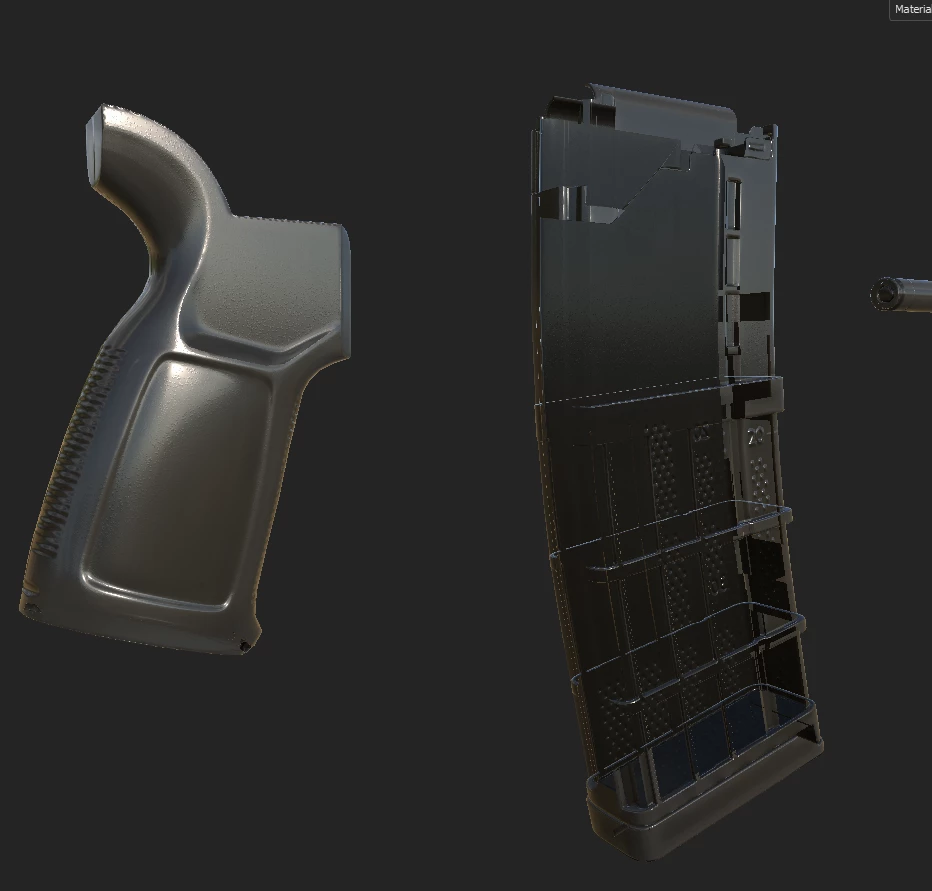
You can see that the mag is looking weird but the grip is fine (screw holes are also weird but its nothing compared to the mag).

The model is linked below ("003").

    2 replies

    Cyril Dellenbach
    Community Manager
    Community Manager
    April 4, 2023

    Hello @Louanne29216655vfwb,


    Thanks for your message.


    The issue comes from how the Opacity is handled in real time. When the object is hollow and the borders are thin, the engine can have difficulties. Tell me if I'm wrong, but the problem should disapear in the Iray rendering.

    From your messages, I can see you didn't have the same issue with Marmoset toolbag and this is because Marmoset has a different way of handling real time.


    Therefore, if you're only planning to make a nice rendering, you shouldn't worry about this issue. But if you're planning on adding the mesh in a game engine, you may want to check first if the issue remains in the engine.


    Best regards,


    Cyril Dellenbach (Micro) | QA Support Artist | Adobe
    Participant
    April 3, 2023


    Here is a preview from another software, you can see that the transparency is working fine (dont mind the baking issues)