

Claudia R.
Participant
July 3, 2023
Answered

3D model of a wine glass with lines/edges

  • July 3, 2023
  • 2 replies
  • 413 views

Hi all,
I have created a 3D model of a wine glass in Illustrator with the circle option and exported it as obj-file.
When importing this model to Stager and rendering an image the rim and the base of the wine glass show distortions. It looks like the model consists of too few segments to be displayed smoothly round. However, I can't set any smoothing in Stager. In Illustrator the model look perfect. Can someone please help me?
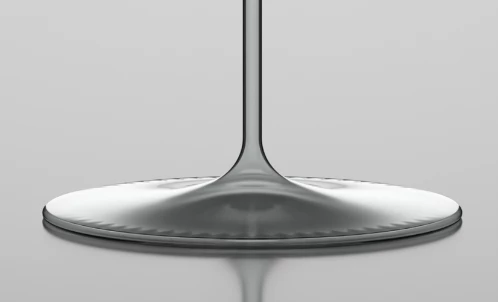
 

This topic has been closed for replies.
Correct answer Claudia R.

Hi Cyril,
I found the error! Wohooo! The path in Illustrator, which is the base for the 3D model, was not clean. Nevertheless, I'm super happy that I found the error and thank this fantastic community for the support.

2 replies

Ares Hovhannesyan
Community Expert
Community Expert
July 3, 2023

Here is my rendered wine glass after importing Ai->OBJ into Stager. I also attached screenshot from Ai. Usually Ai exported 3D model consist of separate layers in Stager. In my case there is no fill in Ai.


Claudia R.
Participant
July 4, 2023

Thank you, Ares, for your input. My path also had no fill. I drew an outline of the base to get a more realistic result.
Fortunately, I have found the error. The path in Illustrator was not clean.
Thank you so much for your support.

Cyril Dellenbach
Community Manager
Community Manager
July 3, 2023

Hi @Claudia R.,


Thanks for the message.


It indeed looks like a topology issue. Does the problem also occur when turning the Ray Tracing on?


I'd love to take a look at your asset to see if I can solve the problem. Would you mind to export it from Stager as an .OBJ or .FBX and sending it to me? You can DM me if you don't wish to share the file on this thread.


Let me know.


Cyril Dellenbach (Micro) | QA Support Artist | Adobe
Claudia R.
Claudia R.AuthorCorrect answer
Participant
July 4, 2023

Hi Cyril,
I found the error! Wohooo! The path in Illustrator, which is the base for the 3D model, was not clean. Nevertheless, I'm super happy that I found the error and thank this fantastic community for the support.