

Imaginerie
Community Expert
Community Expert
June 24, 2023
Question

Animation rendering progress bar

  • June 24, 2023
  • 1 reply
  • 787 views

I was wonedring if it was a feature or a bug:
When I render a fixed scene, I get an estimate (acknoledging that it's just that: an estimate), but if I render a simple spin of an object/group, I just get the elapsed time in the progress bar. (and no time left or even the blue bar)
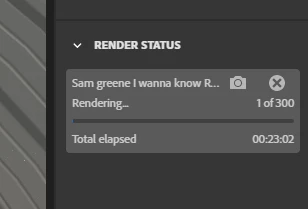
 

not the end of the world but since it's supposed to take a long time, I'd raher know if I can start something else instead of watching the computer running 🙂


This topic has been closed for replies.

1 reply

Imaginerie
Community Expert
Community Expert
June 24, 2023

Never mind, it works, it's just very long.

My animation is only 10 sec, 1080 x1080, resolution: full, preset: medium (128 samples)
It's estimating at 16 hours (still no clear estimate, but just multiplying the time taken by each frame to render)

My computer is admitedly not the powerhouse I would like it to be, but well-within the acceptable specs:

Nvidia RTX2070 (8GB Vram), 64 GB RAM,


It was just for a test, I don't think I will ever do any animation at this rate 🙂

AlanGilbertson
Community Expert
Community Expert
July 5, 2023

Maybe export a PNG sequence at a lower resolution, upscale in Photoshop, and render from there? Or maybe don't lower the resolution, because you can interrupt an image sequence render, and tell Stager to pick up at the next frame in the sequence when you're ready to go on. Premiere Pro loves image sequences, and you have the advantage of better quality to work from than an MP4 and all the tools of PPro to work with.


You could divide the animation into, say, five 2-second sequences so that you're less likely to have to interrupt a render to attend to client work, then stitch the clips together in PPro, or you could just run the render overnight, but the image sequence seems like a more flexible way to go in either case.


I was able to justify a 12-core i7 with RTX 3090/24GB because I use Stager for client work (and, let's be honest, because it was on sale at a deep discount from Dell!). In case the comparison might be useful, I tried a 1080x1080 scene with a single small object set to rotate 360 in 10 seconds @ 15 fps with full resolution and medium preset. A PNG sequence renders at about 4 seconds per frame (Stager 2.1). MP4 seems to take longer, but I only tried one run. It may be worth doing the comparison on your system, just in case.

AlanGilbertson
Community Expert
Community Expert
July 5, 2023

Well, it was just to try things out so I just dropped the whole thing.
I find Stager extremely long to render compared to Dimension (same GLB file rendered on both shows a clear difference) of course I cannot render animations in Dimension 🙂
I am trying Blender at the moment because, while I greatly prefer the interface and the convenience of Stager, it's just drives my computer into a frenzy, I feel like it's ready to take off at any moment (and also the noise is unbearable). I also expect it's just not very good for the computer itself.
It's not just while I'm rendering, just opening Stager (without even opening a file) and/or leaving it idly doing nothing, just set the GPU on fire (and the fans... the fans!)


Blender is definitely more nimble as far as rendering goes. Unreal Engine is also free, and if anything even more nimble. I know the Substance team is working on making the rendering more efficient, and there's a significant difference between 2.0 and 2.1. I guess we're all looking forward to the next iteration!