
Participant
June 28, 2018
Answered

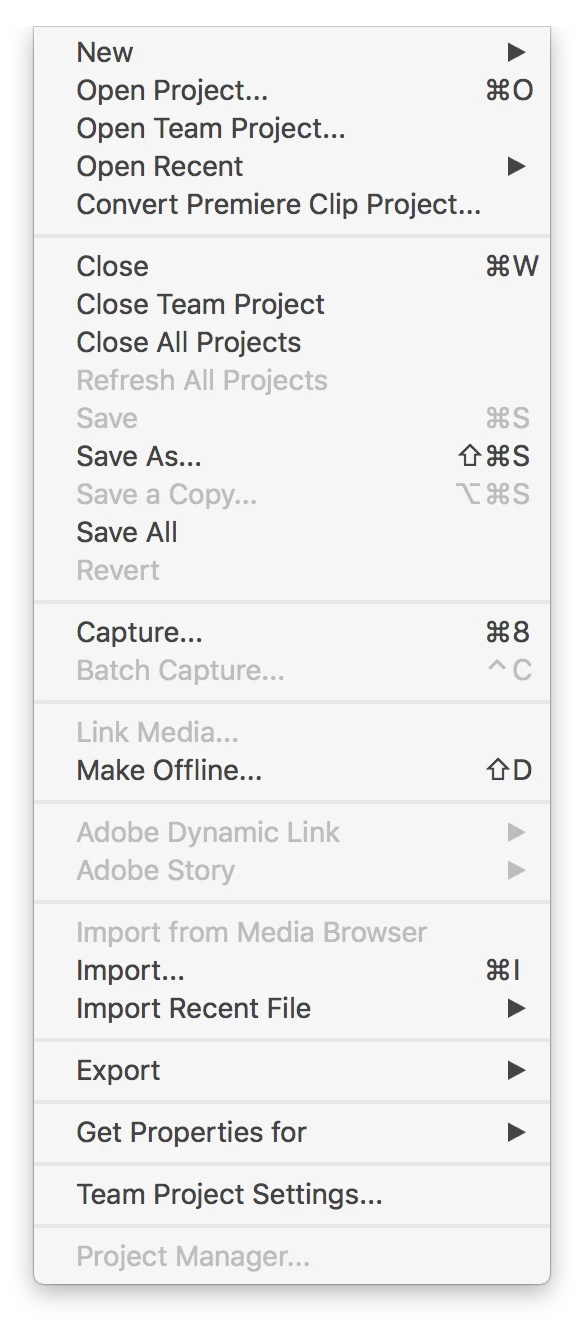
Project Manager option is greyed out in Premiere Team Projects

  • June 28, 2018
  • 1 reply
  • 5424 views

After completing a project for a client, I would like to create an archive of the final sequence by using the File > Project Manager selection.  This option is available when I use a regular Adobe Premiere project, but not when I use an Adobe Premiere for Teams project (screenshot attached).  Is there a reason I can't archive a Team project with the Project Manager?
    This topic has been closed for replies.
    Correct answer Vinay Dwivedi

    I don't think it is still a feature in Team project. You should  convert the project to local first and then run project manager and convert that project to Team project again.

    //Vinay

    1 reply

    John T Smith
    Community Expert
    Community Expert
    June 28, 2018
    Participant
    June 28, 2018

    Those links don't seem to address why the Project Manager option is greyed out

    Vinay Dwivedi
    Adobe Employee
    Vinay DwivediCorrect answer
    Adobe Employee
    June 28, 2018

    I don't think it is still a feature in Team project. You should  convert the project to local first and then run project manager and convert that project to Team project again.

    //Vinay