


Participating Frequently
October 27, 2016
Answered

Adobe Will Not Display Font Correctly, But Edge Will

  • October 27, 2016
  • 1 reply
  • 14021 views

Hi there

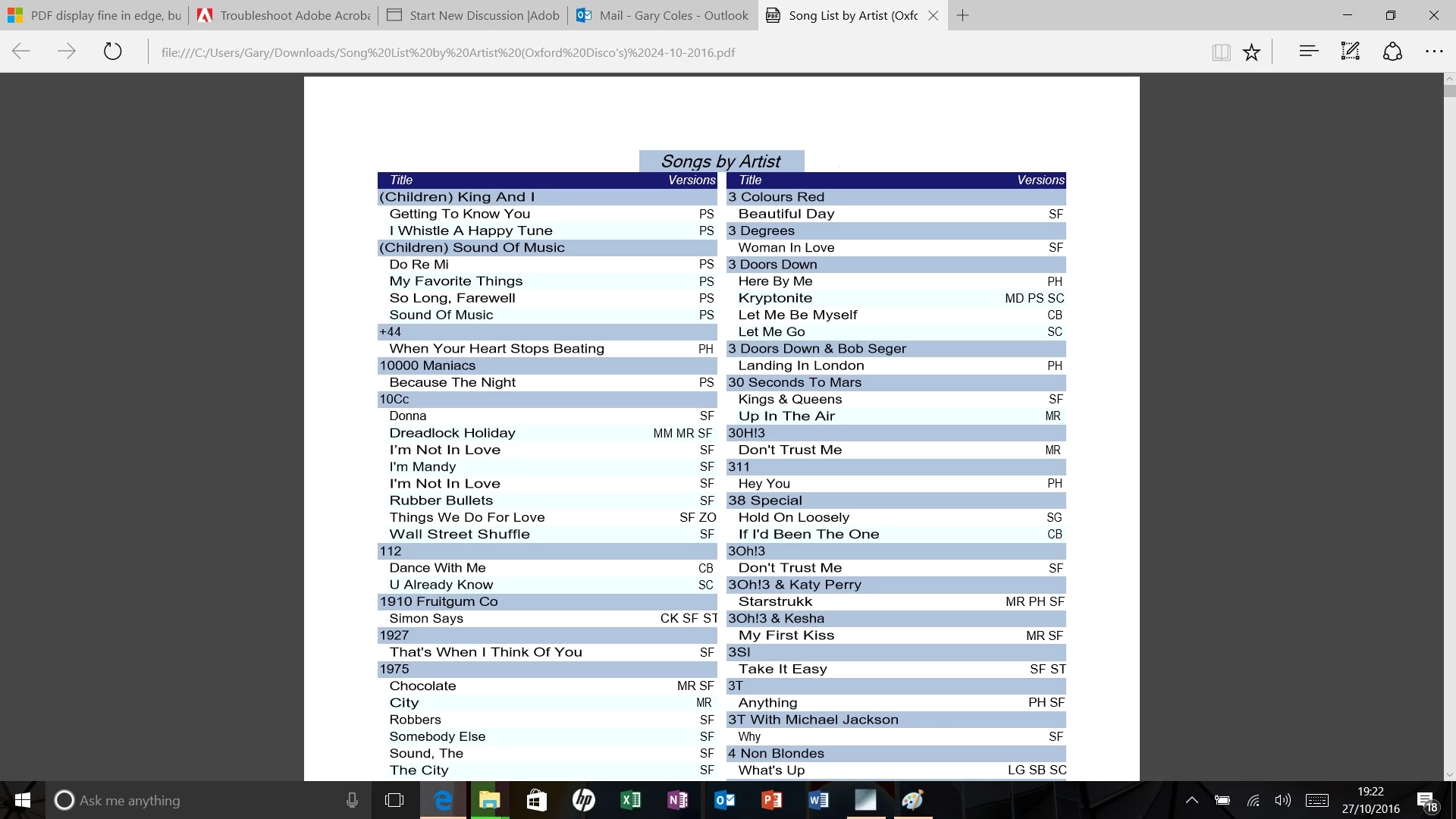
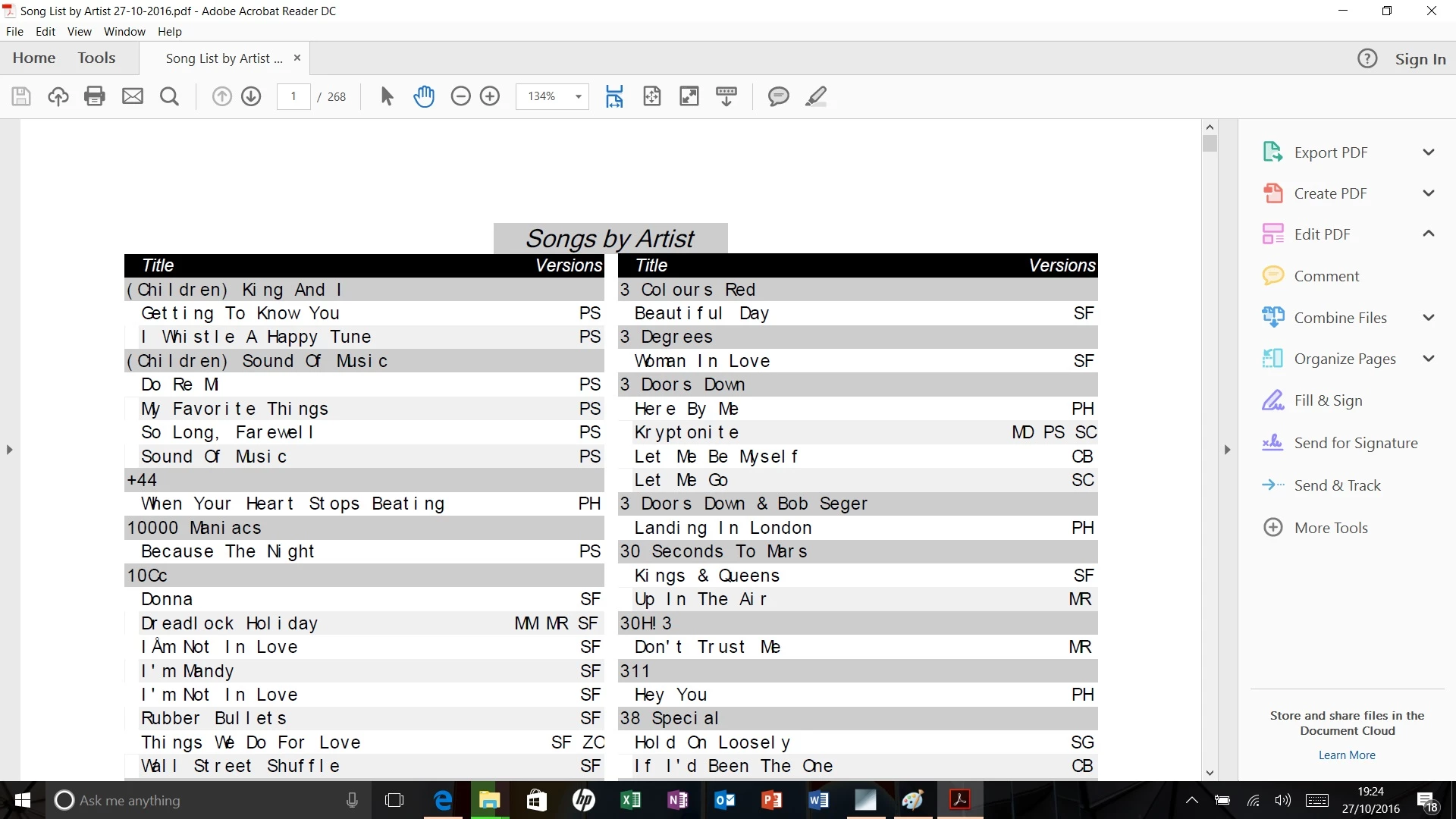
I have a PDF that when I open it with Edge, it looks fine.  If I use Adobe Reader, the font is not displayed correctly.  The manufacture of the software I use to create the PDF tells me I have corrupt windows fonts and I need to reset my laptop back to the start.  Is this correct as I have a lot of music files that will take hours to back up, and software that is locked by server to activate, so to reset the laptop and inactivate the software is a pain too.

The font I have issues with is Ariel.  For some reason Adobe requests a font pack "Asian extended" to be downloaded and installed.  This doesn't fix the issue.

Any ideas on how to fix?

Regards

Gary

(Screen Shot - Edge)
(Screen Shot - Adobe)
This topic has been closed for replies.
Correct answer Dov Isaacs

Got the file, thanks!

Simply stated, this file has numerous font issues. Except for some instances of Microsoft San Serif, none of the fonts are embedded. The other fonts claim to be Arial, but when digging into the PDF file's internals, for the font used for the song names, it seems to want a version of Arial using UniJIS-UCS2-H Japanese CID encoding. This is very unusual. Analyzing the file with our tools finds that for a Type 2 CID font, the file has either invalid or missing CIDtoGIDMap entries. The reason why you may have gotten a message to install an Asian font pack has to do with the fact that the PDF looked like it was trying to use Japanese font encoding.

There is nothing wrong with the Arial fonts on your computer. And the advise to “reset your laptop back to the start” is absolutely ludicrous, at best!!

The fact that Edge can “properly” display the PDF file is somewhat of a red herring. Edge's PDF renderer ignores much of the PDF specification and its ability to “properly” render the font is more luck than sense in terms of their implementation of the PDF specification.

In other words, the file is not a kosher PDF file in terms of how it encodes and references fonts! Please convey that information to the software provider. (The PDF files are created using a third party library, not any Adobe components).

The only way to “fix” the PDF file is to regenerate it with properly fixed software from your software provider. Sorry!

          - Dov

1 reply

Dov Isaacs
Brainiac
October 27, 2016

Without seeing the file, it would be virtually impossible to debug this.

If you can post the file (or at least a portion of it) someplace, we can take a look at it here at Adobe and advise next steps.

          - Dov

- Dov Isaacs, former Adobe Principal Scientist (April 30, 1990 - May 30, 2021)
djgarycAuthor
Participating Frequently
October 27, 2016
Dov Isaacs
Dov IsaacsCorrect answer
Brainiac
October 27, 2016

Got the file, thanks!

Simply stated, this file has numerous font issues. Except for some instances of Microsoft San Serif, none of the fonts are embedded. The other fonts claim to be Arial, but when digging into the PDF file's internals, for the font used for the song names, it seems to want a version of Arial using UniJIS-UCS2-H Japanese CID encoding. This is very unusual. Analyzing the file with our tools finds that for a Type 2 CID font, the file has either invalid or missing CIDtoGIDMap entries. The reason why you may have gotten a message to install an Asian font pack has to do with the fact that the PDF looked like it was trying to use Japanese font encoding.

There is nothing wrong with the Arial fonts on your computer. And the advise to “reset your laptop back to the start” is absolutely ludicrous, at best!!

The fact that Edge can “properly” display the PDF file is somewhat of a red herring. Edge's PDF renderer ignores much of the PDF specification and its ability to “properly” render the font is more luck than sense in terms of their implementation of the PDF specification.

In other words, the file is not a kosher PDF file in terms of how it encodes and references fonts! Please convey that information to the software provider. (The PDF files are created using a third party library, not any Adobe components).

The only way to “fix” the PDF file is to regenerate it with properly fixed software from your software provider. Sorry!

          - Dov

- Dov Isaacs, former Adobe Principal Scientist (April 30, 1990 - May 30, 2021)