


New Participant
September 17, 2015
Answered

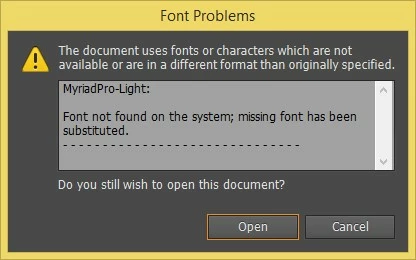
Font (MyriadPro-Light) not available
  • September 17, 2015
  • 2 replies
  • 6931 views

I have an ai file that uses the font "MyriadPro-Light" and when I open the file I get the above font problem message.  I bought the full version of CS6 web and design so I am surprised that I don't have this font.  I have looked through my font files and I do have one called "MyriadPro-lt.otf".  I am wondering if I am getting this problem because the font filenames are slightly different (i.e., "Light" versus "lt")?  Part 2 of my question would be...if this is the reason for the problem, how do I fix it?

    This topic has been closed for replies.
    Correct answer Dov Isaacs

    Simply stated, the Light weight variants of the Myriad Pro font family are not bundled with any of the Adobe Creative Suite configurations. If your Illustrator document is referencing this font, it must have been created on a system on which Myriad Pro Light was separately licensed. It has nothing to do with “Light” (a weight) versus “It” (the italic style).

    What are your options at this point?

    (1) Separately license this font <Buy, download fonts | Adobe Type> either with a perpetual license or via subscription to Typekit. (Note that Typekit access is provided for Adobe Creative Cloud subscriptions.)

    (2) Change references to Myriad Pro Light to some other typeface you have access to with similar characteristics (sans serif, light weight, etc.).

                - Dov

    2 replies

    Dov Isaacs
    Dov IsaacsCorrect answer
    Brainiac
    September 17, 2015

    Simply stated, the Light weight variants of the Myriad Pro font family are not bundled with any of the Adobe Creative Suite configurations. If your Illustrator document is referencing this font, it must have been created on a system on which Myriad Pro Light was separately licensed. It has nothing to do with “Light” (a weight) versus “It” (the italic style).

    What are your options at this point?

    (1) Separately license this font <Buy, download fonts | Adobe Type> either with a perpetual license or via subscription to Typekit. (Note that Typekit access is provided for Adobe Creative Cloud subscriptions.)

    (2) Change references to Myriad Pro Light to some other typeface you have access to with similar characteristics (sans serif, light weight, etc.).

                - Dov

    - Dov Isaacs, former Adobe Principal Scientist (April 30, 1990 - May 30, 2021)
    Inspiring
    September 20, 2015

    Simply stated, the Light weight variants of the Myriad Pro font family are not bundled with any of the Adobe Creative Suite configurations

    But they HAVE been Dov, as the following page attests to (Standard Disk Set):

    Fonts included with Adobe Creative Suite 5 and 5.5 | Adobe

    it even prompted me to check my old install disks!

    Dov Isaacs
    Brainiac
    September 21, 2015

    The question was with regards to CS6, not previous versions. None of the configurations of Creative Suite 6 (either suites or individual applications) had Myriad Pro Light bundled. See <Fonts included with Adobe Creative Suite 6 | Adobe>.

    Yes, as you noted, previous versions, CS5 and CS5.5 did have these fonts bundled. However, if the OP in fact licensed and installed such versions, created documents using said fonts, then upgraded to CS6, those installed fonts would have remained on their system. Adobe uninstallers do not remove any installed fonts. It is also possible that the OP received documents originally created on a system that CS5 or CS5.5. Alternatively, the document came from a user who separately licensed Myriad Pro Italic.

    In retrospect, one could obviously argue whether we should have removed any fonts from the fonts bundled with the CS products. But that is water under the bridge at this point four years later. I did provide options for licensing this or other fonts that may be “missing” with CS6.  In addition to those options, one could upgrade to the Creative Cloud Subscription in which Typekit access is included providing immediate access to Myriad Pro Light.

    My personal belief is that if you need a typeface for a graphic arts project, you should not rely on fonts that may be, previously were, or could be available via an on-line service being available when you need them. License them, install them, and most importantly, keep backup copies of the fonts (and the licenses/receipts that you receive when you license the fonts). The same is true for any other digital asset necessary for your projects, whether those be clip art, stock images, ICC color profiles, and/or Pantone swatch books.

              - Dov

    PS:  I was not involved in the decision as to what fonts to bundle with what products when!!!  

    - Dov Isaacs, former Adobe Principal Scientist (April 30, 1990 - May 30, 2021)
    Atul_Saini
    Community Manager
    Community Manager
    September 17, 2015

    Moving the discussion to Adobe Type

    New Participant
    September 17, 2015

    I assume you know that my post should go to the discussion ADOBE TYPE.  Now I will just wait for an answer to my post.  Thank you