Known Participant
May 16, 2009
Answered

dashed font

  • May 16, 2009
  • 2 replies
  • 40351 views

  I need a dashed font.  That is, a font where each of the letters is composed of broken lines.  Is there such a font available in Adobe Illustrator?

This topic has been closed for replies.
Correct answer Ramón G Castañeda

Here the file is as a png file:

Thanks for the suggestion about the camera tool.  It seems that the png files upload better.

  So,  below are two examples of a dashed font.  Example 1 is the Trace font which is a little too light and doesn't provide special characters or alternate characteristics (bold, underline etc).  Letters made with Trace font can be darkened clicking the "stroke" icon and adding some stroke width in black.

  Example 2 just shows some letters made with the pen and ellipse tool.  The letters were rendered as broken lines by making them dashed.

  I'd like a font like the "Trace" font but darker and with more features.

     I uploaded a jpeg file using the camera icon a minute ago.  A small box with a red X is displayed though instead of the image.  This time I uploaded image as a png file.


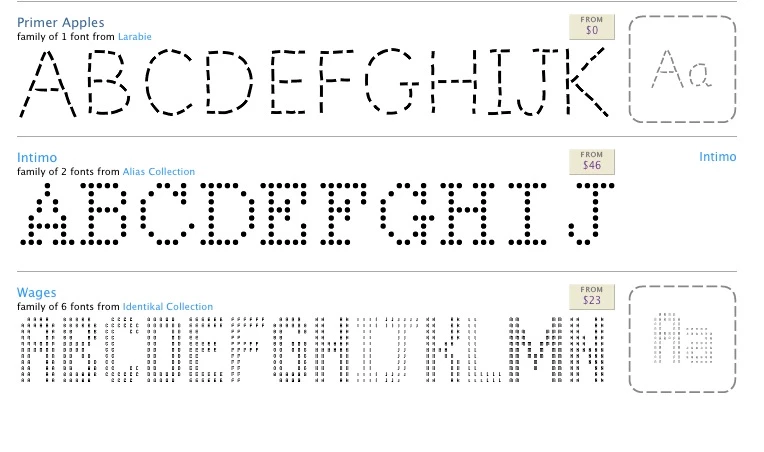
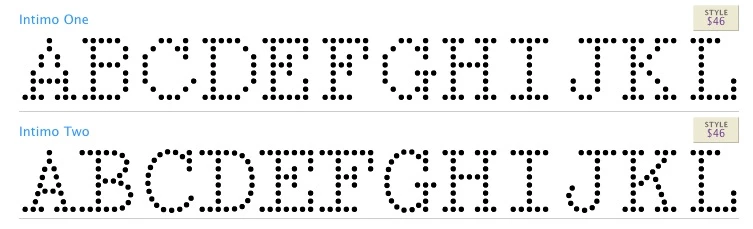
Here are some examples found at myfonts.com, where you might find even more if you have more time to look than I did.


2 replies

toryanseAuthor
Known Participant
May 16, 2009

  Thanks for getting back to me so quickly.  Ideally, I'd like a font having shorter and more numerous dashes than the one you suggested.  It might be nice, though not necessary, to have some control over the dash size (ie length).  Clearly, I would need to be able to control other characteristics such as font size, bold, underscore, strikethrough, etc.  The intent is to use this font when illustrating design patents.

  Let me step back for a moment.  The text used in the specification of patents, be it utility, design or plant patents, is generally 12 point Arial, Times Roman, or Courier.  Text on the drawings needs to be legible and distinct as well.

  A design patent, in particular, is for an ornamental design of an article of manufacture.   The drawings in a design patent illustrate the claimed design.  Broken lines may be used (and often are) to show visible environmental structure which forms no part of the design to be patented.  At times, the environmental structure may contain text.  Being part of the environmental structure, this text should be displayed in broken lines.  Hence, I'd like a broken line font for this purpose on drawings for design patents.  Incidentally, fonts themselves can be protected with a design patent; cf MPEP 1504.01(a) "Computer generated Icons".

  Do you know of any other broken line fonts having shorter and more numerous dashes that might meet this need?

MiguelSousa
Community Manager
Community Manager
May 16, 2009

Well, if you're using Illustrator it looks like you already have all that you need. Just use whatever font and play with the Stroke settings, like so:

Is this what you're after, or do you need the letter stems to be defined by a single stroke?

Ramón G Castañeda
Inspiring
May 18, 2009

  I'd be happy to give you an example (attached pdf file).  In this example, I wrote the word "HELLO" using the pen tool for the first 4 letters and the ellipse tool for the 5th letter.  Then, I changed the strokes to dashes.  This approach is clumsy at best but the result illustrates the concept.  That is, I'd like to acquire an attractive, readable, broken line, True Type font.

  Incidentally, there is a font called "Trace" that would work if it was darker

  Please let me know if you didn't get the attachment -- and of course let me know if you have any other questions/suggestions.


Incidentally, your PDF document is still stuck in the queue.  Thank you for embedding the JPEG and PNG images.

Ramón G Castañeda
Inspiring
May 16, 2009

Fonts are installed at the OS level and are then accessible to all applications.  There's no reason to single Illustrator out.

Can you provide a better description of what you're looking for?  An LED-simulation type of font, perhaps?

AAAAAA_font_samples.jpg

Go here:

http://new.myfonts.com/fonts/jnlevine/displayced/

Look at "More fonts like this" on the right of the page.