Community Expert
September 12, 2019
Question

Error message: "Correct the highlighted errors and try again. " when trying to send a reply

  • September 12, 2019
  • 3 replies
  • 2183 views

Hi together,

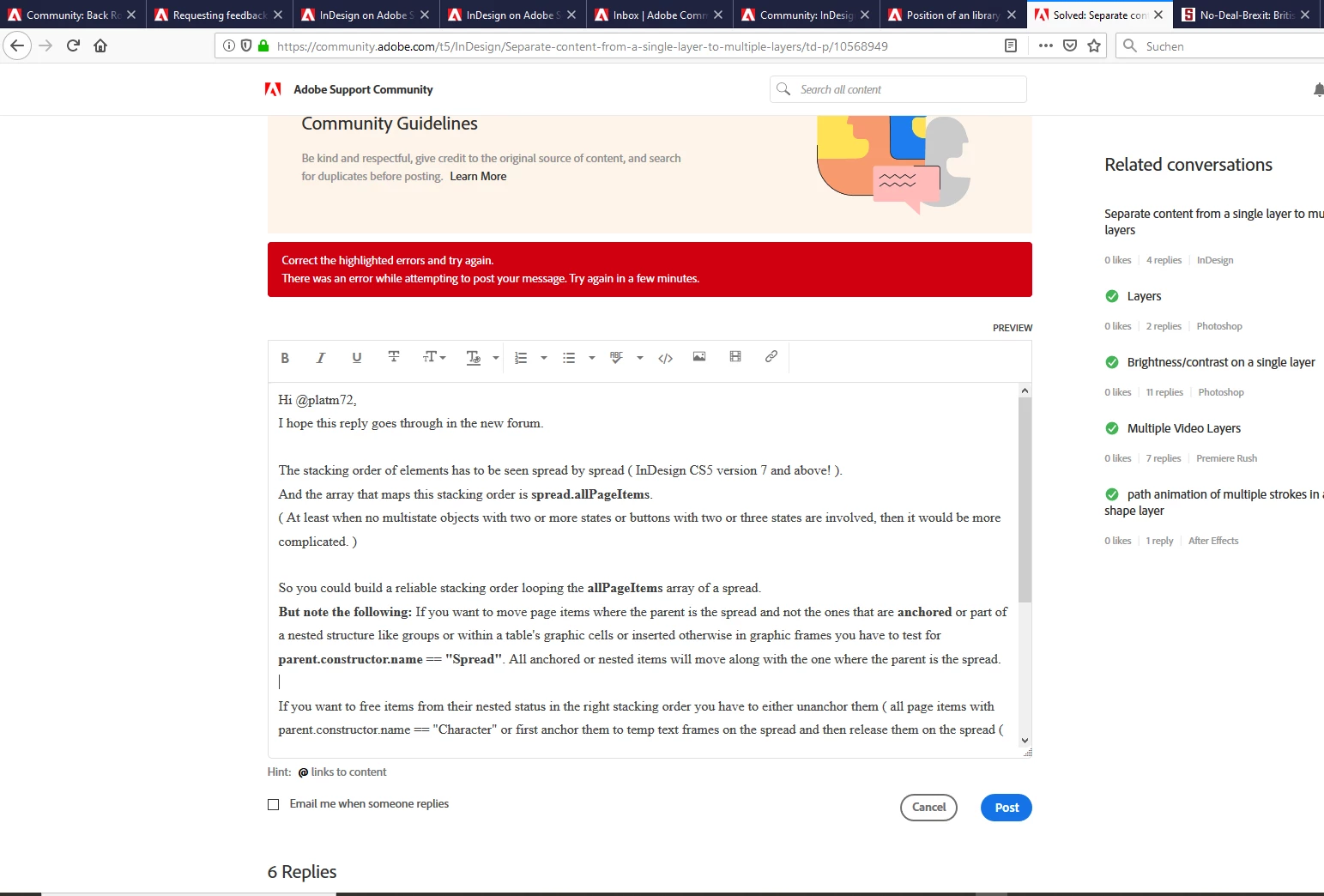
don't know what to do. I wanted to reply to a post in the InDesign Community. Wrote my reply and after I hit the "Post" button the following message popped up:


Correct the highlighted errors and try again.
There was an error while attempting to post your message. Try again in a few minutes.


What went wrong?


The URL of the thread I wanted to send a reply:

https://community.adobe.com/t5/InDesign/Separate-content-from-a-single-layer-to-multiple-layers/td-p/10568949


Here a screenshot of the incident:


Regards,
Uwe

    This topic has been closed for replies.

    3 replies

    Sil.C
    Community Manager
    Community Manager
    September 21, 2021

    Hi all, just checking in to see if this is still happening. Can someone confirm if they've got this exact same error message this week?

    Inspiring
    October 1, 2021

    I did just now different browsers very anoying I ended up posting my answer 1 line at a time no punctuation 

    LaubenderAuthor
    Community Expert
    September 12, 2019

    Hm. Seems, that my reply went through without noticing it.

    Why? I saw my reply at my profile page listed under "Topics I've Participated In".

    However, I do not think that my addressee will notice this. There is no way to sort threads by "Latest Activity".

    Plus: There is no indication if a thread was already visited in list view ( title not in Bold ), was never visited or had new activity since the last visit ( title in Bold ).


    And: I have no idea how to tag a reply as "Correct".

    Would like to do this for this reply for example.


    Regards,
    Uwe

    New Participant
    September 9, 2021

    I am having the same trouble. I do not understand what is going on anybody?

    Nancy OShea
    Community Expert
    September 11, 2021

    >do not understand what is going on


    The forum software (which Adobe rents) updated about a week ago


    I have read a few other problem reports since then


    If I take too long to write my remarks, the authentication time expires and fails.  The solution I use is to highlight & copy my remarks (Ctrl / Cmd + C). Hit F5 to refresh the page in my browser.  Paste my remarks in a new reply (Ctrl / Cmd + V) and post it right away.


    Hope that helps.


    Nancy O'Shea— Product User, Community Expert & Moderator
    LaubenderAuthor
    Community Expert
    September 12, 2019

    Tried again now. New error message came up:


    Authentication Failed.
    Authentication Ticket Mismatched, failed authentication.


    Regards,
    Uwe

    Inspiring
    September 13, 2021

    Same problem for me!