
Fonts and browsers
I'm seeing a number of comments about the typography of the new forum skin looking wrong (text being cropped, overprinting other text, etc.) and in general it's down to two things:
- Clear your browser cache to remove any CSS files from the old skin
- You are blocking the use of Web fonts (either in your browser configuration or firewall software)
Sorry and all, but the new forums are styled to work only if the downloadable Web font "Adobe Clean" is activated. In the CSS for the new skin we have some @11220649-face declarations that try to load this font from the Adobe server, and the fallback is to use your default sans-serif typeface (Arial etc.). Adobe Clean is a narrow width font, so if it's not used the text becomes too wide for the style sheet:
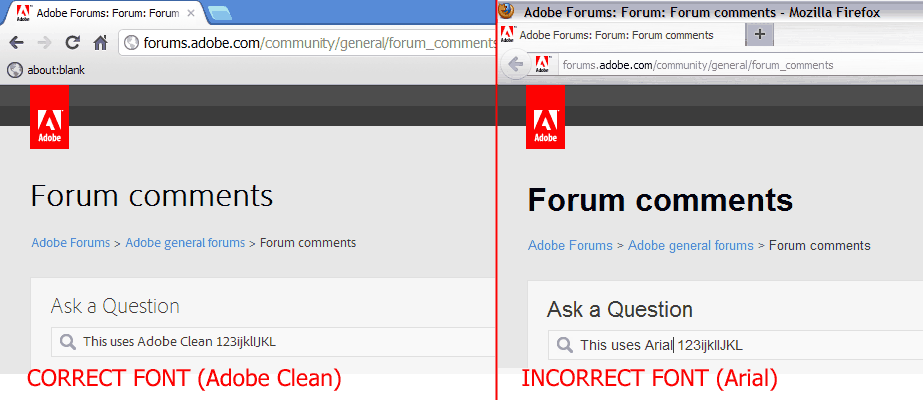
So if the forums look like the image above left, you're OK. If they look like the image above right, you're not loading the Adobe Clean font files and the layouts will be gnarly.
The @11220649-face style rules should work on all major browsers (I had to disable them in Firefox to create the screenshot above) but some firewall/AV software and browser plugins can block their use.
If you've cleared your browser cache and are still seeing the incorrect Arial-styled pages, please reply with info about your browser, operating system, firewall software and any browser plugins that might affect styling (accessibility, content-filtering, etc.) so we can work out which combinations aren't playing ball.
 AdChoices