
Inspiring
April 10, 2016
Answered

How the heck are you supposed to find your way around these discussions?

  • April 10, 2016
  • 2 replies
  • 3735 views

I don't know who Jive is, but they've sure got me confused. I can't for the life of me even find a discussion I created and want to reply to. Why can't these guys make these forums logical like EVERY OTHER FORUM IN THE WORLD. I can't believe Adobe can be that obtuse. Maybe this is a test or something to see how much corporate stupidity we can tolerate before finding other ways to do the work we like best. If I go to my profile all I can see that looks like my stuff is something called Actions which pertains to everything I don't want to know in any random order. What a waste of time!

Sorry for the rant.
    This topic has been closed for replies.
    Correct answer Claudio González

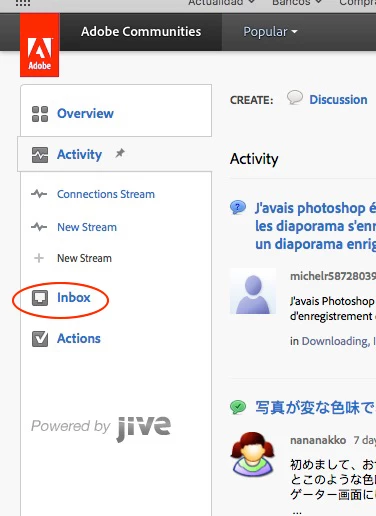
    Once the Inbox and Activity window opens, you have to click on the Inbox button. As far as I am concerned, all the rest there is just useless garbage kindly donated by Jive (the company that developed and maintains the software driving these forums).

    2 replies

    Claudio González
    Legend
    April 10, 2016

    As for finding your way in thee forums, maybe this method serves: go to the list of forum here https://forums.adobe.com/welcome and select the one in which you are interested. Once where you want, don't forget to bookmark the page in your browser if you have any intention of coming back.

    MadisonLeupp
    Community Manager
    Community Manager
    April 18, 2016

    You can also go to https://forums.adobe.com/content and select Participated or Authored to see your content.

    Thanks!

    Nancy OShea
    Community Expert
    Community Expert
    March 18, 2021

    I'm locking this discussion because it's 5 years out of date and no longer relevant to this platform.


    Nancy O'Shea— Product User & Community Expert
    John T Smith
    Community Expert
    Community Expert
    April 10, 2016

    Viewing Past Messages

    Click your Avatar picture to the left of your message

    Click the Activity option

    User Manual for the Adobe Community (the forums) https://forums.adobe.com/docs/DOC-4714

    -or http://docs.jivesoftware.com/jive/7.0/community_user/index.jsp

    Inspiring
    April 10, 2016

    You mean the avatar along the top? I clicked it and clicked the Inbox and Activity button but the results have nothing to do with me. There are links to discussions I've never heard of.

    Claudio González
    Claudio GonzálezCorrect answer
    Legend
    April 10, 2016

    Once the Inbox and Activity window opens, you have to click on the Inbox button. As far as I am concerned, all the rest there is just useless garbage kindly donated by Jive (the company that developed and maintains the software driving these forums).