
Inspiring
August 8, 2012
Question

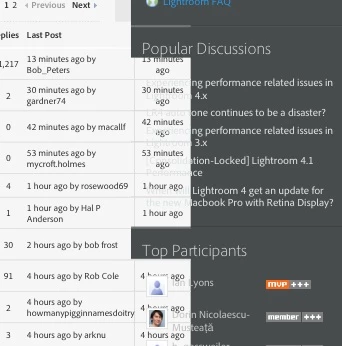
iPad rendering bad?

  • August 8, 2012
  • 1 reply
  • 1413 views

Has something changed in the forum software to cause the rendering on an iPad (second generation) to be screwed up?  Portions of the right hand column  ("Top Participants", etc) intrude into the "Modify Date" section.  It's a mess.

Yes, I have removed all Adobe website information from Safari and power-cycled the iPad.
    This topic has been closed for replies.

    1 reply

    Steve Werner
    Community Expert
    Community Expert
    August 8, 2012

    Try force quitting Safari on the iPad. By default apps will stay in memory. Even when you power cycle the iPad, the app will open as it was when you quit.

    Click on the Home button to return to the Home screen. Then double-click on the Home button. You'll see a row recently used apps. Click and hold on the Safari app until you see a red "delete" icon. Press the delete icon and the Safari icon will disappear.

    Return to the Home screen and relaunch Safari. That will cause it to start from scratch.

    Inspiring
    August 8, 2012

    I've done that several times but still get the messed up display

    Steve Werner
    Community Expert
    Community Expert
    August 8, 2012

    Sorry. I can't think of another solution at the moment. It displays correctly on my iPad in Safari. Maybe someone else can suggest something.