
Dave_Draws
Inspiring
November 18, 2020
Answered

Option to edit or remove posts missing

  • November 18, 2020
  • 1 reply
  • 1733 views

I hope this is the correct place to post this. There seems to be a bug in using this very online forum.


After posting on the Adobe Support Community, there are options at the bottom of every post, such as "Like", "Translate", "Report", and so on. The rightmost option is "... More".


However, whenever I press the "... More" option, I get what appears to be a blank drop down, like this:
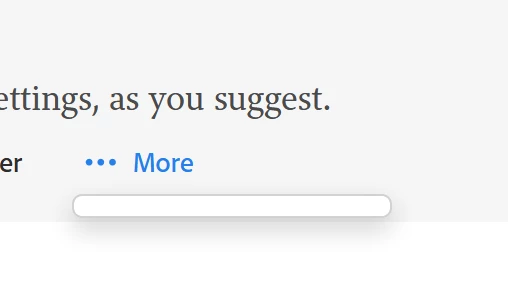
I have tested this on my Miscrosoft Surface Pro, using Firefox, Chrome, and Edge, and they all have the same issue, so it would appear it's not browser specific.


I am hoping that under the "... More" option are the ability to edit and remove posts. But at the very least, there should be something to choose to do.

This topic has been closed for replies.
Correct answer Sil.C

Hi Dave, you're correct in saying this is an issue. We have the bug logged with the team. The option ...More should not be available to users that have no additional options.


The option to delete posts has never been available in this community, only admins can do so and for moderation reasons.

The option to edit your own post is only available after you've achieved a certain rank. For example, your current rank is "Community Beginner". By keep posting and interacting in this community, you will move up the ranks and have this option available to you. If at this time you need to make an addition to a post, you can reply below it and add the information you missed. If you added private information or similar and would like to remove that from your post, please use the Report button and an admin will do so for you.

Hope this helps!

1 reply

Sil.C
Community Manager
Sil.CCommunity ManagerCorrect answer
Community Manager
November 18, 2020

Hi Dave, you're correct in saying this is an issue. We have the bug logged with the team. The option ...More should not be available to users that have no additional options.


The option to delete posts has never been available in this community, only admins can do so and for moderation reasons.

The option to edit your own post is only available after you've achieved a certain rank. For example, your current rank is "Community Beginner". By keep posting and interacting in this community, you will move up the ranks and have this option available to you. If at this time you need to make an addition to a post, you can reply below it and add the information you missed. If you added private information or similar and would like to remove that from your post, please use the Report button and an admin will do so for you.

Hope this helps!

Sil.C
Community Manager
Community Manager
November 19, 2020

@Dave_Draws as an admin I can see that a fellow community moderator marked my answer as correct. Only the original poster (yourself in this case) and moderators and admins can mark answers as correct. 

Note for moderators reading this: A best practice I use myself is to let the OP mark it themselves. If a few days (2-3) have passed and they have not engaged with the post, you can then mark it as correct if you believe it to be 🙂

Dave_Draws
Inspiring
November 19, 2020

I don't think a moderator or anyone other than the original poster should mark an answer as correct.

Having someone else decide for me that an answer was correct makes me feel like my concerns are being ignored in favor of accepting conclusions as a way of dismissing potential problems.