 Adobe Community

- Home
- Using the Community
- Discussions
- Re: Where Do I Go to Access My Profile - E-Mails A...
- Re: Where Do I Go to Access My Profile - E-Mails A...

Copy link to clipboard
Copied
Where Do I Go to Access My Profile?
I have got to turn OFF E-Mail notifications, as I have gotten over 3,000 since the "new & improved Jive" went live.
I know that it's just hidden, on say page 300 somewhere (like posting this question!), but I cannot find it.
TIA,
Hunt


 1 Correct answer


Sign into forums and go to:
https://forums.adobe.com/user-preferences!input.jspa
There is a checkbox for moderation items where you can turn these off.

 10
Replies
10
10
Replies
10

Copy link to clipboard
Copied
Sign into forums and go to:
https://forums.adobe.com/user-preferences!input.jspa
There is a checkbox for moderation items where you can turn these off.
Copy link to clipboard
Copied
John C.,
Thank you, as always. That link was exactly what I was looking for, but could not find.
Much appreciated,
Hunt

Copy link to clipboard
Copied
It's hidden in your profile (access on the top black bar). The dropdown list has an ítem called Preferences. That's where the link in adobe-admin's message takes you.


Copy link to clipboard
Copied
Welcome back... and that will teach you to be away for more than a few seconds 
The other thing you are going to find is that Jive 7 is now a "social networking" site, so EVERY TIME you post a new message, or reply in an existing message thread, you are going to have to IMMEDIATELY click the FOLLOW link at the upper right, and select the option to STOP FOLLOWING... or your inbox will fill up with every new response
So far, there is no way to globally turn the FOLLOW option off (that social networking orientation) AND I have found that reply messages I posted before the Jive7 switch are also generating automatic FOLLOW commands so I have to go back to each individual message and click to STOP FOLLOWING
Of course, that extra work is offset by BLAZING SPEED of the new forum software... are we having fun yet?

Copy link to clipboard
Copied
I'm not getting eMails from responses to threads I post in...
Seems like there are a couple of preference settings that govern that...
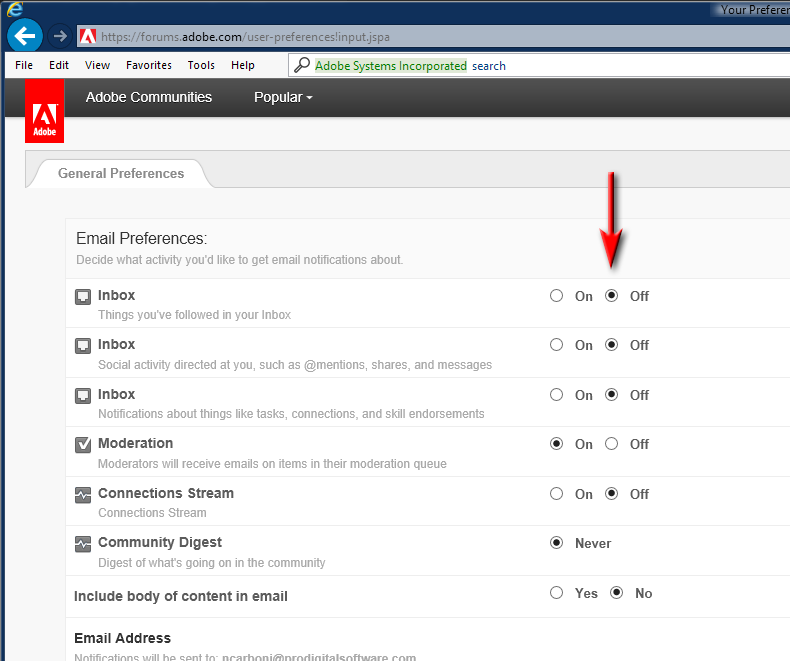
-Noel
Copy link to clipboard
Copied
John T.,
Welcome back... and that will teach you to be away for more than a few seconds
Yes, I feel that I have been abducted by aliens, and dropped onto a landscape, which is unfamiliar to me - everything up is really down, and everything down is really up. Here I thought that I would just sit out the transition, and pick right up, where I left off, but was very wrong. I am just glad that my InBox is digital, and not analog, as it would have crushed my desk under the weight of all those e-mails!
Thanks,
Hunt
Copy link to clipboard
Copied
If the aliens have 4 arms, and you are introduced to a beautiful 'human' princess... check your name tag to see if it says John Carter
Copy link to clipboard
Copied
By the way, that name tag says something different if you're looking vs. if everyone else is looking.
-Noel
Copy link to clipboard
Copied
So what you're saying is that falling into the J7 rabbit hole means that nothing is what it seems?
Copy link to clipboard
Copied
That only appears to be what I am saying. It depends on who, where, when, and how you look.
Ponder: "My points are your points"
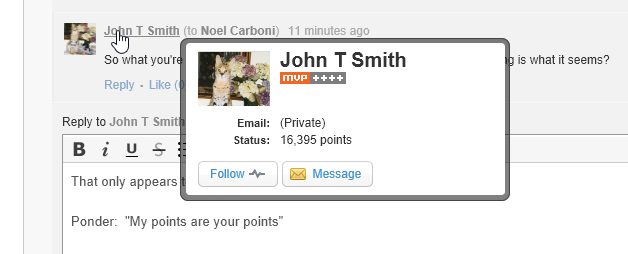
At least I can now insert that screen grab. But it appears fuzzy (to me, here, now, on IE11) unless clicked, which makes little sense.
-Noel


 AdChoices