


Participating Frequently
April 6, 2018
Question

External disks for an IMac late 2015
  • April 6, 2018
  • 4 replies
  • 5853 views

Hello everyone,

I'm new here and as many from what I read, I experienced speed problems with my IMac using Premiere Pro and After Effects.

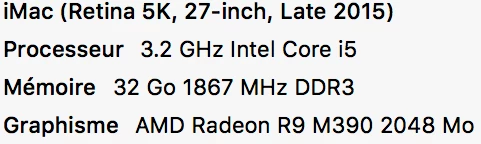
As you can see above, here's my IMac configuration ; let me add that it has a 1 To Fusion Drive.

I have it for about a year and as I was looking for informations, I think I understood the main problems.

I'd say my CPU, my graphic card and my SSD are what make the softwares running a bit slow.

So after looking on Mac websites for answers, I was avised to buy external disks as those ones :

HDD Western Digital (WD) Black 3,5" - 2 To - Achat Disque dur interne 3.5 sur Materiel.net

SSD Crucial MX200 500 Go - Disque SSD Crucial sur LDLC.com

Hard Drive Enclosure Boîtier de disque dur USB 3.0 avec UASP - Aluminium | Boîtiers pour disque externe | StarTech.com France or a storeva

And for a fast connexion, use Thunder2 Dock - Adaptateur Thunderbolt vers Thunderbolt, USB 3.0, eSATA et FW800 - Thunderbolt AKITIO - MacWay

As I'm really inexperienced in this area, I'd like a second opinion.

So what do you think ? How many external disks would you recommend ? Would 2 (1HDD and 1 SSD) could be ok for a start ?

I'm looking to improve my use of Premiere and After but if possible without spending too much money,

Thanks in advance for your replies.

    This topic has been closed for replies.

    4 replies

    Participating Frequently
    April 26, 2018

    Ok thank you,

    Well as stated before I'm really new at this subject so if I hear you correctly RJL190365 and Bill Gehrke, it could be a better solution to use my USB 3.0 rathet than a thunderbolt adaptater, right ?

    Participating Frequently
    April 9, 2018

    Hello,

    Any other thoughts, advice ?

    Thank you in advance 

    Bill Gehrke
    Inspiring
    April 9, 2018

    Download this document and look at page 8 for Mac info

    Here is another with pictures, it comes with two different cables

    You will not get the USB 3.1 speed that it is capable of providing since you only have USB 3.0 ports onb your computer but here is what I get on my 3.0 USB laptop for sequential reads and writes which is what important for video editing.

    While this is not as good as your Crucial specs but I am guessing that your usage of the Crucial cannot not be connected internally to get those speeds, and any "Hard Drive Enclosure" that you use to connect it to a USB 3.0 port is going to give you worse speeds that those above.

    Bill Gehrke
    Inspiring
    April 23, 2018

    Well, I do't know what to say

    I read many times that it will be faster with a Thunderbolt 2 vs USB3.

    Bill suggested to go with the T5 and now you lean toward TB2 as well, I don't really know what to think


    "I read many times that it will be faster with a Thunderbolt 2 vs USB3."

    It definitely could be faster but each situation must be tested to find what speeds you will actually get. 

    Bill Gehrke
    Inspiring
    April 7, 2018

    As your iMac has several USB 3.0 ports I would strongly suggest get a Samsung T5 portable USB SSD, it would be three tomes faster than any hard disk drive, they are available in 250  and 500, GB and 1 and 2 TB.  On my laptop I put all the project and media files for you current project.  When you finish that project then you can use the old and slow technology of hard disk drives for backup and archiving

    Participating Frequently
    April 8, 2018

    Hi,

    Thanks for the reply.

    So, as I'm new in this, let me get this straight ; even though I have an IMac and that this SSD seems to be design for PC, the last version of it is connectable on my IMac via the USB 3.0 Port ?

    Also not sure but if I understand correctly, this SSD doesn't need a Hard Drive Enclosure, right ?

    Still the SSD I was talking about, the Crucial MX200 is 555 Mo/s vs the samsung 540 Mo/s but doesn't go above 500go if I'm correct vs the samsung 2TB.

    So I don't know.

    Ann Bens
    Community Expert
    Community Expert
    April 6, 2018

    Moved to Hardware Forum

    Participating Frequently
    April 8, 2018

    Ok thanks