



Harm_Millaard
Inspiring
June 18, 2010
Question

Generic Guideline for Disk Setup

  • June 18, 2010
  • 53 replies
  • 376700 views

There have been many questions about how to set up your disks.

Where do I put my media cache files, where the page file, and what about my preview files?

All these allocations can be set in PR, so I made this overview to help you find some settings that may be beneficial. It is not a law to do it like this, it is a generic approach that would suit many users, but depending on source material, workflow and backup possibilities, it is not unthinkable you need to deviate from this approach in your individual case.

The reasoning behind this overview is that you want to distibute disk access across as many disks as possible and get the best performance.

Look for yourself:
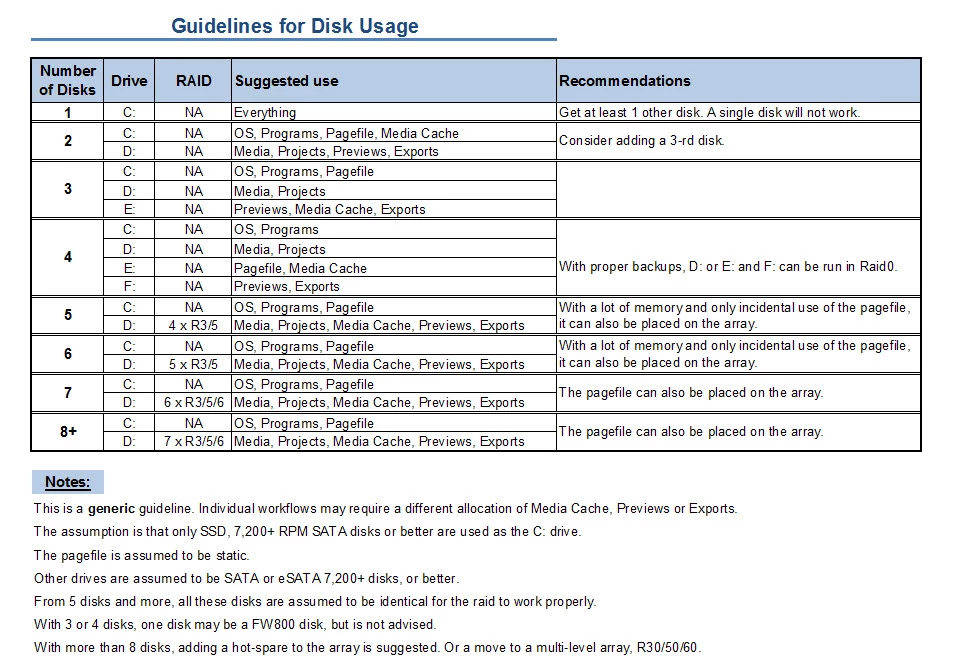
I hope this helps to remove doubts you may have had about your setup or to find a setup that improves performance.

    This topic has been closed for replies.

    53 replies

    KJerryK
    Brainiac
    August 17, 2012

    Empty post

    KJerryK
    Brainiac
    August 17, 2012

    This thread has been going on for two years without any problems, and then in the last few days we've received a number of abuse notifications. I've been reading them and see that three or four posters are more and more making personal comments against those with whom they disagree. This is a technical forum and there will inevitably be differences of opinions. But using comments such as "that is foolish" or "you don't know what you are talking about" or even "you are mistaken" has no place here. They are inflamatory phrases and contribute nothing. Please make your case in technical terms, Or if you can't just do not post.

    You'll notice I posted this in reply to myself so I don't appear to single out any one individual. You know who you are.

    TerriStone
    Adobe Employee
    Adobe Employee
    August 17, 2012

    Well said, Jerry.

    As the forum guidelines say:

    "Personal insults, verbal attacks, and generally disrespectful, offensive, or abusive messages will be edited or deleted by forum moderators. Repeated violations will result in temporary suspension of forum access, eventually leading to being banned from forums. "


    Those of you using inflammatory terms such as Jerry describes above, be warned that you are very close to temporary suspension.

    New Participant
    August 15, 2012

    Wondering if anyone could help me with what would be the better setup. I am going to have an msata drive as my boot, and then three 7200RPM hard drives.

    So I was just wondering if I should replace one of my 7200 RPM drives with an SSD, and how that would help performance-wise? (And what I should place on that SSD). Should I be using the SSD as my boot and then the msata as another drive ? (And in case you're wondering, this is going to be in a laptop which is why there's an msata drive).

    I also have an option to use my external / esata dock for another 7200 RPM drive if necessary.

    August 16, 2012

    To answer media 747's question, no spinning hard drive is going to even be on the same planet as a good SSD for your main booting drive.  I have a demo system with a little 60GB Intel maplecrest 330 SSD and when it's loading windows 7, the little floaty glowing ball things don't even touch.  They're supposed to form into a flag and then pulse while the OS loads but it finishes so fast, it doesn't even get that far.  It also loads the desktop, all applications, the antivirus, etc in 3 seconds.

    My very high performance Seagate 7200 1TB drive in my home computer will do about 4 pulses on the flag and take at least 30 seconds to fully boot everything.  There's just no contest.  The only problem is, SSDs above 120-128GB are quite expensive!  Also, the majority of SSDs brands have quality control problems, inferior flash chips, bad wear leveling, etc.  It changes weekly but just look online to see which are the best.

    Participating Frequently
    August 16, 2012

    VHC-CO-IT wrote:

    To answer media 747's question, no spinning hard drive is going to even be on the same planet as a good SSD for your main booting drive.  I have a demo system with a little 60GB Intel maplecrest 330 SSD and when it's loading windows 7, the little floaty glowing ball things don't even touch.  They're supposed to form into a flag and then pulse while the OS loads but it finishes so fast, it doesn't even get that far.  It also loads the desktop, all applications, the antivirus, etc in 3 seconds.

    My very high performance Seagate 7200 1TB drive in my home computer will do about 4 pulses on the flag and take at least 30 seconds to fully boot everything.  There's just no contest.  The only problem is, SSDs above 120-128GB are quite expensive!  Also, the majority of SSDs brands have quality control problems, inferior flash chips, bad wear leveling, etc.  It changes weekly but just look online to see which are the best.

    SSD boot drives are expensive on a per GB basis, but as a boot drive it is quite cheap.  Since a boot drive doesn't need to be above 250GB (120GB is sufficient, really), there is no reason NOT to get an SSD.  I splurged on a quality 250GB SSD, and it was about the price as a 7200rpm 2TB drive so "expensive" it was not.

    On the other hand, don't expect it to make a huge difference to your life.  Yeah, it boots faster but with modern operating systems, there is not a huge reason to reboot all that often.  When I boot in the morning, I really don't care whether it takes 40 seconds or 20 seconds.  If you really care about that 20 second difference, just consider that you will spend a whole lot more time researching the "right" SSD drive, troubleshooting it, downloading firmware, tweaking and posting here about it if it doesn't work as you expected.

    Right now, I am running Windows 8 from a VHD on the 7200rpm drive.  (That means I am basically not using the SSD at all except occasionally when I need to boot into Windows 7 for something.)  And you know what?  I don't miss the speed of the SSD for boot-up and starting programs.  When Windows 8 is released, I will install it on the SSD, but it's not such a big deal.

    As far as quality changing weekly, I suppose that is the case if you are scraping the bottom of the barrel.  If you go for quality name brands like Intel, Samsung and Crucial, their quality does not change by the day.

    My advice would be not to fret too much about benchmarks and "performance" when shopping for an SSD boot drive and instead go for quality and reliability.  TRIM or no TRIM, the performance will deteriorate and the drive will be upgraded sooner or later, and cheaper, more reliable SSDa are just around the corner, so don't spend too much and don't get anything bigger than you need for "future proofing".

    August 14, 2012

    There's a lot wrong with that, like for example if someone has a board with only SATA II connectors, they all share the same controller and approx 300MB/s of effective bandwidth.  So your chart goes out the window.  Other than that, your chart states "With proper backups, D: or E: and F: can be run in RAID0."

    Okay, you need to go back to basic RAID training to see why that's nonsense.  Let's say it's 2x1TB drives.  Half the data does on each drive so you get around 2x the speed.  Hurray, except if either one of those drives failes, 100% of your data is gone, thus your suggestion for backups.

    So your solution is to...what, buy an external 2TB backup drive, run backups manually occassionally?  I have an idea!  Run a mirrored striped pair instead with 2 more 1TB drives, right?  WRONG.  RAID5 is the way to go.  2 or more data drives, 1 parity drive.  If Drive A fails, B and C can rebuild the data.  If B fails, A and C can rebuild the data.  If 2 fails at the exact same time, you're really unlucky The RAID5 speeds vary A LOT with drives and controllers but it's usually just under 2x the overall throughput speed.  So you're safer and it cost less.  Tada.

    Oh but by the way, that entire chart is also complete nonsense considering every single option there would be cheaper and run as fast or faster with a high performance SSD as a temp/cache drive for basically anything.  A Patriot Pyro, Intel Maplecrest 330, or Kingston HyperX can all read at 500MB/s+ and write respectably fast too.  It'd take a bare minimum or 4 striped 7200RPM drives to match that read speed alone.  A single SSD can beat an entire RAID array easily, almost regardless of what's contained in it and if it can't, that's because the array cost 5x more

    Bill Gehrke
    Inspiring
    August 14, 2012

    VHC-CO-IT wrote:

    Oh but by the way, that entire chart is also complete nonsense considering every single option there would be cheaper and run as fast or faster with a high performance SSD as a temp/cache drive for basically anything.  A Patriot Pyro, Intel Maplecrest 330, or Kingston HyperX can all read at 500MB/s+ and write respectably fast too.  It'd take a bare minimum or 4 striped 7200RPM drives to match that read speed alone.  A single SSD can beat an entire RAID array easily, almost regardless of what's contained in it and if it can't, that's because the array cost 5x more

    Until your write performance drops to nothing very quickly

    New Participant
    August 17, 2012

    Well...if it were me, I would rethink the configuration a bit.  Assuming you only have 4 bays to put your drives in, I would strongly consider keeping your boot drive SSD, and making the three remaining a raid 0 configuration of 1TB drives...and here is why.   If you are only doing every simple, small projects, what you propose will likely be fine, but the minute you start trying to stream more than one HD content source, the individual drive you have your project on will choke and really slow everything down.  By raiding it you will have a combined throughput of 300-350MB/s for reads and writes, whereas if you are delivering to individual drives you are only going to get between 80-150MB/s (depending on the drives) for read and write operations.  Most motherboards have the ability to do internal RAID 0 so you don't have to buy an expensive raid card and for raid 0 it will be fine (RAID 5 and other raid configurations would require a dedicated card). 

    The caveat, is that you also need to purchase an external drive to back up your data.  I have had very good success using Seagates USB3 external drives for this purpose.  I have several different configurations over the years and have found that this ends up being the most cost effective and highest performing option (from a disk perspective anyway).  If you do go this route, I would recommend a 7200 RPM disk that has 64MB cache, and that is built to work in a raid configuration, like the WD Caviar Black line.  Just be disciplined about backups.  Although I have never had a drive fail in over five years, it can and does happen.


    I will already have the 500GB and the 320GB 7200 RPM drives (and planning on purchasing the 750GB 7200RPM). So I wouldn't want to have to go out and buy three 1 TB drives. Would you still think it's worth it to just buy all new / matching drives?

    (note that this is on a laptop. I know it's not as effcient / cost effective as a desktop)

    I do have an esata dock that I can use with a 1TB desktop drive that I have.

    Known Participant
    August 12, 2012

    Currently I've got two drives. I've got my 255gig SSD with my operating system and I've got a 1tb 7200 RPM Raid 0 Thunderbolt drive with all my media, exports and and cache. (I've also got a nightly backup for my raid and a bunch of really slow drives for long term storage but not really relavent.) My 255 gig SSD isn't large enough to hold my cache and it is also starting to be cumbersome on my 1tb Raid 0. I was going to place the cache on a 7200 RPM FW800 drive instead. I know it is normally better to break these up but I wonder if  a Raid 0 with Thunderbolt doing everything might be faster than the help of a Firewire 800 drive.

    Harm_Millaard
    Inspiring
    August 12, 2012

    Calculate around 55 - 65 MB/s sustained transfer rate for a FW800 drive, a modern internal SATA 7200 RPM disk achieves around 120 - 140 MB/s. Dunno what Thunderbolt does, it is not available on PC yet.

    Participating Frequently
    August 13, 2012

    To piggy back off of this topic, I had a few similar questions.  I read through this thread and am still confused about a few things.

    I have 2x External eSATA 2 drives. 

         - Drive A has 2x 500GB WD Caviar GREEN drives. RAID-0
         - Drive B has 2x 1TB WD Caviar GREEN drives. RAID-0

    I have a 180GB SSD for OS and Programs.

    I have an older 150GB SATA2 WD Raptor X that currently has my media project files. 

    **I PLAN on getting another SSD and 2x 500GB WD Velociraptors in RAID-0.

    My quesiton is which drives should I set up as my disc cache, preview files, media cache, etc.  Should i take the extenral GREEN drive out of the equation because they shut down after inactivity?  Or could they still by used in the workflow somehow.  Should my source footage drive be the Velociraptors and the new SSD be AE disc cache?  Also, can PR preview files and AE disk cache be on the same drive?  Finally, i know some operations in the worflow require faster READ speeds and some faser WRITE speeds, can you elaborate on which operatons require which?  In other words, should my fasted READ drive by my source footage or my disc cache?  Should my faster WRITE drive be my export drive?  And, how large does the AE cache drive need to be if its ONLY used for AE cache?

    Thanks!

    Jim

    El_Plates
    Participating Frequently
    July 18, 2012

    I'd like to ask a few more questions about disc set up, plus ask for some suggestions for choice of disc model /type, and backup options. please.

    I must preface this with a brief overview of my workflow: I use photoshop projects, and DSLR footage to create 1080p After effects compositions, which are then exported as Uncompressed .avi files upto 1491516kbps bitrate. The After effects exports are then edited in Premiere Pro before their final export in Youtube friendly formats.

    Setup :

    1/ is a Raid0 configuration relatively easy for a beginner to build?

    2/ Do most Motherboards (including Z77's) support Raid cards, and how much should I expect to pay for a good one (if I need a card/hardware solution)?

    3/ How many sets of Raid0 can I have per computer if there's one Raid Hardware/card?

    Disk choice :

    1/ what model/brand/spec'd drive would you recommend for Raid0 ?

    2/ If I don't go Raid0, then what brand/model disks are best for my needs? (I was considering WD Velociraptors for discs D: E: F: G: because WD claimed that model has good write speeds).

    Backup:

    Once-a-day backing up is fine by me, so I ask : what is the best software for that, and can it be configured in a way that won't impact on system performance?

    Harm_Millaard
    Inspiring
    July 18, 2012

    1. Yes.

    2. No, unless you accept a 10-15% performance penalty, caused by the video card. Prices from $ 400 to $ 1500.

    3. Up to 14 per card, depending on the model.

    1. Seagate Constellation ES, Hitachi 7K3000 Ultrastar, WD RE4.

    2. Seagate BarracudaXT,  WD Caviar Black, Hitachi 7K3000 Deskstar.

    El_Plates
    Participating Frequently
    July 18, 2012

    Thank you Harm. You've helped me greatly in figuring out what components I need, and why.

    I now understand why your what PC to build guide suggests vastly differing components lists for the "economical" and the "warrior builds. Around two thirds of the warrior budget goes into disk drives, and the components necessary to make the most of them.

    If a Z77 motherboard doesn't offer proper support for a raid card, then I'd assume a Z68 wouldn't either.

    Next I must figure out whether I want to spend $5,600 or only $2,500 on this build.

    I may have to sell a kidney or two if I choose the Warrior option.

    El_Plates
    Participating Frequently
    June 26, 2012

    Thank you for this Generic Guideline for Disk Set-up, Harm. It should prove invaluable when I'm building my PC. (for which I'm currently choosing components).

    My budget allows for a 4 Disk configuration, plus an extra SSD (intel 520 series) for After Effects CS6's new cache features that assist RAM previews.

    I have some questions about the "pagefile". My understanding of how the Pagefile works is limited, so I need to ask how does the Pagefile location become an issue for Premiere Pro? I noted that your guidelines consistently suggest to Not locate the Pagefile on the same Disk as the Media, Exports, or Project files.

    Taking that into consideration, I must now ask : How large do Pagefiles tend to be?

    My C: drive will be an SSD, and must have enough capacity to store the OS, Pagefile, CS6 Production Premium, CS5.5 Master collection (if it's necessary to place CS5.5 on the same drive as the CS6 upgrades), security software, plus a handful of minor apps.

    Edit : would the Pagefile cause much wear and tear on the SSD, significantly lowering the drives lifespan? how frequently would it be read/written to?

    June 26, 2012

    I'm curious about this as well. I have 1 SSD (M4) for os/progs, and (2x) 2TB Barracuda xt's and (1x) 1tb Barracuda (6gbps) coming. I'm assuming I'll use the 1TB for pagefile and media cache.

    Being new to Windows I'm not sure how big these pagefile's get. I'll have 32gb of RAM initially, hopefully 64 eventually. Will my system be using the pagefile much? Also how much write space does media cache usually need? I'm wondering, do we need to leave this disk exclusively for this stuff, or can we put other non-project related files alonside it or would this hurt performance?

    Sorry about all my inquires, I'm new to windows and multi-disk editing setup so lots of questions flying at once!

    FITB STUDIOS
    New Participant
    June 26, 2012

    Generally speaking you should make your pagefile 1.5 times your ram. With that said, that was the formula back before ram was so cheap and 64x made it capable to have more than 4gb's. I still use it though. Go into your pagefile set up page and check the box so you can manage your own pagefile. Then set the max and minimum size for the pagefile to be the same amount and remove or set the pagefile on your operating system drive to be the absolute minimum. I think I turn mine off totally So for me I have 32 gb of ram, and created a partition on my SSD Cached Drive (Old Vertex 60gb ssd and an old sata2 500gb drive.) and made a 60gb pagefile on that partition. Probably overkill, but I have the space for it. The other partition with the remaining 400gb's is for my media cache, and scratch disks. I have an internal raid 10 for my media files and project files and a 3Tb sata 3 for my exports. Everything get's backed up to my external raid 3 device.

    Hope that helps.

    -Paul

    May 29, 2012

    Hello,

    I understand where OS and programs are but I don't even know how allocate pagefile, media, projects, previews, exports.

    I found media cache under edit>preferences>media.

    How do I get to set up the rest?

    Thanks you for helping,

    Bert

    Harm_Millaard
    Inspiring
    May 29, 2012

    Pagefile is setup in Windows.

    Media, projects and exports where you store them, previews in PR from Project>Project settings>Scratch disks.

    June 4, 2012

    Thanks Harm for answering my question - I should have known.

    Participating Frequently
    May 22, 2012

    I currently have 3 HDDs (7200rpm) set up as suggested at the beginning of this thread.

    I would like to add a 128GB SSD.  Should I add it as (1) boot drive, (2) Previews/Exports or (3) Media Cache/Page File?

    Thanks!

    Inspiring
    May 22, 2012

    Choice 1, add it as a boot drive.

    Participating Frequently
    May 23, 2012

    JEShort01, would adding the SSD have any effect on Premiere Pro performance or only application startup time?

    New Participant
    March 6, 2012

    I was wondering if some might guide me a bit I have alot of questions:

    For my situation I will list my build, I wont be spending and more on the hardware.. for a while so..

    This is at the house about to be put together:

    Intel I7 core 3930k c2 SR0KY

    ASUS p9x79 Deluxe Mother Board, BIOS 0906, x79 Socket 2011

    32 GB DDR3 1600mHz Corsair Vengeance

    EVGA Geforce GTX 580 3GB

    Cooler Master Storm Trooper Case

    Corsair H 80 Liquid CPU cooler

    MS wireless touch mouse

    MS 2000 Wireless

    MS Windows 7 Pro 64bit Service pack 1

    Adobe Production Premium CS 5.5

    Lite-On iHBS212 12x Internal Blu-ray Disc Drive with Cyberlink Software - Retail

    Cooler Master Silent Pro M850 Series Modular 850W 80 PLUS Bronze Certified Active PFC Power Supply RS850-AMBAJ3-US

    Corsair Force GT 180 GB SATA III/6G SATA 6.0 Gb-s 2.5-Inch Solid State Drive - CSSD-F180GBGT-BK

    drives:

    2 of Corsair Flash Voyager GT USB 3.0 16 GB USB Drive (CMFVYGT3-16GB) (for raid drivers??, maybe windows 7 install?? )

    2 of Barracuda 7200RPM 1 TB SATA 6 GB/s NCQ 64 MB Cache 3.5-Inch Internal Bare Drive -ST1000DM003

    2 of Barracuda 7200RPM 2 TB SATA 6 GB/s NCQ 64 MB Cache 3.5-Inch Internal Bare Drive -ST2000DM001

    to be purchased: (Not now Cause I'm da** BROKE) Audio Interface( for my music- currently on MAC with Pro Tools Mix Cube), and External Storage Solution, new dual 27inch monitors.. because I want them!!

    ok.. I am not a techie nor do I have any formal computer science degree so go easy!

    I will not be buying a raid card in the forseeable (don't know how to spell that) future.

    I want to Put my OS/ APPs  on the force gt ssd...

    I want 2 of the hdd to be a raid 0 ... don't worry about be backing it up because I will.I will make copies of things on different drives until I can get an external back up, I will also be backing up source to bluray and archiving in a fireproof safe so future generations of space invaders can study and learn from one of the true great masters

    I want the last two hdd's to be seperate.

    I have been reading for weeks so please no more links I just wanna to play guitar really.

    Here's my shizzle:

    AVCHD from EL Cheapo Canon Vixia HF M 31, Stop Motion From Nikon D300, Smart Phone Footage, and in very soon but at least a few months for DSLR footage... I was thinking Nikon D7000 because I have Nikon Lenses (not that many but a few and a friend with about 15)

    I seen Dave H. from adobe talking about the container nikon uses.. but I am betting CS6 will be solving that and by the time I have the money there will be a new camera I will be after..) I will be doing smaller projects and a very low budget feature later...

    Here are my questions:

    Which controller for which drives?

    NCQ on or off for which drives?

    Sector setting for raid??

    Drivers and firmware updates to drives before windows install?

    Should I leave off all drives except the ssd and the odd till windows is installed?

    Setting  in BIOS before WIndows install?

    Install from a ODD or make usb drive windows install?

    All my disks are sata 3 , 6gbps, since I have only 4 sata 3 ports should I make one of these drives an esata external on the external powered esata 6 gbps port?

    WHat about my bluray burner, what port/controller does it go on..  sata 2 or 3.. is it only bootable on the intel chipset?

    Should I use the 2TB or the 1TB for the raid 0, I have several thousands of pics I'll be Migrating from the mac, plus many more I'll be taking, plus at about 500gb of personal files...many audio???

    If I use the 2x1TB it I can have the two other for a long term build up of personal junk..and later I can add more to the raid and maybe turn it redundant so I am not always copying files here and there.. I always save projects and source in a few different places before/ and during projects?? 

    Does the raid have to be on intel chips? Or can I use them on the marvell? and or does the ssd have to be on one or the other? I have heard that not having the raid on one and the boot on the other chipset can cause problems?

    Its a UEFI BIOS can I set up after windows as long as before I install I select RAID in BIOS for that ??

    I have read posts  about drives 2TB or larger needing to be gti instead of mbr (master boot record) for raid ..is this done after or before install of win 7. or was this something win 7 has solved... never owned windows 7, and i've never set up raid. barely know dos but I can follow a recipe, so can we keep to any command prompt stuff to a minimum, (making bootable )

    If later I need a bigger apps /os drive... whats the best way to plan this... just a clone of my apps/os drive then swap and copy?

    Will the raid 0 under perform if the 6gbps drives are on 3 gps port?

    I have read that disabling ncq greatly improves raid performance and seen a bench mark suggesting??

    I was thinking

    2 storage/junk/ on the MARVEL controller which would keep them sata 3 and zippy

    ssd on intel sata 3 with the chipset on raid not ahci??

    ODD on sata 3 intel

    2 raid 0 drives on intel sata2 (even though I paid for sata 3 drives??

    which leaves 2 x sata2 ports open for raid change /additional raid drives or additional internal odd

    will the raid and ssd on the same controller cause problems??

    when I finally get external backup what should I do something ethernet or esata backup .... raid???

    and would any techie just come over and do it all for me because they want to put together a x79 system!!.... haha??

    and should put together the system, with raid on intel (but not install the raid drives till I get another identical one or 2 drives on my next payday)

    to make to drives have some sort of redundancy) I really like the raid 0 with proper back ups.....I am not gonna be doin too much right off the bat...

    if I add one more drive of either 1 or 2 tb 7200 seagate identical to whichever one I use for the raid... and then make it have some redundancy and there for no need to back up as rigorously like  3 x 2TB(or 1TB) raid 5

    6 drives

    that would be :

    ssd intel sata 3 ..set to raid but ssd will never be raid

    ODD intel sata 2

    2 storage sata3 marvell controller (it there special setting on marvell for that ahci or raid or ide)

    install windows start messing around

    then next payday buy 1 more (that all!!!) identical sata 3 ,7200 seagate barracuda 64mb cache (1 or 2TB)drive even though it will go on intel sata2 just to keep all the raid drives the same.

    and install on the 3 remaining intel sata2 ... and setup a raid 5???

    for now I have only 5 drives..

    the last scenario would be 6 drives me adding one for a 3 disk raid 5 instead of a 2 disk raid 0.

    there would still be 1 sata 3 intel left for a future 2nd internal blueray or big ssd when prices drop, or another storage .. or I could throw the odd to the sata 3 and add another to the raid on sata 2

    another scenario:

    ssd (ssd is sata3) on marvel sata3 if I can boot and setup windows with that ...possible??

    1 sata 3 hdd storage on sata 3 marvell

    odd on sata 2 intel

    2 raid0 2TB's or the 1TB's (remeber they are sata3) on intel sata3

    and my last storage sata 3 on the intel sata 2 more sata3!!... I know... I heard you guys say why it doesnt matter.. but I bought sata3 and they should be on a sata ! ..J/K

    anyway, I need the best answer. This computer will not be just video!.. I have other stuff to fill the void.. besides hard drives!!.. I need a martin 28 as well! a dslr hd cam... I heli cam with gyros!!..need to start learning how to fly those little cheapos first!

    dont forget the ncq on or off.. and sector size...what ever happen to "plug and play"!

    Participating Frequently
    May 8, 2012

    Do Premiere CS6 and the new Intel chipsets change any of the general recommendations?

    Known Participant
    January 27, 2012

    Hi,

    I have a question I'd like to ask to clear up some conflicting info.  I am using basically the three drive setup.  One for the OS and programs, one drive for media, and a drive for previews/renders/media cache.

    I'm using just a standard WD Caviar Black for my C:, but my question is, between the media drive and the previews/renders/media cache drive, if one of those drives was a little bit faster than the other, which should it be?

    I ask because I'll be reconfiguring my drives soon with and I'll be using a 10,000rpm Velociraptor for each of those two drives, (I already have the drives, they're just not installed yet) one of them is a 3gb/s, the other is a 6gb/s.  Which do I put where? 

    One source told me that the render drive should be the fastest, the other source told me that the media drive should be fastest.  I could use your expertise.

    Harm_Millaard
    Inspiring
    January 27, 2012

    The Velociraptor has lower access times and thus is more suitable for the render/media cache files. In addition its capacity is lower, so small files are better stored on this one.

    Known Participant
    January 27, 2012

    Yes, I've got two Velociraptors.  One is 3gb/s, one is 6gb/s.  Sounds like you're saying the 6gb/s drive would go best as the render drive, and put the 3gb/s as the media drive?