


Smarley
Participating Frequently
May 16, 2018
Answered

My PC is not using 100% of GPU

  • May 16, 2018
  • 1 reply
  • 6578 views

Hi guys, I have a PC without GPU and render time was very slow.

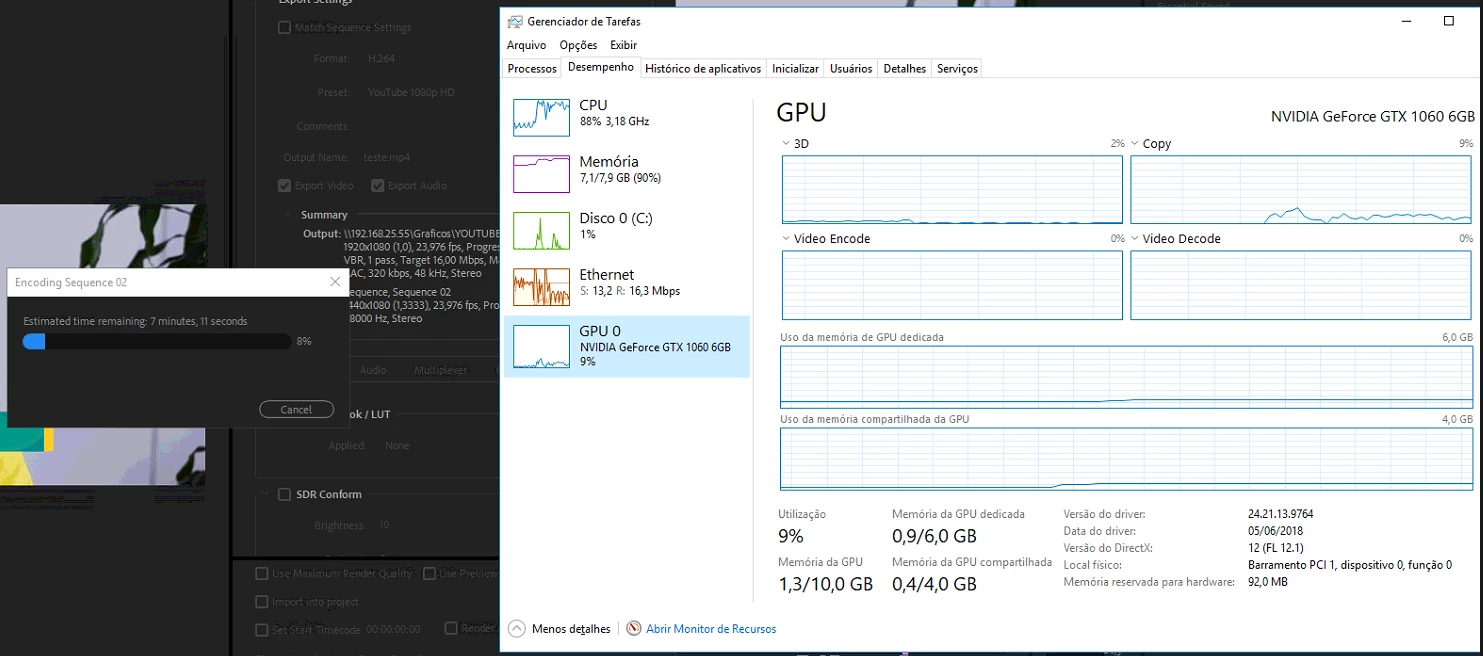
So, I got with a friend one Geforce GTX 1060 6Gb and install it today.

The render time reduce a lot, from 15min to 6min for ex.

But the use of GPU is not in 100%, the configuration at General/Preferences is Hardware Aceleration with CUDA.

The memory in GPU was very low to, but my output file was only 650MB.

Now I need to buy a GPU to me, and return this to my friend.

With I´m not using 100%? It´s because my CPU or RAM?

If I buy an GTX 1050ti the perfomance will be the same in my case?

I´m glad with 6min of render, and don´t want to change the PC.

In my home I have anothe PC, with a core i5 8400, maybe with this CPU should be faster?

The files are in my server, and I acess them directly to work by the network.

But I noted that Premier do a buffer in my PC, and only export the final file by the LAN at the end, so, my 100Mb LAN should not be a problem.

My PC:

Intel Core i5 4460

Asus H81M-A/BR

8Gb DDR3 1666Mhz

SSD Kingston 120Gb SV300S37A120G

100Mb LAN

Thanks!
    This topic has been closed for replies.
    Correct answer Bill Gehrke

    Your i5-4660 is only 4-core with no hyperthreading where the i5-4800 is 6-cores also with no hyperthreading, more CPU power. so yes the GTX 1060 will do better but most people recommend i7 CPU's with hyperthreading for good results editing Premiere.

    If you really want to see the total CPU, GPU, and storage analysis, download and run Premiere Pro BenchMark (PPBM) and run it and SUBMIT the results.

    1 reply

    John T Smith
    Community Expert
    Community Expert
    May 16, 2018
    Smarley
    SmarleyAuthor
    Participating Frequently
    May 16, 2018

    Thank you, probably my video is not using all effects that need CUDA, and it´s using more CPU instead.

    I will try the same GPU at i5 8400, and check if the results are better.

    Maybe I can change the CPU´s, and increase the RAM do 16Gb.

    Bill Gehrke
    Inspiring
    May 18, 2018

    When you read that CSV file for PPBM, it's always in the following format (and in the following order):

    "Disk I/O","H.264 Blu-ray MPE On","MPEG-2 DVD MPE On","MPEG-2 DVD MPE Off"

    and not in the order that you ran the tests. This is done to isolate the less-important part of the overall scoring.


    About the only way they could be out of order is if you actually ran the two MPEG2-DVD tests out of order.  If you reran the Statistics.vbs script again and captured a screen grab rather than getting this which shows my laptop having an MPE gain of 10.9.

    You would see this change for line 3