Known Participant
December 1, 2016
Answered

Premiere 2017 not using all CPU when exporting H.264

  • December 1, 2016
  • 2 replies
  • 26741 views

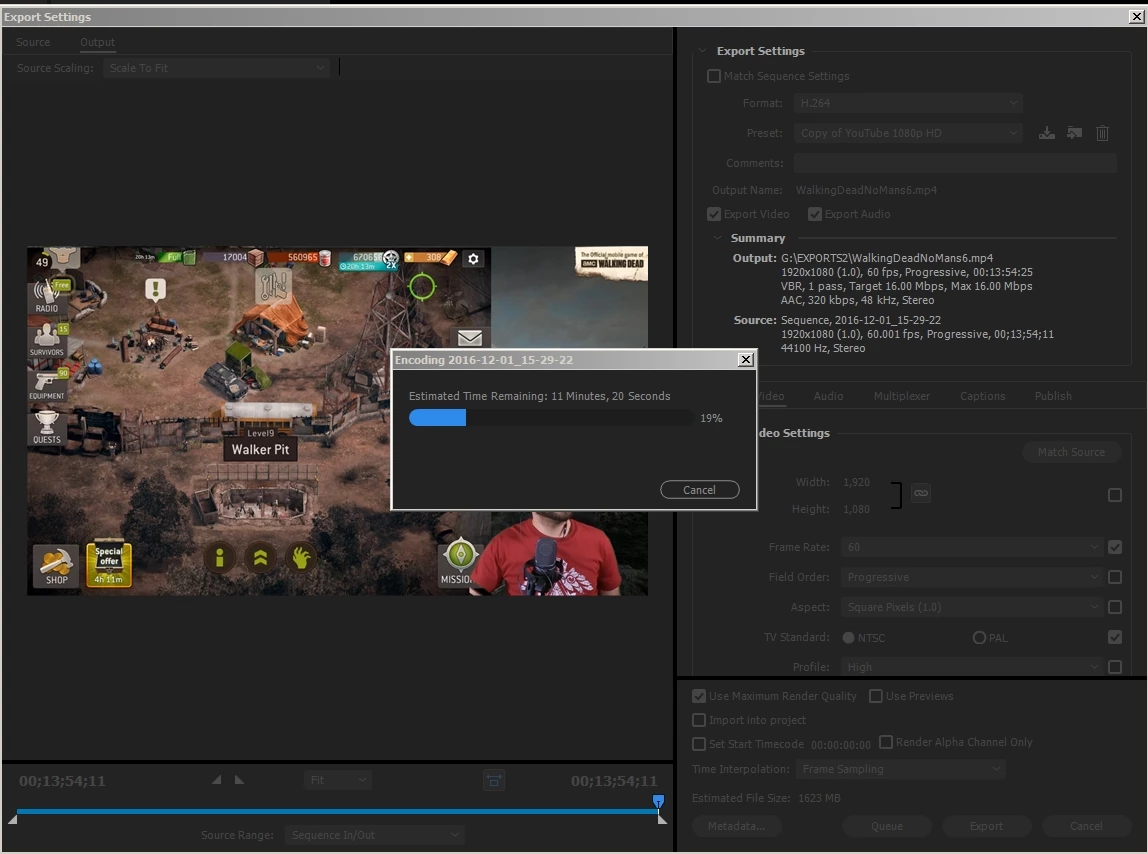
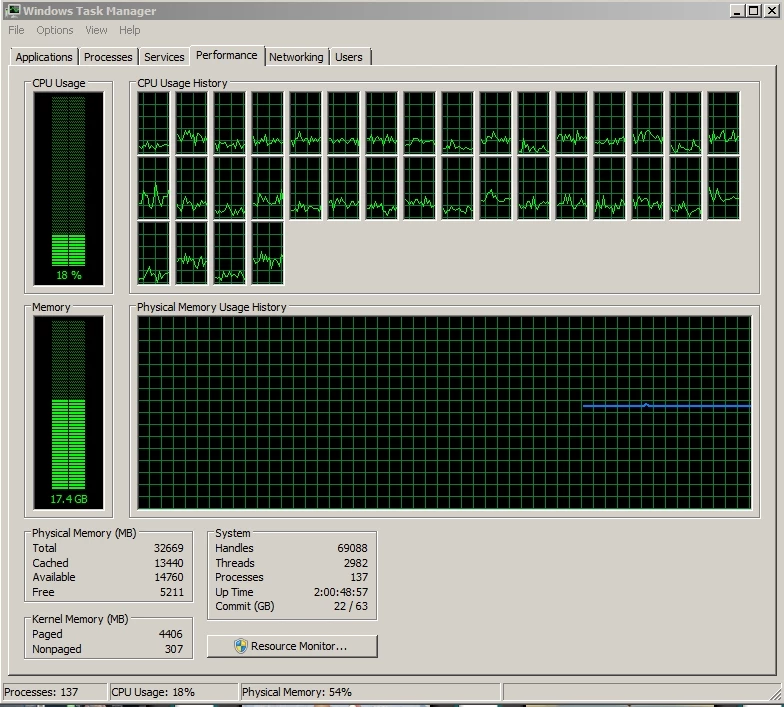
Hey guys, was curious if there was some kind of configuration I had wrong - but I expected that Premiere would use all my CPU power to export a video in H.264 - but it only seems to hit 20-25% max. Is there something I can change? I'm using the Youtube 1080p preset (I use a copy in the screen shot so it just appears at the top of the list.)

If this is normal - how could I increase the speed of my video exports for YouTube? Should I be using a format besides H.264? I thought a CPU with more cores was all I needed. From what I can tell in other threads, the GPU would only help for certain tasks (effects, resizing). I'm also using separate SSD's for the source video and export location - so I don't think disk write is the bottleneck. Any advice would be great!

    This topic has been closed for replies.
    Correct answer JEShort01

    Figured it's worth noting that I did a fresh install of Windows 10 (not an upgrade) - and as you guys suspected, there was no change. Getting about 25% CPU usage across all core.

    I'm baffled. What is my bottleneck?


    Josepha,

    I'm late to the party, but I may have something to contribute to this thread.

    I just did some testing on my system trying to study hardware utilization of your 60Hz H.264 output workflow:

    - from HD to HD, from HD to 4k, and from 4k to 4k (timeline to output)

    - using various options of cores, Hyperthreads, and single/dual CPU up to 24 threads

    - exporting from Premiere Pro, Media Encoder, and both at the same time (CC 2017 versions)

    - using RAM available for Adobe up to 128GB

    - using an 8x Intel s3700 SSD array on a LSI 12Gb SAS controller that can keep up with any possible workflow

    - using a single GTX 980 Ti video card

    My conclusions are:

    1) There does not seem to be any hard coded limit on CPU threads for H.264 output workflow for Premiere Pro (ie 4k to 4k utilizes 100% CPU on 24 threads -- dual Xeon 6-core w/ HT's)

    2) However, there is a definite limit as to how may CPU threads will get utilized for a HD to HD H.264 output workflow; I was seeing 90+ % CPU utilization, but only when I had dropped available cores to around 12 threads. With 24 threads available, I was only seeing about 50% CPU utilization (think about that as closer to 100% utilization on 12 cores and the rest are just sitting around).

    3) Both Premiere Pro and Media Encoder can run at the same time and utilize more cores than either will by itself (for HD workflows and lots of available CPU cores) When I ran both simultaneously, total CPU utilization was hitting just above 90% (w/ 24 threads available).

    All conclusions are based on reverse engineering and speculation. It sure would be helpful to us users if Adobe engineering would help weigh in on threads like this one!

    Possible changes to your workflow:

    A) Stack up output Render jobs in Media Encoder while you do other things

    B) Run Media encoder and Premiere Pro on separate jobs at the same time; yeah, that's an extra step but for all practical purposes it will essentially double the work output that your PC can do for your workflow and using Adobe

    And, sorry to be the bearer of bad news, but you would have been much better served for your particular workflow by buying an overclocked i7-6950x system for the use case of HD timeline media to HD H.264 outputs using Premiere Pro. On the other hand, if you ever update to higher-pixel timelines like 4K, 6K, or more, you will likely see full benefit from your monstrous number of cores.

    Some interesting results:

    - exporting a 4-layer 4K RED timeline to 4K utilized 96% of GPU and 100% of 24 CPU threads, but only 15GB of the 128GB available

    - exporting HD to HD barely uses the GPU at all, but disabling the GPU (from within Adobe) dramatically increased render times

    Regards,

    Jim

    2 replies

    Bill Gehrke
    Inspiring
    December 3, 2016

    What version of Premiere are you using?

    You have 137 processes running stealing CPU cycles and memory that is about twice as many as necessary tune your system for editing

    Unfortunately it is not just cores it is cores and clock speed and there is no way to overclock your Xeon.  What processor do you have?

    What motherboard do you have?

    It looks like you are running Windows 7, correct?

    What GPU do you have?

    Known Participant
    December 3, 2016

    Hi Bill,

    Version of Premiere: 2017.0.1    (although I've gotten similar performance with the 2015 versions)

    CPU: Intel Xeon E5 2699 v3 @ 2.30GHz   (I used to use an 8-core Intel i7 5960X overclocked at 4GHz a core - and still have it around, but it performed oddly about the same)

    Motherboard: Asus X99-Deluxe

    GPU: Nvidia GTX 980 (but I do have a spare GTX 980ti around, and a 1080 from my gaming rig I can use as a test)

    OS: Yep, using Windows 7!

    As for the tuning, I'll try eliminating all unnecessary processes on my next export today as a test. Also, as far as formats go, I create my source material by recording video footage in x264.

    Also, Chris above mentions 6 gigs of ram per core - would increasing my RAM help? I never did exceed 32 gigs on any of my editing systems.

    Really appreciate the help!

    Bill Gehrke
    Inspiring
    December 5, 2016

    Ah, thank you! Submitted via the form!


    The Output.csv numbers are all wrong and it did not include the Premiere version number.  Are you using an old version of the benchmark?  Here are my currant numbers.

    "21","60","19","250", Premiere Version:, 11.0.1.6

    Here are the numbers you submitted, looks to me like a copy and paste to get ~27000 extra seconds on those 3 big ones

    "27658","65","27620","27677"

    Thanks for the try but I cannot get any information on your performance from these numbers.  Your configuration on the Speccy file came through fine.

    R Neil Haugen
    Brainiac
    December 1, 2016

    There's a special forum for hardware-specific discussions and processing/export speeds & such ...

    https://www.adobe.com/cfusion/mmform/index.cfm?name=wishform

    There the folks like Bill Gehrke hang out ... and provide immense help.

    Neil

    Everyone's mileage always varies ...
    Known Participant
    December 2, 2016

    Hi, thanks for the reply Neil! Although that looks like a link to a feature request form?

    R Neil Haugen
    Brainiac
    December 2, 2016

    Oops ... !

    Copied the wrong link.

    On the Overview page there's a group of forums down the right side.

    Neil

    Everyone's mileage always varies ...