


site_fail
Known Participant
January 29, 2016
Question

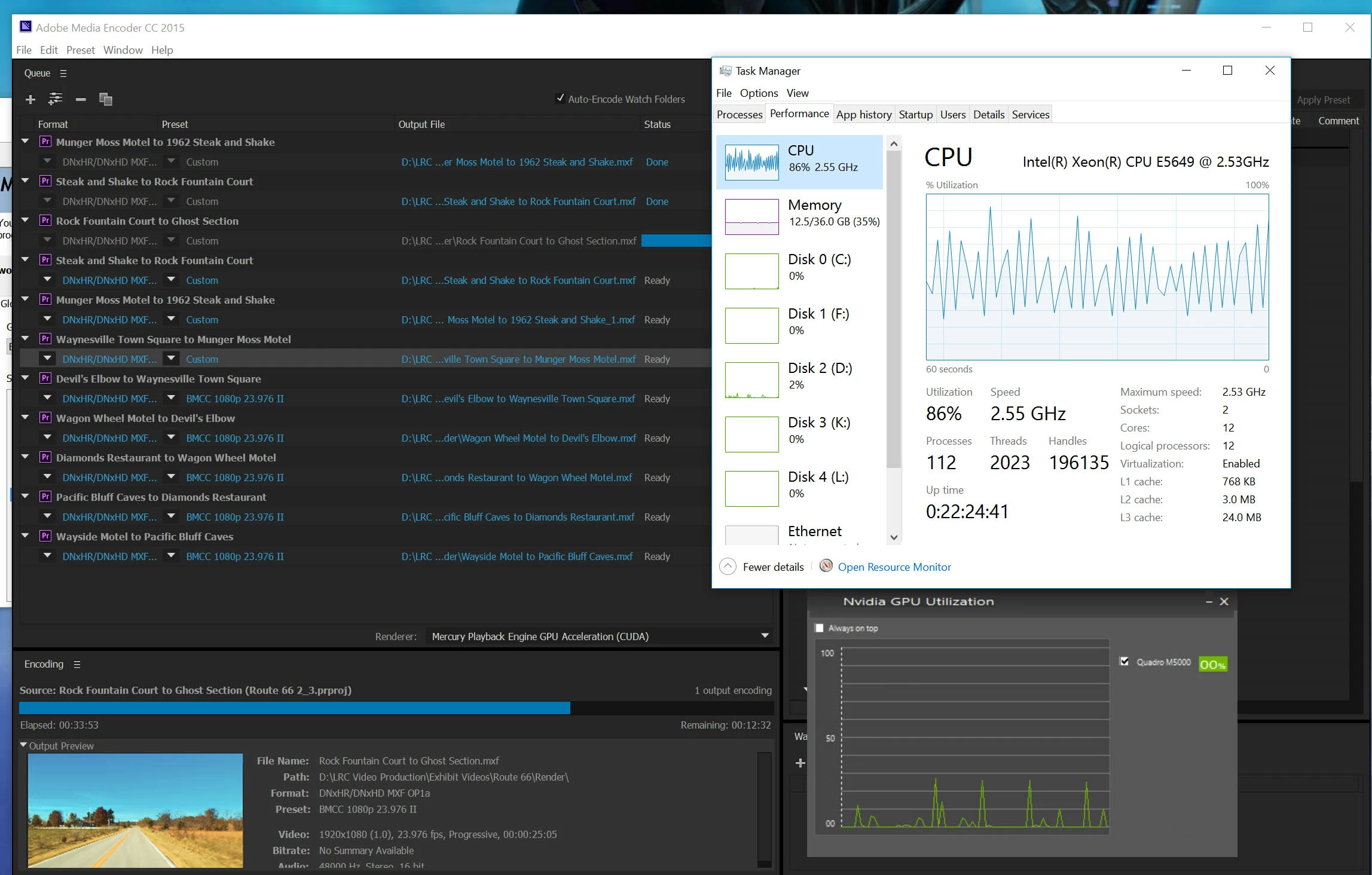
Why is my render not making more use of my GPU?

  • January 29, 2016
  • 3 replies
  • 18826 views

We recently upgraded from Windows 7 to Windows 10 (clean install), added two SSD drives (one as a system drive, one for Adobe cache, etc.), and the system has a 10TB RAID for media.  The system is a dual proc Xeon machine.  We also upgraded from the Quatro 4000 to the M5000 (properly connected and supplied with the additional power required, latest drivers installed).  The problem is that I notice no difference in the slugish performance I see in Premiere and in rendering.  I've attached a screen capture that shows almost no GPU usage and the render of a 24 second clip taking nearly an hour with long gaps between frames in which the computer seems to do nothing.  And why is CPU utilization so hight?  There are a few effects applied to the footage, mainly MagicBullet Denoiser II as well as some Grad filters. Raw footage is BMCC DNG image sequence.  I understand that Denoiser II is slow, but I'm not understanding why it is so slow on such an expensive system and why the graphics card spends most of its time doing nothing. I've even closed all other applications and told the nvidia control panel to set power use to prefer maximum performance.  Any advice would be appreciated.
This topic has been closed for replies.

3 replies

site_fail
site_failAuthor
Known Participant
February 2, 2016

Hello.  Thanks for the feedback.  I've done some tests but I decided to start a new thread as this no longer seems related to just the render performance as related to the GPU.

ECBowen
Inspiring
February 2, 2016

There are several problems involved with this config. Number 1 those CPU's are 4 generations back at this point and the clock speed is to low for good realtime playback and GPU acceleration. You want the CPU clock speed to be atleast 2.6 GHz or higher. GPU acceleration performance is impacted greatly by clock speed. The lower the clock speed the less data gets to the GPU at any point in time. More threads helps but does not offset the low clock speed. Couple this the ram bandwidth of that platform compared to the current X99 platform ie i7 Gen 4. is significantly lower ie a fraction of the performance with far lower clock speed. This has a huge impact on GPU acceleration with frames above 1080 resolution. The 10TB raid you list does not state the amount of drives. CinemaDNG media takes a huge amount of disk bandwidth even at 1080 res. At 2.5K res the disks need to be able to handle around 500 to 600MB/s or more. At 4K you are talking upward of 1GB/s a sec. That likely is a huge impact to what you are running now. You can try and move some of that media to the SSD cache drive and see how it plays in a Premiere timeline by itself. However I would plan on getting 1TB SSD's for media if you work with Cinema DNG often. Adobe has far greater caching at the moment with CC 2015 than previous version and other applications. Davinci also caches far more to ram when playing back. Premiere has GPU accelerated debayering which should help with the Cinema DNG media but you have to have the clock speed on the CPU's to really be beneficial. All the way around the CPU's and ram are a major bottleneck for that platform compared to the current X99 platform. That system with a 5960 8 Core and 64GB of DDR4 would vastly outperform the current system you have with 2.5K or 4K media especially CinemaDNG. Also keep in mind the camera playback is far different than media playback in an editor just like playback in QuickTime player or VLC is far less load on the system and less disk requirement than an editor.

Eric

ADK

site_fail
site_failAuthor
Known Participant
February 2, 2016

My point is not that the system is not old, my point is that it used to work just fine in CC, and CC2014 for editing this footage. I could playback BMCC 2.5k CinemaDNG just fine, in fact I could even scrub through it and play it with basic grading on it.  As I said, I've edited feature length pieces (Portrait of St Louis at 250 Years) and countless smaller projects this way. Additionally, see my other post detailing the tests I've run for simple playback.  This system, for example, can play GH4 4k footage with nearly no load on the processor or graphics card.  Inside of Premiere, the load is significant.  The same goes for all other formats I've tested.  IMHO, there is no reason that it should be 2,3, or 6 times more taxing on the processor to run playback from the source monitor in premiere as it is to run playback via VLC or Windows Media Player.  I'll gladly hear arguments to the contrary, but if "Premiere should be significantly slower to play video than freeware" is a realistic argument to Adobe then I need to know so I can make decisions moving forward.  I work for a NFP institution and we can't afford to replace expensive editing workstations every other year because software actually got slower.

Kevin-Monahan
Community Manager
Community Manager
February 2, 2016

Moving to Hardware forum.

Kevin

Kevin Monahan - Sr. Community & Engagement Strategist – Pro Video and Audio
Ann Bens
Community Expert
Community Expert
January 29, 2016

Might want to read this doc on what cuda does and does not do

CUDA, Mercury Playback Engine, and Adobe Premiere Pro « Premiere Pro work area 

site_fail
site_failAuthor
Known Participant
January 29, 2016

Thanks but that raises more questions than it answers as all of the effects I'm using, including Denoiser II, are supposed to be GPU accelerated. 

Legend
February 3, 2016

jim, it was just to make a point against how bad the performance was at 6fps. even if it required a computer 2x more powerful, the current i7 x99 cpu's wouldn't cut it.

there is this old footage to download if you or anyone else wants to test it.

http://video.blackmagicdesign.com/Shot_1.zip

http://video.blackmagicdesign.com/Shot_2.zip

http://video.blackmagicdesign.com/Shot_3.zip

http://video.blackmagicdesign.com/Shot_4.zip

http://video.blackmagicdesign.com/Shot_5.zip


I downloaded one of the older test clips.  It played back without any dropped frames on my i5 2500K system for about 2 seconds, but then started dropping frames.  However, this was due to my single disk drive which just couldn't keep up.  The CPU only hit about 10% load during playback.