

Multiple Boxes overlapping but dimensions are right?
Hi guys,
I am creating a template in AE for my to animate over three screens.
The dimensions are;
Centre = 896 x 768
Left / Right = 1280 x 640
So I made a comp with dimensions 3456 x 768.
I created three boxes with the rectangle tool with the dimensions above;
Centre = 896 x 768
Left / Right = 1280 x 640
But when I align them, left, centre and right. How come they overlap? They don't fit perfectly?
I tested my dimensions above in PS and it works perfectly but in AE, it seems my total width is smaller but I checked all my dimensions 5 times or more and I can't figure out why the pixels are overlapping when all the numbers add up.
I added a picture below, as you can see within the red boxes, the left and right overlap the middle, or the middle overlaps left and right. Which ever way you want to see it. It's not perfectly aligned.
Edit: The height on all 3 boxes are ok. It's the width that's the problem. Just can't figure out why the width dimensions are overlapping.
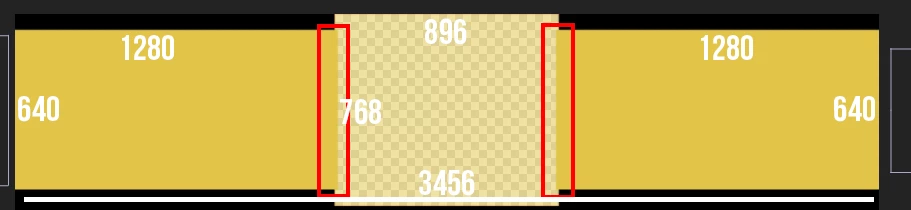
But in PS, it aligns perfectly

I dont understand?
I need to get the dimensions right before working because my animations is going to animate over those 3 screens and i feel if I mess up the dimensions, it's not going to output correctly.
 AdChoices