
Inspiring
October 18, 2018
Answered

Properties Panel USELESS

  • October 18, 2018
  • 3 replies
  • 625 views

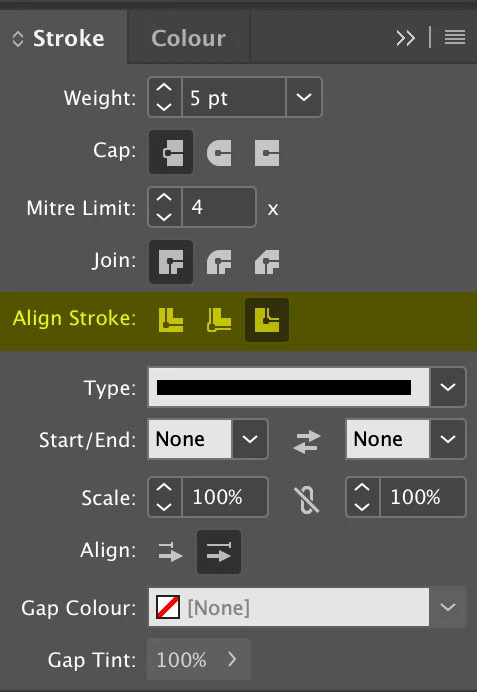
Please remove or improve the properties panel -many of the most basic functions that I regularly use are not even included, as an example the stroke options doesn't give you the "align to center, outside or inside" options, so I need to keep stroke panel open anyway...Also whenever I select a text box the font options arent there, I literally need to click inside the text box and highlight the text to access their properties - this is a pointless extra step that I dont need if I have the character panel open.

Also please fix your software, it crashes almost once every single day - even after this update I still have the daily crashes, believe it or not most people DONT appreciate paying to rent broken software.
This topic has been closed for replies.
Correct answer Derek Cross

Which version of InDesign and OS?

Re your crashes, have you tried resetting your InDesign Preferences?

Re your issue with text do you know about using Paragraph (and Character) Styles?

Re aligning a stroke, this can be selected in the Stroke panel (see screen shot), you can save your choices as an Object Style.

Note: The new Properties panel in InDesign CC2019 lets you view settings and controls in the context of your current task or workflow.

The Properties panel is available by default in the Essentials workspace. You can also enable it from Window > Properties.

Note this is a user-to-user forum, if you have a feature request or complaint send it to Adobe via:

Adobe InDesign Feedback

3 replies

BobLevine
Community Expert
Community Expert
October 18, 2018

Adobe InDesign Feedback is where you might want to post your request.

Jongware
Community Expert
Community Expert
October 18, 2018

I don't think the new Properties panel was meant as a single replacement for all the other panels at once. It's a shortcut for the most common operations -- where "most common" is for a larger set of InDesign users, and not specifically tailored to your personal "most basic functions that I regularly use".

  • It's also v1.0.0 and so it may change in future versions.

  • Which may be a good idea though. A fully customizable Properties Panel where you can drag and drop any tool, function, menu item, and script in.

  • francoestrubia
    Participating Frequently
    September 26, 2023

    That's the problem, most common is a limit to get rid off. Most common to who? Hate this kind of panels.

    Derek Cross
    Community Expert
    Derek CrossCommunity ExpertCorrect answer
    Community Expert
    October 18, 2018

    Which version of InDesign and OS?

    Re your crashes, have you tried resetting your InDesign Preferences?

    Re your issue with text do you know about using Paragraph (and Character) Styles?

    Re aligning a stroke, this can be selected in the Stroke panel (see screen shot), you can save your choices as an Object Style.

    Note: The new Properties panel in InDesign CC2019 lets you view settings and controls in the context of your current task or workflow.

    The Properties panel is available by default in the Essentials workspace. You can also enable it from Window > Properties.

    Note this is a user-to-user forum, if you have a feature request or complaint send it to Adobe via:

    Adobe InDesign Feedback