

Susan Flamingo
Known Participant
March 8, 2021
Answered

half a border on a text frame

  • March 8, 2021
  • 9 replies
  • 3139 views

I am trying to setup a text frame that I will use in many different places in my doc.


I want a border on the bottom of the frame, but only across *a third or half * the width of the frame. I'd rather do this without having to add a line object. Any easy solution?


Thank you

Susan
This topic has been closed for replies.
Correct answer pixxxelschubser

I wonder.
A paragraph border at the bottom (with stroke style and automatically height resize) brings the same result - without having to split the frame and "re-join" it.


9 replies

pixxxelschubser
Community Expert
Community Expert
March 17, 2021

@Susan Flamingo 

I don't know exactly what you really want …


By @pixxxelschubser

                                                                                          --> jump to quoted post


Unfortunately, this is still the case. Different interpretations of the request from OP @Susan Flamingo  are still possible.


Hi Uwe,

thanks for your new approach.


At the beginning I also thought about a percentage lengthening of the line. And I agree with you. The use of a gradient would in principle make this possible. (I like to call the gradient you showed "Hard gradient".)

😉


But then I decided for that version: a line with an exact length that does not change its length even after enlarging / reducing the text frame.


It seems that Michel understood it that way too.


Michel, you are right. Not all variants are possible with a paragraph border. But these were not asked for here either.

These four variants are, for example, possible in any case without any problems using standard settings in the paragraph format. The distance to the text can also be varied. (The length always remains the same.)


Community Expert
March 17, 2021

Hi Susan,

hi everybody else who contributed.


After a little discussion with pixxxelschubser off-forum I re-read all the posts here.

And I wonder if I was right to mark three answers as the "correct" ones.


In her first post Susan asked for a solution with "*a third or half * the width of the frame" and that implies a percentage of the width of the text frame. Correct me if I'm wrong, but none of the basic solutions presented here will offer exactly this. Can we perhaps add another or a modified trick to do a stroke at the bottom of a text frame with a width that is a percentage of the frame's width? A flexible solution, that automatically follows the width of the frame?


One possible candidate could be a paragraph border that is filled with a gradient that has 4 color stops.

Two positioned at the extreme, 0% and 100%, two at the same position between the extremes to express the percentage from one to a different color. E.g. from black to white.


The second and the third color stops of that gradient share the same position at 30% here:


Two points that speak against that:

[-] A possible background color on the page would reveal the part of the gradient that we define with [Paper]

[-] One has to make sure that the last paragraph of the text frame needs a paragraph border; that's not very automatic if you need to edit text or if you have to use different formatting or different contents like inline graphics or a table or, or, or…


Well, I came up with this alternative, that basically relies on two text frames stacked on each other. In my screenshots below the length of the stroke, an underline is always a third of the width of the text frame. You can change the width of both text frames simultanously and the stroke's width will always follow as a third of the overall width:


Why do I think that this is working?

The top frame contains the visible text. It has text wrap applied to. The purpose of the text wrap is to move contents of the other frame stacked below past the bottom of the frame with the visible contents.

The frame stacked below contains one paragraph of text with a GREP style that detects a dot and one blank character at the beginning of a paragraph. The paragraph has four dots and three spaces, the width of the text is set to 1%, justifaction is set to fully justify and the fill color of the text is [None].


That means the first dot and the first white space are always one third of the frame's width.


[+] We can express the width of the stroke in a half, a third, a quarter of the text frame's width. We only have to change the number of dots and spaces in the text frame stacked below.

[-] There are two items you have to select if you want to move or change height and width of the combination of frames.


Susan, what do you say? Is this another solution?

Here my InDesign document to download from my Dropbox account:

https://www.dropbox.com/s/8u220l40lzg58dv/UnderLine-A-THIRD-Of-TextFrame-Width-2021.indd?dl=1


Regards,
Uwe Laubender

( ACP )


EDITED

FRIdNGE
March 17, 2021

Hi Uwe,


Maybe time to play this game with just "1 click" and the kind of Script below!


I suppose Susan applies a specific object style "XXX" to each text frame she wants to be included in the game). Not really complicated. Once done, it's done!


After having (eventually) parametered the kind of "para rule below" she wants in para styles (without activating it -- these parameters could be included in the Script):


/*
    _FRIdNGE-0702_EndStoryParaRule.jsx
    by FRIdNGE, Michel Allio [17/03/2021]
*/

var myDoc = app.activeDocument;  

app.findObjectPreferences = null;  
app.findObjectPreferences.appliedObjectStyles = myDoc.objectStyles.itemByName("XXX"); // To Be Changed!
myFound = myDoc.findObject();  

for ( var f = 0; f < myFound.length ; f++ ) {
    myFound[f].parentStory.ruleBelow = false;
    myFound[f].paragraphs[-1].ruleBelow = true;
    // Para rule parameters to be eventually added here!…
    myFound[f].paragraphs[-1].ruleBelowRightIndent = (myFound[f].geometricBounds[3]-myFound[f].geometricBounds[1])/3*2;
}

app.findObjectPreferences = null;


(^/)  😉


pixxxelschubser
Community Expert
Community Expert
March 17, 2021

Just a reminder:

But why easy when it can be difficult?
Michel's approach was necessary to get around this in previous versions. At a time when there were no paragraph frames. Of course it's a right solution.


FRIdNGE
March 17, 2021

"At a time when there were no paragraph frames." …


Not so sure!  😉


About these paragraph possibilities you mentioned, I already played with them 5 years ago [just for fun!]:


(^/)

FRIdNGE
March 17, 2021

… If it's simplistic to use paragraph settings to add an horizontal "red" 2pts weight and fixed length (here 30mm) line at the bottom-right of a para, is it as easy to add a similar but vertical "blue" (same weight and same fixed length) line at the bottom-right of a para using paragraph settings?


Of course, the user could need to increase/decrease the text frame width without more problems!


(^/)  😉

pixxxelschubser
Community Expert
Community Expert
March 9, 2021

Hi Michel,

It wasn't directed against you.

You know: I love workarounds for features that a program doesn't offer out of the box. However, this is not the case here.


On the other hand, we don't know which version the OP is working with. (or I didn't see it): 

pixxxelschubser
Community Expert
pixxxelschubserCommunity ExpertCorrect answer
Community Expert
March 9, 2021

I wonder.
A paragraph border at the bottom (with stroke style and automatically height resize) brings the same result - without having to split the frame and "re-join" it.


FRIdNGE
March 9, 2021

I’ve never written a paragraph border is a not-interesting way I personally use myself in some layout situations.

I just think mine can be useful to be known, especially by guys who try to help ID users on forums!

... and, I repeat, it was more an answer to Barb Binder’s comment.


(^/)

Barb Binder
Community Expert
Community Expert
March 8, 2021

I am trying to setup a text frame that I will use in many different places in my doc.


I want a border on the bottom of the frame, but only across *a third or half * the width of the frame. I'd rather do this without having to add a line object. Any easy solution?


Thank you

Susan

By @Susan Flamingo


The options are to use a line object—anchored or not—or paragraph rule or paragraph border. All of which you already discounted. The only text frame options are in Object > Text Frame Options, so unfortunately, no, this is not an option. 


Perhaps there is a scripting solution, but not one within InDesign's feature set.


The only workaround I can think of is to add a footnote on the first line, and then hide the numbers with character styles (which, once created) could be assigned automatically. You can control the line via Footnote Options.


~Barb 

~Barb at Rocky Mountain Training
FRIdNGE
March 8, 2021

I just want to answer to Barb Binder:


"… The only text frame options are in Object > Text Frame Options, so unfortunately, no, this is not an option. 

Perhaps there is a scripting solution, but not one within InDesign's feature set."


Susan could of course create such a text frame as she indicates us!

Just using the "stroke" basic feature and its "stroke style" accessory!


InDesign and its result as exported pdf in Acrobat:


(^/)  The Jedi


Susan Flamingo
Known Participant
March 9, 2021

I am a little lost. The example in the PDF correctly reflects what i need. But i dont get how you set the border (stroke) as half the width?

Soery for bothering..

pixxxelschubser
Community Expert
Community Expert
March 8, 2021

Like this:

kjfdk; dfjkdlasjf kl;dasj jfdkl fdkjf klj;df dkjf kjf fjkdj fkjdklfjdklfjkj fdjkfkd fkdjfkld fkjdfkldf ;jfkdjfd;kljf kdlfjk fjdkljfkl djfkljkljfdklj jdkljfdkfjdkljfkl.

fkdjf;kldjfkl;djfkljfkldjfdkljfkdljfkdljfk fjkdjfkdjf dkfjdkfjdklfjkdlfj dkfj kjf dkjf.

fdkjdfkdlfjdkljfkl fdkjf dkljfkdlf dklfjdklfjkdljfkdjfkdljfkdjfkljfkdjfkldjfkdljfkdlfjkdlfjdkfjkfjkdlfjkdfj;jkfjkldjfkljf fjkdjfkd fkdfjkdf kfjdkjfdklfjkdlfjdklfj

____________________________


But as I said the text will be changing. but I want the line to stay at the bottom of the frame.


By @Susan Flamingo


Isn't that exactly what I showed --> in my screenshot in my last post?

pixxxelschubser
Community Expert
Community Expert
March 8, 2021

@Susan Flamingo 

I don't know exactly what you really want.


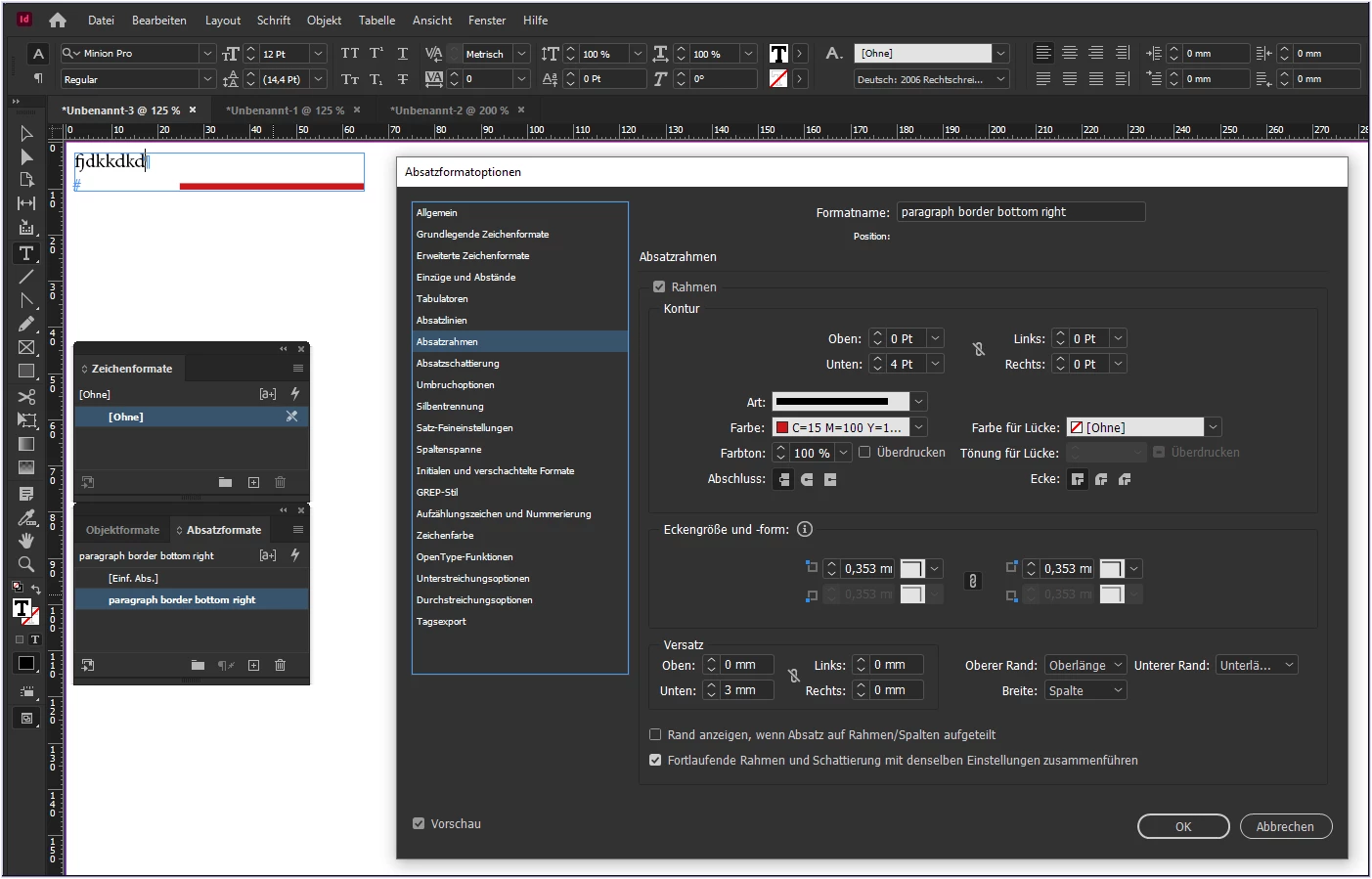
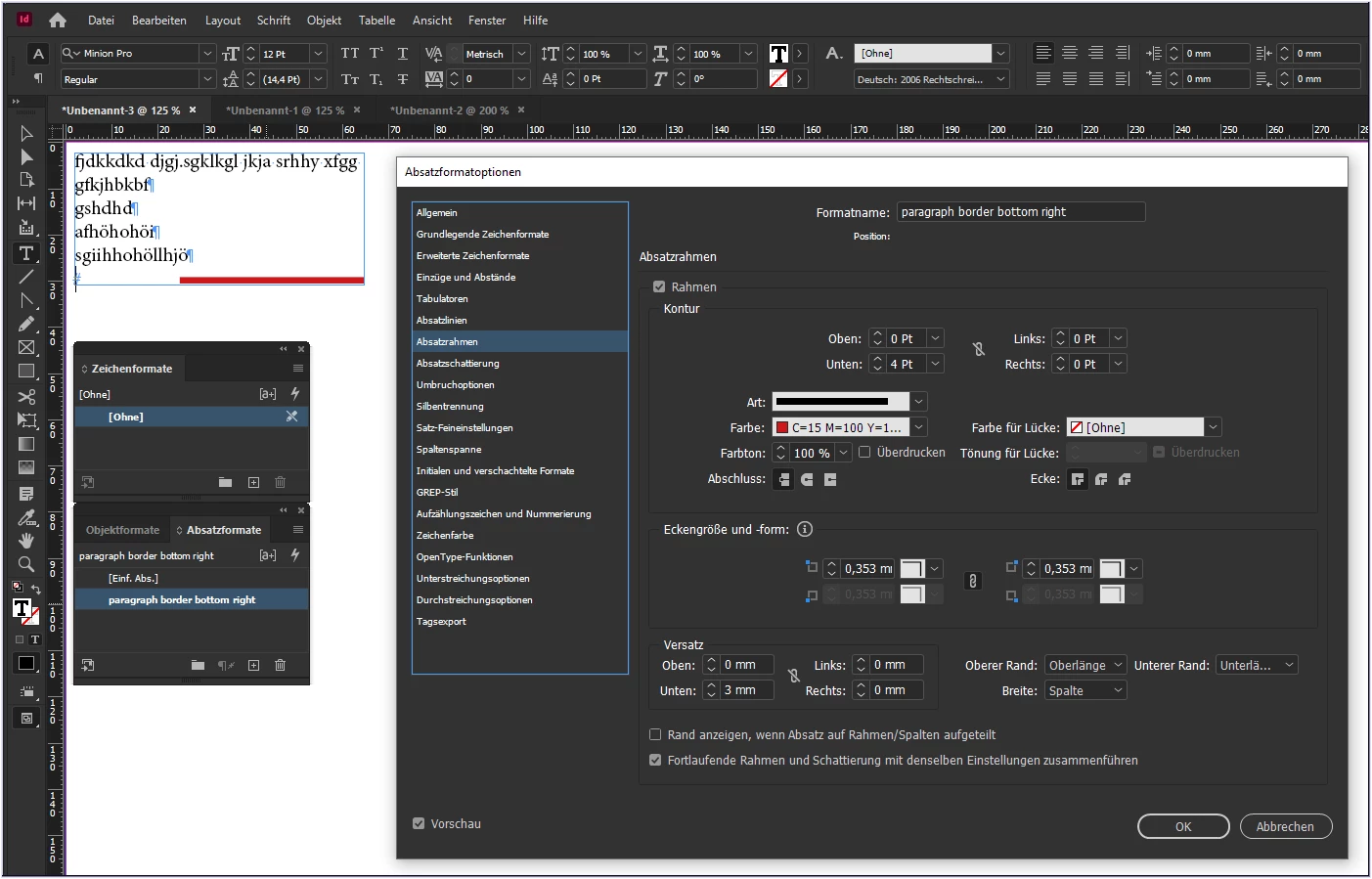
If a paragraph rule does not work for you - it may be a paragraph border does work.

Here is how it works (see the red line at bottom) with my german UI:

But please - show us a sketch for a better understanding.

Susan Flamingo
Known Participant
March 8, 2021

Like this:

kjfdk; dfjkdlasjf kl;dasj jfdkl fdkjf klj;df dkjf kjf fjkdj fkjdklfjdklfjkj fdjkfkd fkdjfkld fkjdfkldf ;jfkdjfd;kljf kdlfjk fjdkljfkl djfkljkljfdklj jdkljfdkfjdkljfkl.

fkdjf;kldjfkl;djfkljfkldjfdkljfkdljfkdljfk fjkdjfkdjf dkfjdkfjdklfjkdlfj dkfj kjf dkjf.

fdkjdfkdlfjdkljfkl fdkjf dkljfkdlf dklfjdklfjkdljfkdjfkdljfkdjfkljfkdjfkldjfkdljfkdlfjkdlfjdkfjkfjkdlfjkdfj;jkfjkldjfkljf fjkdjfkd fkdfjkdf kfjdkjfdklfjkdlfjdklfj

____________________________


But as I said the text will be changing. but I want the line to stay at the bottom of the frame.

pixxxelschubser
Community Expert
Community Expert
March 8, 2021

Why not use a paragraph rule?


Or do you mean something else? If so, please show a sketch.

Susan Flamingo
Known Participant
March 8, 2021

PLZ excuse my ignorance but isn't a "paragraph rule" a property of paragraphs? I have many paragraphs in the text frame, and I want this short "line" (border) after them all, so it would need to be an attribute of the frame, right?

jmlevy
Community Expert
Community Expert
March 8, 2021

You are right, paragraph rules are paragraph attributes but you could create a paragraph style, as suggested by @pixxxelschubser, and apply this paragraph sttle to the last paragraph of the frame.