

dublove
Legend
October 21, 2024
Answered

Font Packaging Script Error in InDesign

  • October 21, 2024
  • 3 replies
  • 1614 views

When ID packages the file, it is simply not possible to package the fonts all together.

A nice font packaging script that someone else shared for free.

But it prompts an error for some files.

Any god willing to help to fix it?


English translation in parentheses
Thanks a lot.


The ID version is the latest
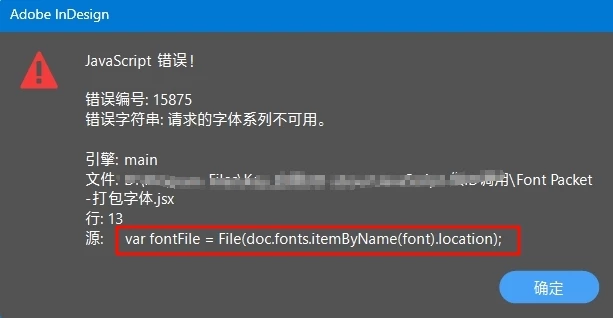


//获取当前文档(Get the current document)
var doc = app.activeDocument;

//获取字体列表(Get the list of fonts)
var fonts = doc.fonts.everyItem().name;

//创建数组(Creating Arrays)
var fontFiles = [];

//循环字体并添加到数组中(Loop through the fonts and add to the array)
for (var i = 0; i < fonts.length; i++) {
    var font = fonts[i];
    var fontFile = File(doc.fonts.itemByName(font).location);
    if (arrayContains(fontFiles, fontFile) == false) {
        fontFiles.push(fontFile);
    }
}

//创建打包文件夹(Creating a Packaging Folder)
var packageFolder = Folder(doc.filePath + "/Package");

if (!packageFolder.exists) {
    packageFolder.create();
}

//将字体复制到打包文件夹(Copy the fonts to the packaging folder)
for (var i = 0; i < fontFiles.length; i++) {
    var fontFile = fontFiles[i];
    var newFile = File(packageFolder.fsName + "/" + fontFile.name);
    fontFile.copy(newFile);
}

//打开打包文件夹(Open the packing folder)
packageFolder.execute();

function arrayContains(arr, item) {
    for (var i = 0; i < arr.length; i++) {
        if (arr[i].toString() == item.toString()) {
            return true;
        }
    }
    return false;
}


<Title renamed by MOD>

Correct answer Robert at ID-Tasker

Replace this part of you script with my version:


//循环字体并添加到数组中(Loop through the fonts and add to the array)
for (var i = 0; i < fonts.length; i++) {
    var font = fonts[i];
    alert(doc.fonts.itemByName(font).location);
    var fontFile = File(doc.fonts.itemByName(font).location); 
    if (arrayContains(fontFiles, fontFile) == false) {
        fontFiles.push(fontFile);
    }
}


You'll get a message for each font - take a screenshot for one before error message - and post it here. 


@rob day - can you maybe make a better version using try...catch?


3 replies

jennymartin806
Participant
June 16, 2026

I’ve seen this issue before with font packaging scripts, especially in cases where certain fonts have restricted embedding permissions or are partially corrupted. In Adobe InDesign/CC workflows, the “Package” feature can fail silently or throw errors when even one font in the document doesn’t support full packaging.

A few things you can try:

  • Check if the problematic fonts are licensed for embedding/package use

  • Replace or temporarily deactivate suspicious fonts and test again

  • Run InDesign as administrator (sometimes permission blocks packaging scripts)

  • Manually package using “File > Package” instead of third-party scripts to isolate the issue

  • Update the script if it’s outdated for your current CC version

Also, this discussion might be related to similar CC packaging/link issues: https://community.adobe.com/questions-652/cc-libraries-is-changing-link-file-names-when-packaging-a-file-816554/Zee Packaging/

If you are frequently dealing with packaging or file preparation problems, you may also find structured packaging workflows useful. 

They focus on organizing and preparing production-ready packaging files in a more consistent way, which can help reduce these kinds of font and linking issues in larger projects.

Robert at ID-Tasker
Legend
October 21, 2024

Instead of arrayContains() function - you could use a string and then indexOf on this string - instead of iterating an array.


dublove
dubloveAuthor
Legend
October 21, 2024

I don't know how to script. I got this off the internet.

Robert at ID-Tasker
Robert at ID-TaskerCorrect answer
Legend
October 21, 2024

Replace this part of you script with my version:


//循环字体并添加到数组中(Loop through the fonts and add to the array)
for (var i = 0; i < fonts.length; i++) {
    var font = fonts[i];
    alert(doc.fonts.itemByName(font).location);
    var fontFile = File(doc.fonts.itemByName(font).location); 
    if (arrayContains(fontFiles, fontFile) == false) {
        fontFiles.push(fontFile);
    }
}


You'll get a message for each font - take a screenshot for one before error message - and post it here. 


@rob day - can you maybe make a better version using try...catch?


Robert at ID-Tasker
Legend
October 21, 2024

Add alert() to display "doc.fonts.itemByName(font).location" to see what is the problem.