Participating Frequently
January 10, 2025
Answered

Need help moving just 1 coordinate of a rectangle via jsx?

  • January 10, 2025
  • 1 reply
  • 535 views

Hello community,

I am having trouble figuring out how to move one corner coordinate of a rectangle object in Indesign with jsx script (essentially a very simple "free transform").

Can anoyone assist?

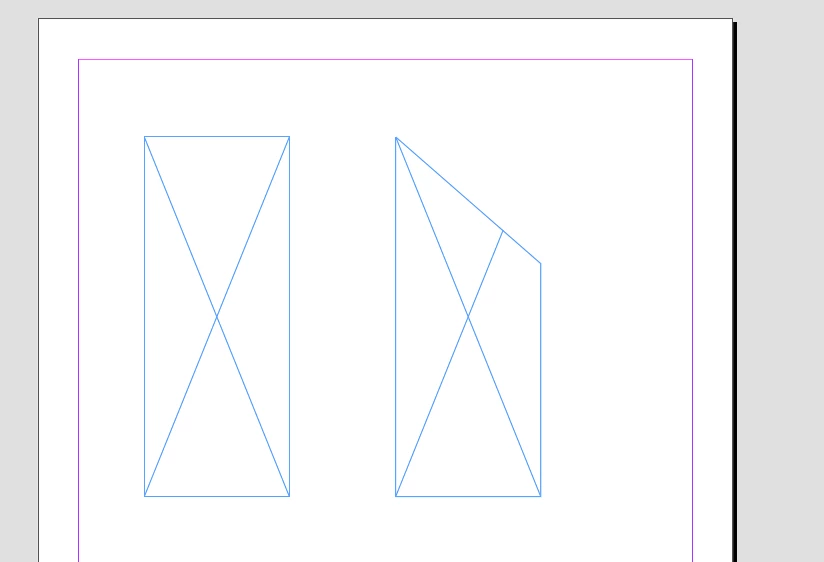
Example: what command(s) would I use to turn the rectangle on the left below into the rectangle on the right?

Thank you!

Correct answer m1b

Hi @Matt276783077obu, an Indesign page item might have paths property, and if so, each path will have pathPoints. Each PathPoint has an anchor property. This is all we need to know for your example.


Here's a script example:

/**
 * Example showing moving a particular path point of the selected rectangle.
 * @author m1b
 * @version 2025-01-11
 * @discussion https://community.adobe.com/t5/indesign-discussions/need-help-moving-just-1-coordinate-of-a-rectangle-via-jsx/m-p/15082698
 */
function main() {

    app.scriptPreferences.measurementUnit = MeasurementUnits.POINTS;

    var doc = app.activeDocument,
        item = doc.selection[0];

    if (
        !item
        || !item.hasOwnProperty('paths')
        || item.paths[0].pathPoints.length !== 4
    )
        return alert('Please select a rectangle and try again.');

    // start with the first path point
    var targetPoint = item.paths[0].pathPoints[0];

    // loop over each point in item's path, to find the top right point
    for (var i = 0; i < item.paths[0].pathPoints.length; i++) {

        var point = item.paths[0].pathPoints[i];

        if (
            point.anchor[0] >= targetPoint.anchor[0]
            && point.anchor[1] <= targetPoint.anchor[1]
        )
            targetPoint = point;

    }

    // add an amount to the top right point's anchor's Y coordinate
    targetPoint.anchor = [
        targetPoint.anchor[0],
        targetPoint.anchor[1] + 50
    ];

};
app.doScript(main, ScriptLanguage.JAVASCRIPT, undefined, UndoModes.ENTIRE_SCRIPT, 'Move Top Right Path Point');

 - Mark

1 reply

m1b
Community Expert
m1bCommunity ExpertCorrect answer
Community Expert
January 10, 2025

Hi @Matt276783077obu, an Indesign page item might have paths property, and if so, each path will have pathPoints. Each PathPoint has an anchor property. This is all we need to know for your example.


Here's a script example:

/**
 * Example showing moving a particular path point of the selected rectangle.
 * @author m1b
 * @version 2025-01-11
 * @discussion https://community.adobe.com/t5/indesign-discussions/need-help-moving-just-1-coordinate-of-a-rectangle-via-jsx/m-p/15082698
 */
function main() {

    app.scriptPreferences.measurementUnit = MeasurementUnits.POINTS;

    var doc = app.activeDocument,
        item = doc.selection[0];

    if (
        !item
        || !item.hasOwnProperty('paths')
        || item.paths[0].pathPoints.length !== 4
    )
        return alert('Please select a rectangle and try again.');

    // start with the first path point
    var targetPoint = item.paths[0].pathPoints[0];

    // loop over each point in item's path, to find the top right point
    for (var i = 0; i < item.paths[0].pathPoints.length; i++) {

        var point = item.paths[0].pathPoints[i];

        if (
            point.anchor[0] >= targetPoint.anchor[0]
            && point.anchor[1] <= targetPoint.anchor[1]
        )
            targetPoint = point;

    }

    // add an amount to the top right point's anchor's Y coordinate
    targetPoint.anchor = [
        targetPoint.anchor[0],
        targetPoint.anchor[1] + 50
    ];

};
app.doScript(main, ScriptLanguage.JAVASCRIPT, undefined, UndoModes.ENTIRE_SCRIPT, 'Move Top Right Path Point');

 - Mark
Participating Frequently
January 13, 2025

Thank you m1b!, for your quick and accurate response!

This works for me!  Though I don't understand what is going on with the loop to determine the top-right pathpoint?  


I do also a have a follow-up question, now that I am introduced to path points: How would I add a point to the first rectangle, midway between the top two corners? (I know the coordinates for the desired point).

If it would be preferable I can open another question, I will mark your answer here correct regardless:)


Thank you


m1b
Community Expert
Community Expert
January 13, 2025

Hi @Matt276783077obu


> Though I don't understand what is going on with the loop to determine the top-right pathpoint


I make a var for the "target" pathpoint—this will eventually be the one we want to move, ie. the top right point. Then I loop over each pathpoint, checking the anchor coordinates of each to see if it is greater X and greater Y than the current target—if it is then we store that one ... and so on. The end result is we know `targetPoint` is the topmost and rightmost path point.


> How would I add a point to the first rectangle, midway between the top two corners


This is a little more difficult and there are two approaches. I would first store the pathpoints as arrays using `var newPath = item.paths[0].entirePath;` which collects all the pathpoints into a normal Array (if there are curves than each point will be an array of three coordinates [ [x, y], [x, y], [x, y] ] , otherwise will be just the anchor coordinates [x, y] ).


Then I would work out the two top points (using a technique similar to what I used above), calculate the middle of those mathmatically, and add to the collected entirePath array in the correct place using somethng like: Array.splice(index, 0, middlePoint). And finally applying the entirepath: `item.paths[0].entirePath = newPath;`


That will be a good exercise, but let me know if you want me to code that out for you.

- Mark


P.S. the other way to add a path point is simpler: `item.paths[0].pathPoints.add({properties of new pathpoint});` however the catch is that the pathpoint is added to the end. So then you have to move them around to the correct place, which probably involves re-writing them all because there is no PathPoint.move method.