

SuzzyFlamingo
Inspiring
September 9, 2025
Answered

ID getting a little sluggish - getting me nervous

  • September 9, 2025
  • 1 reply
  • 291 views

Hi, Dear Friends!

My ID is getting a little sluggish (which is the main reason I left MS Word for page layout. Yes, I have a lot of scripts, but I am not running them all at once, so why should this be happening?


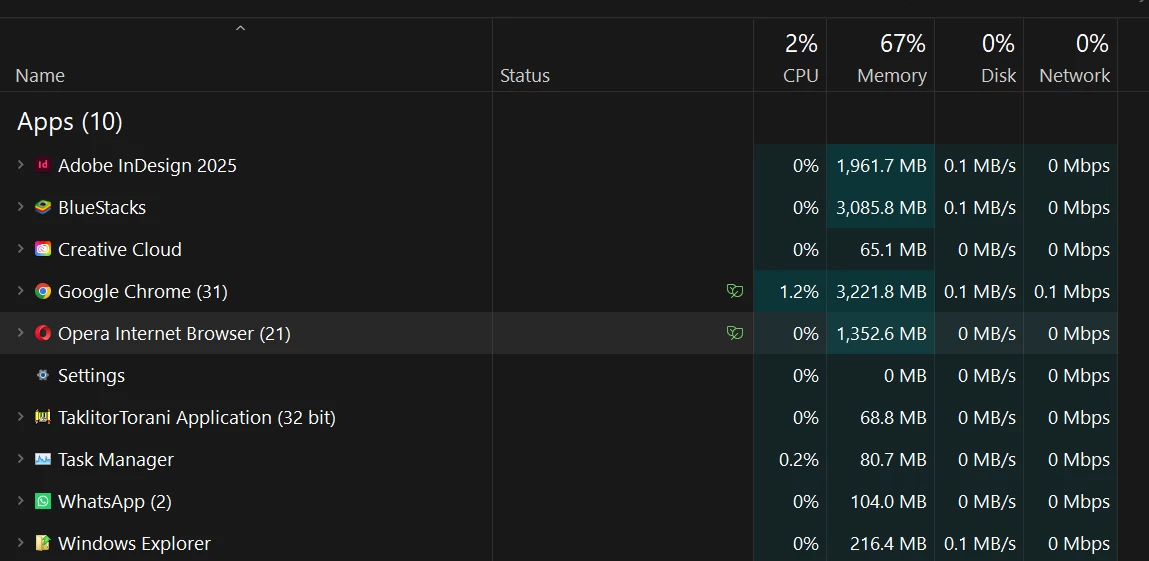
I am a super fast system, Windows 11 with plenty of RAM -
 

Correct answer SuzzyFlamingo

Hi @SuzzyFlamingo,


Thanks for confirming the version and sharing the screenshots. The setting I was referring to is GPU Performance under Preferences > Performance, and from your screenshot it looks like you've found it correctly. I also noticed the message saying "Compatible GPU and monitor not detected", which usually appears when the monitor resolution is below 2K. You can check the InDesign system GPU requirements here for more details.

Could you let me know if the slowdown happens in all documents or only in certain ones? It would also be helpful if you could test the behavior in Windows Safe Mode, so we can better isolate the cause.


Looking forward to your update.

Abhishek


I eventually fixed the problem by resetting preferences and restarting. I cannot imagine which stupid small preference could turn ID into a giant turtle...

1 reply

Anubhav M
Community Manager
Community Manager
September 9, 2025

Hi @7480888 Ref35918412wwxp,

Thank you for reaching out. Could you please try the suggestions outlined in this help article (https://adobe.ly/46iIcr9) and let us know if they improve the situation? If the issue persists, it would be helpful if you could share a few more details - such as the exact version of your operating system and InDesign, whether the issue occurs with specific files or folders, or when using particular tools/features.


Looking forward to your response.

Anubhav

SuzzyFlamingo
Inspiring
September 9, 2025

I followed those suggestions with no real improvement. I have not added any fonts; I disabled all plugins (besides "Mate") . Even when I drag a floating panel, it can't keep up with the pointer. When i move the cursor with the left/right arrow keys, it moves about a letter a second. This is totally unacceptable!

Very upsetting...

Abhishek Rao
Community Manager
Community Manager
September 9, 2025

Hi @SuzzyFlamingo,


Thanks for sharing the update. I hear your frustration. Could you please confirm the exact version of InDesign 2025 and Windows 11 you are running? It would also help to know if the sluggishness happens with all documents or only certain ones. From your screenshot, I noticed InDesign's memory usage is on the higher side, so testing once with GPU Performance turned off from Preferences > Performance could help check if the issue is related to GPU rendering. Resetting InDesign preferences is another step worth trying to rule out any corruption. Moreover, please test the issue in safe mode to rule out any third-party tool/software interference. Ref: https://adobe.ly/4gfBpmo


Looking forward to your update.

Abhishek