

Incredible_Beekeeper8666
Participant
May 12, 2026
Answered

Photoshop cannot open any files or create a new file

  • May 12, 2026
  • 3 replies
  • 145 views

Hello,

I am experiencing a serious problem with Adobe Photoshop on Windows 11.

The issue started after Photoshop froze during normal use. The program became completely unresponsive, and I had to force close it through Task Manager. Since that crash, Photoshop has not been working properly.

The application itself launches, but when I try to open any file, the workspace appears for a fraction of a second and then immediately returns to the home screen. Photoshop does not open any PSD files, and it also does not allow me to create a new file. In many cases, I get a general “program error” when trying to open a PSD. At one point, Photoshop also displayed an error saying it could not load default keyboard shortcuts and suggested reinstalling the application.

This issue affects all PSD files, not just one file. Even after reinstalling Photoshop, the same problem continues. I also tested an older version of Photoshop, but it did not help.

Here is what I have already tried:

  • Restarted the computer

  • Reinstalled Photoshop

  • Tested older Photoshop versions

  • Checked multiple PSD files; none of them open

  • Tried to reset Photoshop preferences

  • Removed leftover Photoshop files from AppData

  • Updated graphics card drivers

  • Restored Windows to an earlier restore point

  • Reinstalled Microsoft Visual C++ Redistributables and restarted the computer

  • Used the Adobe Creative Cloud Cleaner Tool to remove Creative Cloud apps and associated files

  • Reinstalled Adobe Creative Cloud and Photoshop again after cleanup

System details:

  • OS: Windows 11

  • Problem: Photoshop launches, but cannot open any files and cannot create a new file

  • Behavior: when opening a file, the workspace flashes briefly and immediately returns to the home screen

  • Additional errors seen: general “program error”; error saying Photoshop could not load default keyboard shortcuts

This issue has persisted even after a full Adobe cleanup and clean reinstallation, so the standard troubleshooting steps have not resolved it.

At this point, I suspect either a deeper Photoshop installation issue, a corrupted Adobe-related component, or a system-level compatibility problem caused by the initial crash.

Please let me know:

  1. What logs or diagnostic files you need from me

  2. Whether this is a known issue on Windows 11

  3. Whether there is a full manual cleanup procedure beyond the Creative Cloud Cleaner Tool

  4. Whether this behavior may indicate corruption in Photoshop user data, Adobe services, or system dependencies

  5. Whether there is a specific known fix for this type of startup/file-opening failure after a crash

Thank you.
Correct answer D Fosse

Before you do anything else:


How did you reset preferences? Clicking the button in the Preferences dialog will only reset parts of it.


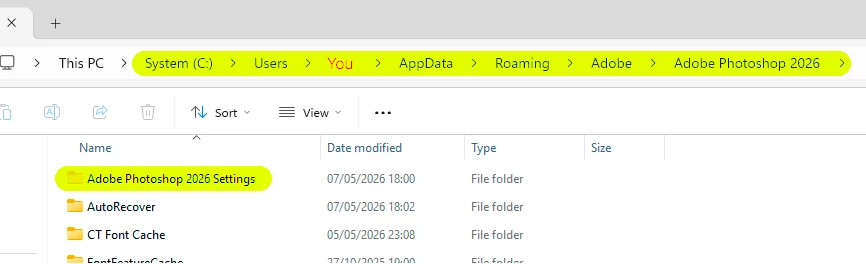
The safest and most complete way is to move the entire “Adobe Photoshop 2026 Settings” folder to your desktop and let a fresh one be built. This returns the application to clean, out-of-the-box factory state.


I would suspect that you have massively corrupted preferences after the crash. The preferences contain much more than your own user settings; it’s the full application configuration, and are rewritten on every application exit (as opposed to read-only program files). That exit was rather catastrophic in this case.


The Settings folder is here:


If that doesn’t do anything, the Cleaner tool is the next step. Make sure to set it at the appropriate level of cleaning. It should remove everything and anything Photoshop-related from your machine, including leftover and incorrect registry keys..

3 replies

lynn_7570
Participant
June 1, 2026

Hi! 

I am experiencing a similar issue. When I start Photoshop and open files from finder it works perfect. Only then during the day sometimes files suddenly refuse to open. I don’t get a pop-up, it is not responding at all when I am clicking a file from Finder. Only when I force quit the app and restart, the files open. 

Peter Villevoye
Community Expert
Community Expert
June 8, 2026

Just to let you know: same here, since a couple of days (I lost track of any coincidence with an application upgrade...) But please note: we’re on a Mac and the original post is about Windows. So we might need a different advice or solution. Nevertheless, there’s something fishy about it...

Peter Villevoye
Community Expert
Community Expert
June 8, 2026

BTW, there’s a more recent and separate thread about it, over here:


D Fosse
Community Expert
D FosseCommunity ExpertCorrect answer
Community Expert
May 12, 2026

Before you do anything else:


How did you reset preferences? Clicking the button in the Preferences dialog will only reset parts of it.


The safest and most complete way is to move the entire “Adobe Photoshop 2026 Settings” folder to your desktop and let a fresh one be built. This returns the application to clean, out-of-the-box factory state.


I would suspect that you have massively corrupted preferences after the crash. The preferences contain much more than your own user settings; it’s the full application configuration, and are rewritten on every application exit (as opposed to read-only program files). That exit was rather catastrophic in this case.


The Settings folder is here:


If that doesn’t do anything, the Cleaner tool is the next step. Make sure to set it at the appropriate level of cleaning. It should remove everything and anything Photoshop-related from your machine, including leftover and incorrect registry keys..

Sameer K
Community Manager
Community Manager
May 12, 2026

@Incredible_Beekeeper8666 Please check this detailed response, and let me know how it goes. (TR)

Thanks!
Sameer K

Mohit Goyal
Community Manager
Community Manager
May 12, 2026

@Incredible_Beekeeper8666 Thank you for the brief info about the issue. Are you seeing any error message while opening or creating new files in Photoshop? if yes, could you please share a screenshot of the error message?


Thanks,

Mohit

Incredible_Beekeeper8666
Participant
May 12, 2026

At this moment there is no error message appearing. The workspace just appears for a second and then immediately returns to the home screen. I previously got “program error” and "Unable to Load Default Keyboard Shortcuts" but it only showed up few times.

J E L
Community Expert
Community Expert
May 12, 2026

Hi ​@Incredible_Beekeeper8666, re the "Unable to Load Default Keyboard Shortcuts" error, I'm curious to know if you switched languages in your system at any point. In Windows, check under Settings > Time & Language > Language and change your typing language to English (United States) if it's not set that way.

Also, make sure the Adobe Creative Cloud app language is set to English (North America) instead of English (International). File > Preferences > Language (see screenshot).