


Participant
November 15, 2019
Answered

Acobe acrobat reader DC について

  • November 15, 2019
  • 3 replies
  • 1473 views

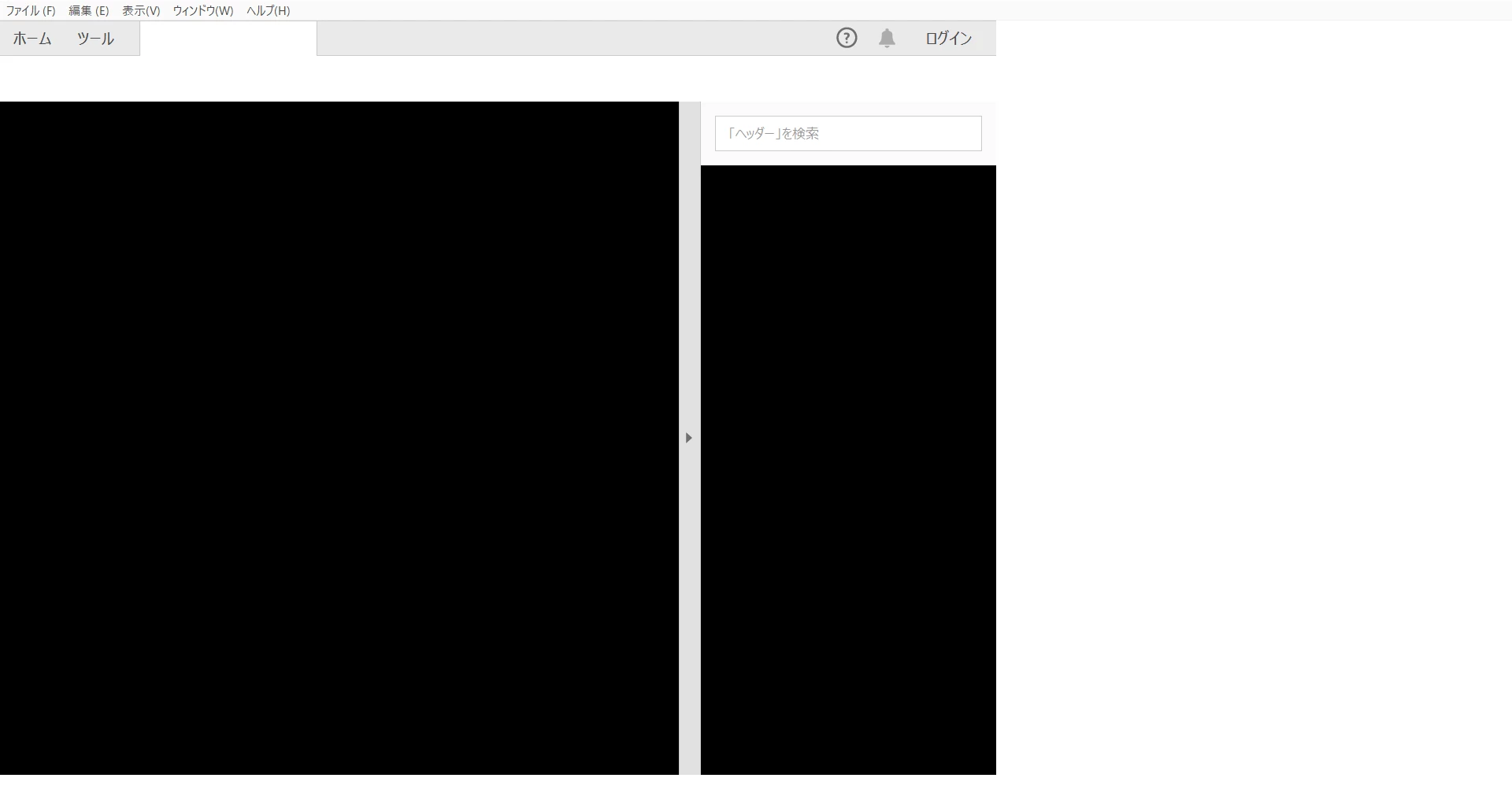
数ヶ月前より、PC起動後1回目のみ、Adobe acrobat reader DCにてPDFを参照することが出来、違うPDF又は同じPDFを2回目に閲覧しようとすると、写真のような黒い画面が表示され、PDFが閲覧出来ない、という状態が続いています(右半分は白色になっていますが、画像の通りです。加工はしていません。)。アプリの再インストールやPCの再起動も何度も行いましたが、一向に改善されません。尚、インターネット上でPDFを閲覧することは問題無く出来ます。上記の問題は、オフライン上でPDFをAdobe acrobat reader DCのアプリを使用して閲覧するときに生じます。どうすれば良いでしょうか。宜しくお願いします。尚、関係無いとは思いますが、OSはWindows10です。
This topic has been closed for replies.
Correct answer 加山雄三

Hi. Thanks for your reply and sorry for my late response.
I solved this problem by myself, so I'd like to tell you the cause of why I was in trouble.
This problem had been caused by Bai○u IME (so-called "China IME"), so if you use this IME and you want to use Adobe Acrobat Reader DC offline, you should change your IME like Microsoft IME.
I don't know why this software is incompatible with China IME, anyway, please be aware of installing China IME.

3 replies

Participant
January 1, 2021

こんばんは 質問者の加山と申します。

既に他の質問者様のご回答からご存知の方も多数いらっしゃるかと存じますが、この問題が解決致したこと、及びその解決方法を、遅ればせながら、ご報告させて頂きます。

原因としては、やはり中華IMEを使用致していたことが考えられます。

(文字入力システムをMicrosoft IMEに切り替えた所、正常に動作致しました。)

参考までに、Adobe Acrobat Reader DCのバージョンは20.013.20074で、2021年1月現在では最新のバージョンです。

皆様、大変ありがとうございました。

又、中華IMEを使用なさる際は、どうぞ、本製品との互換性に、お気をつけ下さい。

ls_rbls
Community Expert
Community Expert
January 1, 2021

Interesting and thank you very much for sharing that feedback!


I am wondering if this is a bug in Acrobat. But now I 'm curious, were you able to test if the problem manifests with all other Chinese input method editors, or just the one from that company ?


Also, from what I read it is recommended to stick to IMEs come with the operating system, supports English, and also traditional Chinese characters.


See this brief discussion: https://chinese.stackexchange.com/questions/5675/which-imes-input-method-editors-are-actually-most-used-in-each-of-prc-roc-an

assause
Community Expert
Community Expert
November 17, 2019

起きている問題自体は該当PC固有の現象だと思います。

再インストールしたりグラフィックドライバー周りの更新を確認することが必要になりそうです。

Acrobat Readerだけであれば下記文書を参照してアンインストール後に再インストールしてどうなるか、というのは出てきます。

https://community.adobe.com/t5/acrobat/acrobat%E3%81%AB%E9%96%A2%E9%80%A3%E3%81%99%E3%82%8B%E3%83%95%E3%82%A9%E3%83%AB%E3%83%80%E3%82%92%E5%85%A8%E3%81%A6%E5%89%8A%E9%99%A4%E3%81%97%E5%86%8D%E3%82%A4%E3%83%B3%E3%82%B9%E3%83%88%E3%83%BC%E3%83%AB%E3%81%99%E3%82%8B%E6%96%B9%E6%B3%95-windows7%E4%BB%A5%E4%B8%8A/td-p/4790891


それとは別に、該当環境はWindows 10プリインストールの環境でしょうか。

もしWindows 7などの古いOSからの上書きアップグレードであれば、それ自体が影響することもあります。

Participant
December 1, 2019

ご返信ありがとうございます。又、返信が遅くなってしまい、誠に申し訳ございません。

ご指摘の通り、起きている問題自体は私のパソコン固有の問題だと、私も思っています。

教えて頂いたサイトをもとに、再度アンインストール及び再インストールを行いましたが、結果は同じでした。

私のパソコンは最近購入したばかりの新商品なので、Windows10がプリインストールされているモデルです。なので、OSのアップグレードに伴う故障ではないと考えます。(仮にWindows7からアップグレードしていたとしても、それによる影響が今になって出てきた、というのもおかしな話ですし。)

私の中では、恐らくWindowsの更新プログラムが例によって悪さをしているのではないか、と考えていますが、正直に申し上げて何が理由であるのか、さっぱり分かりません。

ls_rbls
Community Expert
Community Expert
December 1, 2019

Did you use the adobe cleanup amd repair tool?


You may also try and see if the Program Compatibility Troubleshooter allows the test version wizard to detect download and install any .Net dependencies that may be missing.


If it did worked in a windows 7 machine you may be able to to select in windows 10 an older host environment for Acrobat... is just an idea to see if this help.


ls_rbls
Community Expert
Community Expert
November 16, 2019

Hi does this also happen if you open this file in a different computer with a different operating system or even an older version of windows?

Participant
December 1, 2019

Hi. Thank you for your reply and sorry for my late response.

I can open this file in other computer(even in Windows 7), and, of course this file is not infected by computer virus(e.g. Trojan horses).

I think this problem is caused by my computer, but I have no idea what have happened to it.