March 15, 2017
Answered

Characters entered using "Add text" gets invisible on removing cursor.

  • March 15, 2017
  • 1 reply
  • 492 views

「テキストを追加」機能で入力した文字がカーソルを外すと消えるので印字できません。

「テキストを追加」機能で入力した文字が消えずに印字出来るようにするには、どうしたらいいのでしょうか?

    This topic has been closed for replies.
    Correct answer Meenakshi_Negi

    Hi カズエ奥98177396,

    If you are referring to the "Add Text" option under Comment tool, please try to select show all comments.

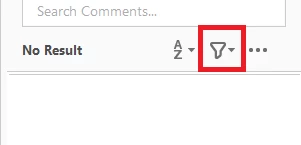
    Open comment tool and click on the icon shown in the screenshot below

    Then select "Show All Comments" from the drop down list.

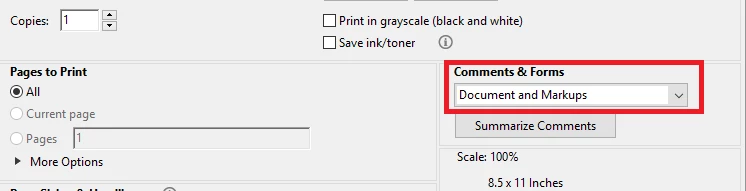
    To print, select "Document and Markups" under Comments & Forms on Print dialogue window.

    Check the screenshot below:

    Let us know if it helps.

    Regards,

    Meenakshi

    1 reply

    Meenakshi_Negi
    Meenakshi_NegiCorrect answer
    Legend
    March 15, 2017

    Hi カズエ奥98177396,

    If you are referring to the "Add Text" option under Comment tool, please try to select show all comments.

    Open comment tool and click on the icon shown in the screenshot below

    Then select "Show All Comments" from the drop down list.

    To print, select "Document and Markups" under Comments & Forms on Print dialogue window.

    Check the screenshot below:

    Let us know if it helps.

    Regards,

    Meenakshi