Participant
February 27, 2018
Answered

DreamweaverCC2018 全角スペースを表示させたい

  • February 27, 2018
  • 2 replies
  • 4481 views

設定のどこを探しても全角のスペースを表示させるような項目が見当たりませんでした。

表示タブにある、コードビューオプション ⇒ 非表示の文字 にはチェックがついていますが、全角スペースは表示されないようです。

(色付きで見えたりすると良いかなと思ってます)

ちなみにOSはWindows10 です。

コードのチェックのために全角スペースなどを他のエディタソフトでは表示させることができると思うのですが、

Dreamweaver にはそういった機能はないのでしょうか。

拡張機能の中でそういったものがあればそれもご教授願いたいと思います。

よろしくお願い致します。

    This topic has been closed for replies.
    Correct answer Nancy OShea

    耀介千14845836  wrote

    ...do not see full-width space.

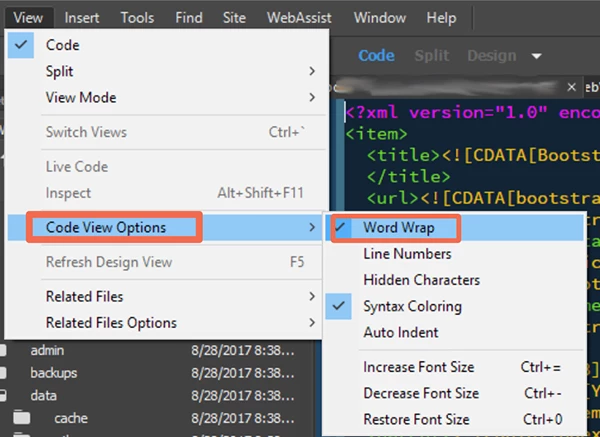
    Go to View > Code View Options and turn off Word Wrap.

    2 replies

    Nancy OShea
    Community Expert
    Nancy OSheaCommunity ExpertCorrect answer
    Community Expert
    February 27, 2018

    耀介千14845836  wrote

    ...do not see full-width space.

    Go to View > Code View Options and turn off Word Wrap.

    Nancy O'Shea— Product User & Community Expert
    anissa_thompson
    Community Expert
    Community Expert
    February 27, 2018

    Are you referring to tab spacing in your code? If so, take a look here in your preferences:

    Hope this helps! Make sure to press "✔ Correct Answer" on this post if this answers your question. Happy Creating!Anissa • @anissat