Participant
Nov 23, 2019 5:03 AM UTC
Answered

photoshop cc 2017

photoshop cc 2017 (旧バージョン)をインストールする方法をお教えください

creative cloud  の 登録者です

 

This topic is closed to new replies. Start a new post to keep the conversation going.
silk-m
silk-mCorrect answer
Community Expert
Nov 23, 2019 5:37 AM UTC

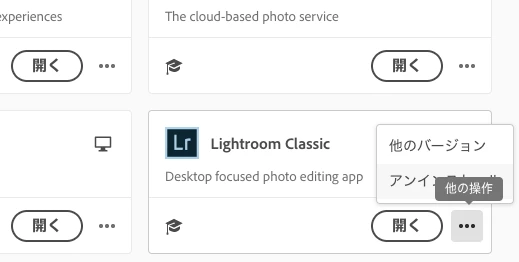
Creative Cloud Desktop App で Lightroom Clasiic の「他のバージョン」をクリックします。

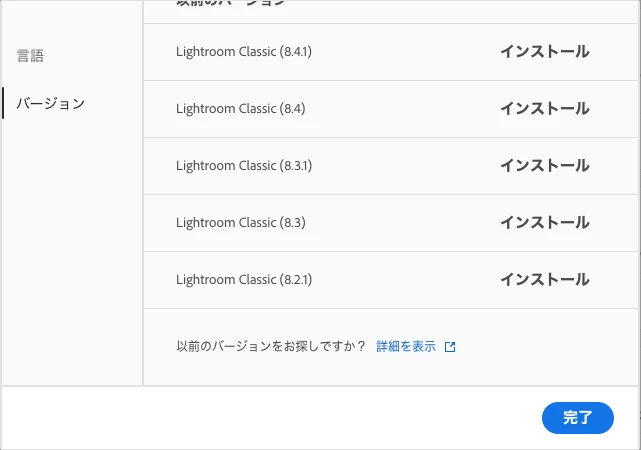
以前のバージョンをお探しですか?「詳細を表示」をクリックします。

Creative Cloud アプリケーションのレガシー版のダウンロードのページが開きます。

https://helpx.adobe.com/jp/download-install/kb/creative-cloud-previous-version-apps-download.html?product=Creative%20Cloud%20Desktop&product-version=5.0.0.354&mv=product&mv2=accc


--Susumu Iwasaki

2 replies

silk-m
Community Expert
silk-mCommunity ExpertCorrect answer
Community Expert
Nov 23, 2019 5:37 AM UTC

Creative Cloud Desktop App で Lightroom Clasiic の「他のバージョン」をクリックします。

以前のバージョンをお探しですか?「詳細を表示」をクリックします。

Creative Cloud アプリケーションのレガシー版のダウンロードのページが開きます。

https://helpx.adobe.com/jp/download-install/kb/creative-cloud-previous-version-apps-download.html?product=Creative%20Cloud%20Desktop&product-version=5.0.0.354&mv=product&mv2=accc


Translate
--Susumu Iwasaki
Participant
Dec 4, 2019 12:49 PM UTC
ありがとうございました

無事2017をインストールできました

今のバージョンは2020ですが、canon printstudioproのpluginに対応していません
ので

旧バージョンが欲しかったので助かりました
Translate