Answered

This topic is closed to new replies. Start a new post to keep the conversation going.
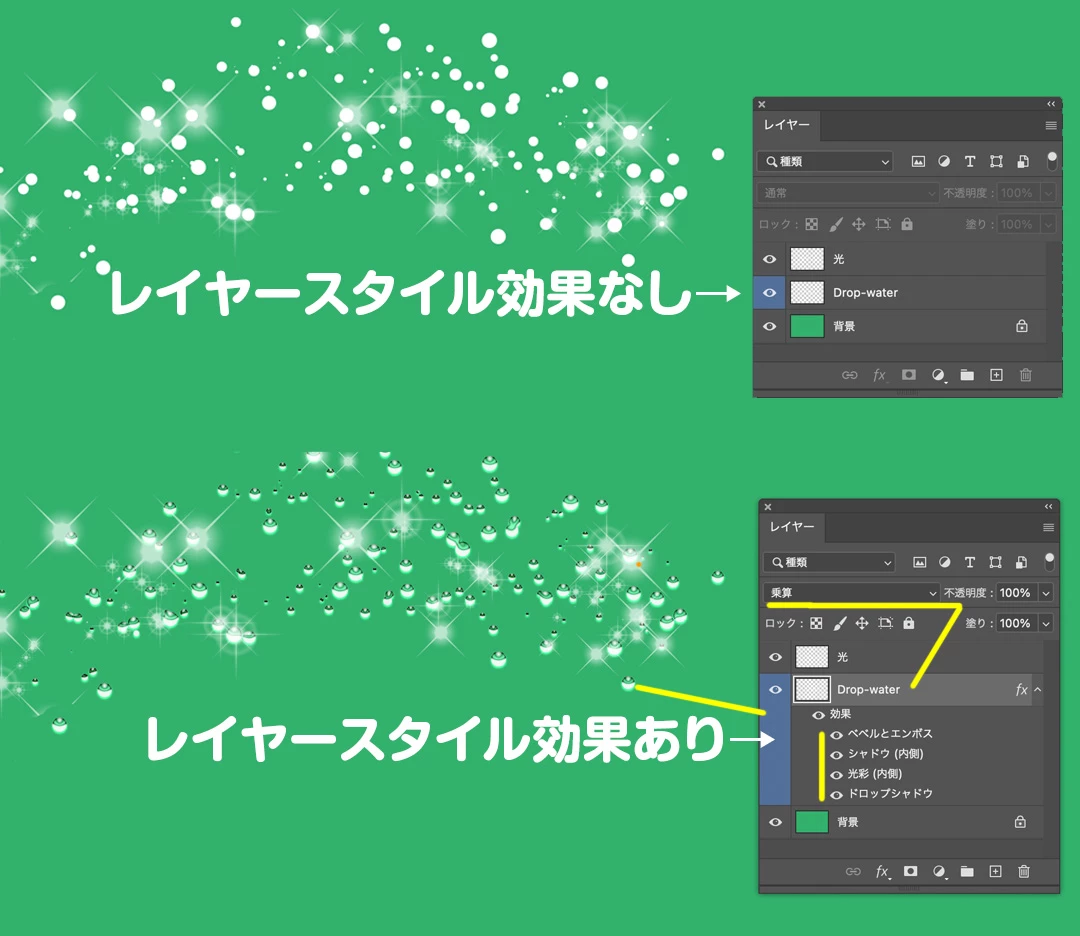
光も水滴もブラシツールを使い白色(描画色)で点々と描いていくだけです。
難しいのは水滴のレイヤースタイル設定ですね。
レイヤースタイル「ベベルとエンボス」の陰影に覆い焼き(リニア)-加算を使用し、シャドウは乗算で可能です。
このスタイルの設定を載せても解像度やブラシサイズで表示が変わり同じ効果は出ませんので、まずはPhotoshopのレイヤースタイルを学んでみてください。


Sign up
Already have an account? Login
To post, reply, or follow discussions, please sign in with your Adobe ID.
Sign inSign in to Adobe Community
No account yet? Create an account
To post, reply, or follow discussions, please sign in with your Adobe ID.
Sign inEnter your E-mail address. We'll send you an e-mail with instructions to reset your password.
 AdChoices