


Participant
May 24, 2019
Answered

フォトショップ CS6 質問 画像のモザイク化

  • May 24, 2019
  • 6 replies
  • 574 views

Mac、Photoshopともさほど詳しくありません。ご教授いただければ幸いです。

MacBook Pro(os 10.14.5)を先月購入して、それまで使用していたMacBook Pro(10.9.5)に入っていたPhotoshop cs6をそのまま移行しました。
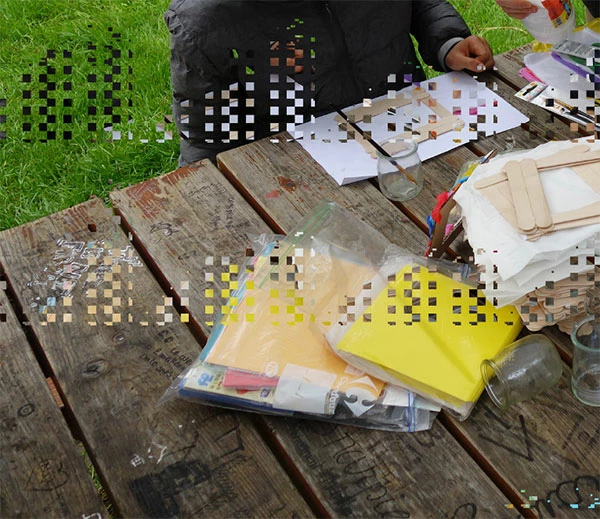
新しいMacBook Proのフォトショップで画像を開くと画像がおかしくなってしまう物が出てきます。

普通に画像が変わらず開ける物もあればズームして行くとモザイク模様の様になってしまうものもあります。

この様な感じです。
以前の物のライセンス認証解除をして、新しい方のライセンス認証は行いました。

何が問題なのでしょうか。

よろしくお願い致します。
    This topic has been closed for replies.
    Correct answer

    Hi

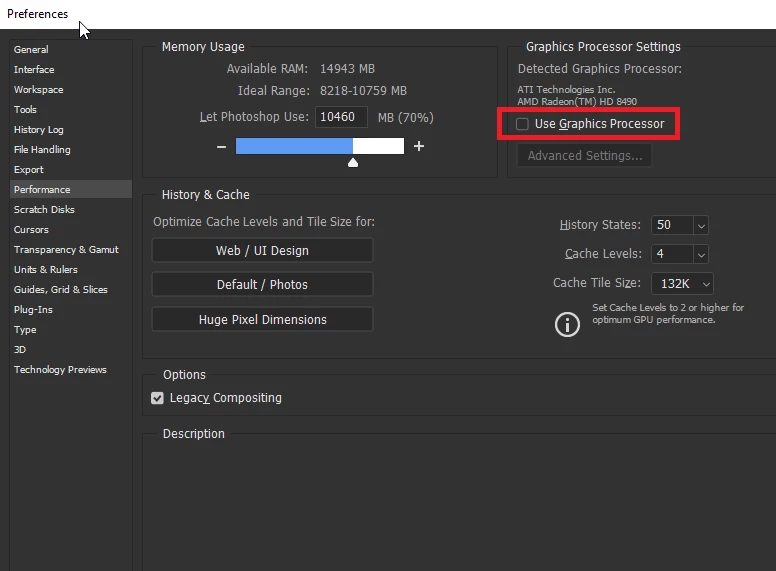
    Looks like it could be an issue with your GPU driver, try disabling "Use Graphics Processor" and restart Photoshop to see if it helps

    You have to remember that Photoshop CS6 has not been tested and is not supported on the latest version of MAC OS

    6 replies

    assause
    Community Expert
    Community Expert
    May 27, 2019

    念のため補足ですが、CS6の動作保証バージョンは、最終で10.9です。

    Photoshopでぎりぎり10.10くらいだと考えておきましょう。

    またmacOS 10.14については、現時点では最新の2019(Ver.20)のみが動作保証です。

    macOSはリリースから3年のみのAppleのサポートしかないため、

    利用できるアプリケーションもこまめなアップグレードを必要とするもので考えておきましょう。

    なおPhotoshop (us) から Photoshopコミュニティフォーラム (Japan) に移動しました。

    9388919Author
    Participant
    May 27, 2019

    了解しました。ご説明、どうも有難うございました!

    Correct answer
    May 24, 2019

    Hi

    Looks like it could be an issue with your GPU driver, try disabling "Use Graphics Processor" and restart Photoshop to see if it helps

    You have to remember that Photoshop CS6 has not been tested and is not supported on the latest version of MAC OS

    9388919Author
    Participant
    May 24, 2019

    It looks okay
    thank you so much
    Despite Japanese

    May 24, 2019

    You will lose some functionality with the GPU disabled more info

    Photoshop graphics processor (GPU) card FAQ

    Try enabling it again only this time set the drawing mode to basic and restart Photoshop