Participant
September 21, 2019
Answered
フォトショップでのパスの作業時の表示色
- September 21, 2019
- 1 reply
- 1102 views

Hi
In current versions of Photoshop CC, you can control the path colour and thickness from the options bar.
With the pen tool selected:
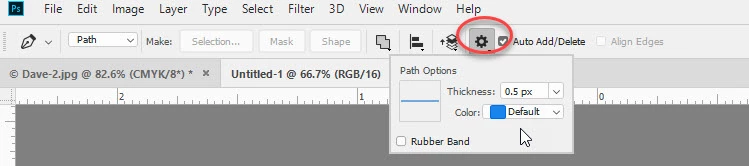
You can also set the default in Preferences > Guides Grids and Slices > Path >Path options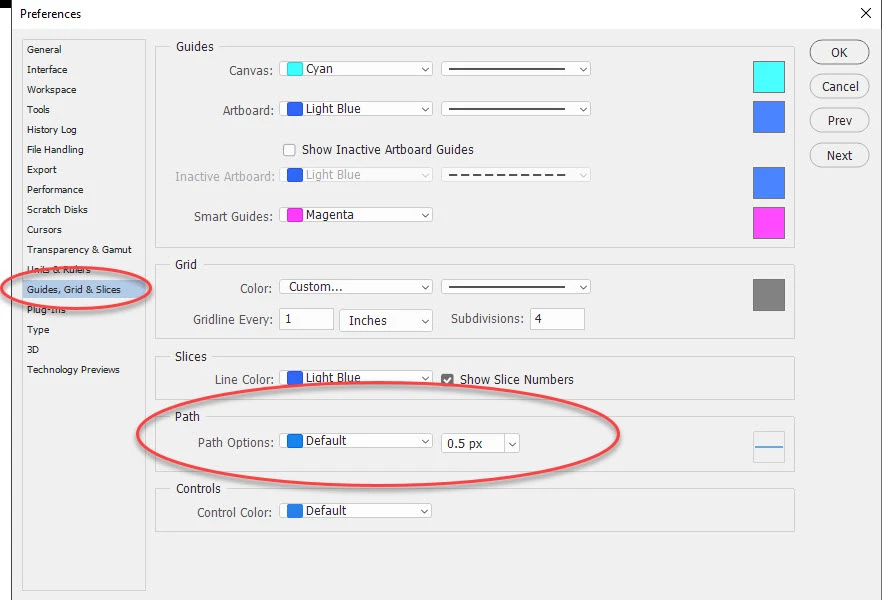
Dave
Already have an account? Login
Enter your E-mail address. We'll send you an e-mail with instructions to reset your password.


 AdChoices