
Participating Frequently
April 21, 2020
Question

レイヤーマスク 使い方 合成

  • April 21, 2020
  • 3 replies
  • 1175 views

どのようなやり方があるのか教えて頂きたいです。

3枚以上の写真を各々いいところ一部部分のみ見せるように合成・かつ結合せずにバラバラのレイヤーで重ねていくにはどうしたら良いのか?一体それは可能なのかと悩んでいます。


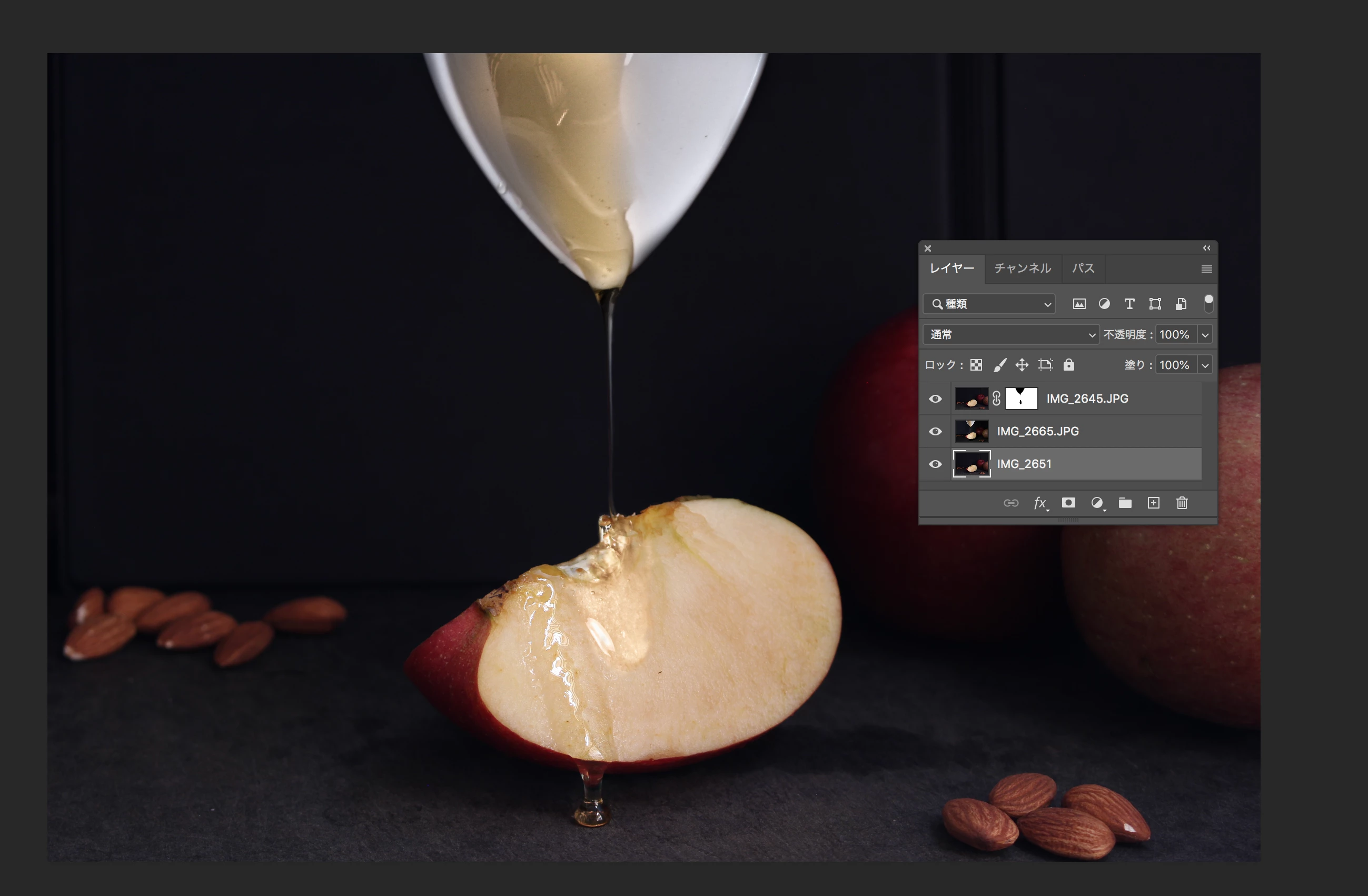
具体的には添付の写真のように複数枚同じアングルから撮った写真で、はちみつがりんごから滴るものを作りたいと思っています。

二枚の写真の時は下にはちみつの注ぐシーン、上にすでにかかってるシーンにして上にレイヤーマスクをかけて

はちみつの注ぐシーンを見えるようにしました。

このあと追加でにすでにかかってるシーンの写真IMG_2651やさらにこれと類似の写真を重ねていきたいと思った時は

一度IMG_2665とIMG_2645を結合?して一枚の写真にしないと出来ないでしょうか?


ご教授していただけると大変嬉しいです!
 

This topic has been closed for replies.

3 replies

Marja de Klerk
Inspiring
April 22, 2020

IMG_2651 is invisible now because it is totally covered by IMG_2665. You can drag IMG_2651 on top of the layers and add a layer mask.  That way you can paint in the layer mask to reveal only the parts you want to show.  

katayanagi51
Community Expert
Community Expert
April 22, 2020

知りたいことを書いてらっしゃるだけなのでまったく問題ないですよ?

(私はPhotoshopをほとんど使わないので回答できませんけど,よい回答がつくかもしれません)


https://helpx.adobe.com/jp/photoshop/how-to/make-complex-selections-composite.html


lambiloon
Community Expert
Community Expert
April 21, 2020

Hi this is not the correct forum for learning Photoshop you can learn on youtube about many such things....regards

Ali Sajjad / Graphic Design Trainer / Freelancer / Adobe Certified Professional
rinkunAuthor
Participating Frequently
April 21, 2020

oops sorry! Thanks.