Known Participant
February 10, 2018
Answered

三輪のRGBの環を作りたい

  • February 10, 2018
  • 9 replies
  • 1090 views

Photoshopの勉強でスタンプのモードをいろいろ試してみたくて、三輪のRGB環をつくろうとしたのですが、RGBそれぞれが透過していないので出来ませんでした。環の重なったところを選択範囲をつくって色を指定すれば良いのかとも思いましたが、もっとすぐ出来る方法をご存知ないでしょうか?


    This topic is closed to new replies. Start a new post to keep the conversation going.
    Correct answer Yamonov

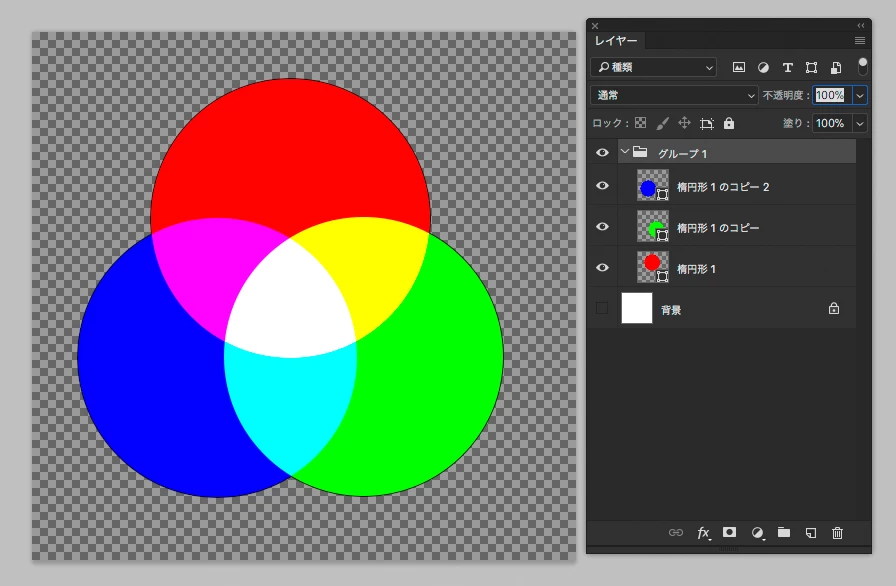
    既に提示されているスクリーンショットですが、こういうことです。

    RGBそれぞれのレイヤーは描画モードをスクリーンにしています。

    それを描画モード「通常」(初期値の「透過」ではない)のグループに入れます。または、グループに入れず背景を真っ黒にしてもいいでしょう。

    なぜスタンプを使うのか分かりませんが、勉強のためでしたら、スタンプの描画モードをスクリーンにしてやれば同じことができます。

    9 replies

    Yamonov
    YamonovCorrect answer
    Legend
    February 11, 2018

    既に提示されているスクリーンショットですが、こういうことです。

    RGBそれぞれのレイヤーは描画モードをスクリーンにしています。

    それを描画モード「通常」(初期値の「透過」ではない)のグループに入れます。または、グループに入れず背景を真っ黒にしてもいいでしょう。

    なぜスタンプを使うのか分かりませんが、勉強のためでしたら、スタンプの描画モードをスクリーンにしてやれば同じことができます。

    --Yamonov
    Known Participant
    February 14, 2018

    Yamo74様

    ありがとうございます!

    出来ました!

    gener7
    Community Expert
    Community Expert
    February 14, 2018

    Since Yamo74's answer solved your problem, I've marked his answer as Correct. I was "helpful", but not "correct".

    Gene

    c.pfaffenbichler
    Community Expert
    Community Expert
    February 10, 2018
    Not because I'd wanted try stamp mode variously in Photoshop and make the RGB ring of the three-wheeled, not through the RGB. Thought how do I specify colors, making the selection where it overlaps the ring, the more you know how soon can it?

    Not sure I understand what you want to do.

    Do you want to do that in CMYK?

    gener7
    Community Expert
    Community Expert
    February 10, 2018

    Adobe has a dedicated Japanese community, I've moved it there.

    Gene

    Known Participant
    February 11, 2018

    It seems Adobe's site is difficult to understand, and it got into English's site. Even if you ask a question on the Japanese site, it will be skipped to the English site. Sorry. I will re-question the Japanese site. Thank you for your advice.