佶赵92358804
Participant
April 17, 2018
Answered

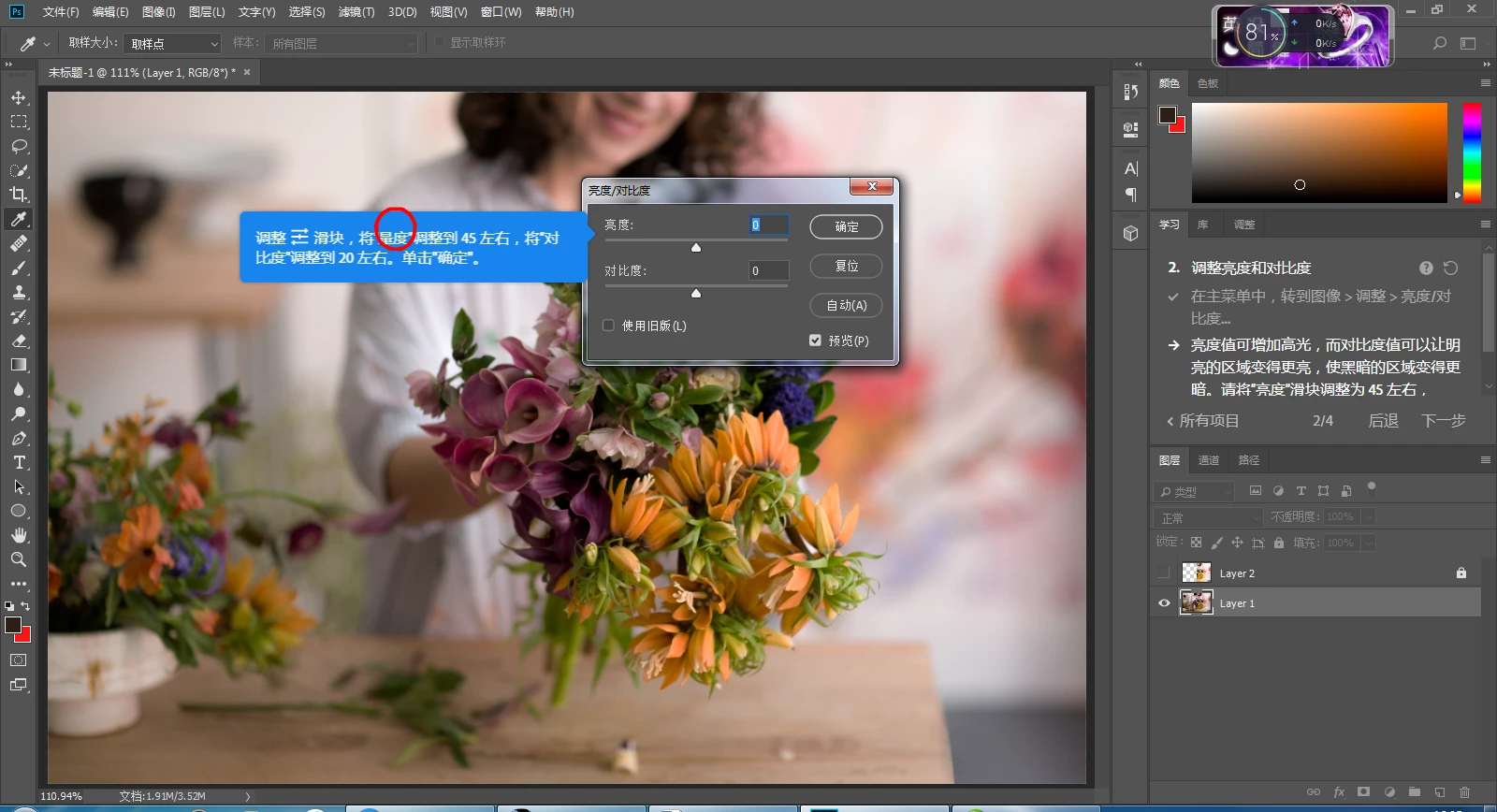
发现Adobe Photoshop CC2018试用版的一个语言汉化小错误

  • April 17, 2018
  • 2 replies
  • 386 views

这里“将量度调整到45左右”应该是“亮度”吧

    This topic is closed to new replies. Start a new post to keep the conversation going.
    Correct answer c.pfaffenbichler

    Found Adobe Photoshop CC2018 a trial version of a language Chinese bug

    "Adjust the measurement to around 45" should be "brightness"

    This is a user Forum so if you want to report a bug please also post over at

    Photoshop Family Customer Community

    2 replies

    c.pfaffenbichler
    Community Expert
    c.pfaffenbichlerCommunity ExpertCorrect answer
    Community Expert
    April 17, 2018

    Found Adobe Photoshop CC2018 a trial version of a language Chinese bug

    "Adjust the measurement to around 45" should be "brightness"

    This is a user Forum so if you want to report a bug please also post over at

    Photoshop Family Customer Community

    PECourtejoie
    Community Expert
    Community Expert
    April 17, 2018

    Hello, this seems to be a bug in one of the step by step tutorials, not sure how to reach that team in particular.