

AlanGilbertson
Community Expert
Community Expert
March 18, 2026
StickyQuestion

Cross-Product Creative Challenge #12: Action Movie Poster

  • March 18, 2026
  • 30 replies
  • 985 views

Welcome to a new Cross-Product Creative Challenge! Thanks to everyone who participated in the alternate timeline challenge. Even if your answers aren’t visible now, we’re told they will be soon!

This time, we’re going to the movies.

The Challenge [Read all of it!]:

Design a movie poster for an action adventure movie. The standard movie poster size here in the US is 27x40, so that is your aspect ratio. Start in Firefly or Boards or Express or Photoshop, but DO NOT stop at a prompt. None of the models use that ratio, for one thing, but there are quality details (lighting, contrast, composition) and content details (titles, credits, franchise logo) you will have to get right.

Guidelines:

  • A prompt is not enough. Layer your assets and refine your composition. Treat Firefly as a collaborator, not a shortcut. Use prompts to generate characters. Try out partner models.
  • Think like a director. What’s the story here? Who are the characters? What's happening in the scene?
  • It’s a Cross-Product Challenge! Don't do it all in Firefly. Use Photoshop, Illustrator, Substance, Adobe Express, Fresco—whatever tools will help you build the scene.
  • Share your process. Tell us how you created it. What tools did you use? How did you refine your idea? What choices did you make?
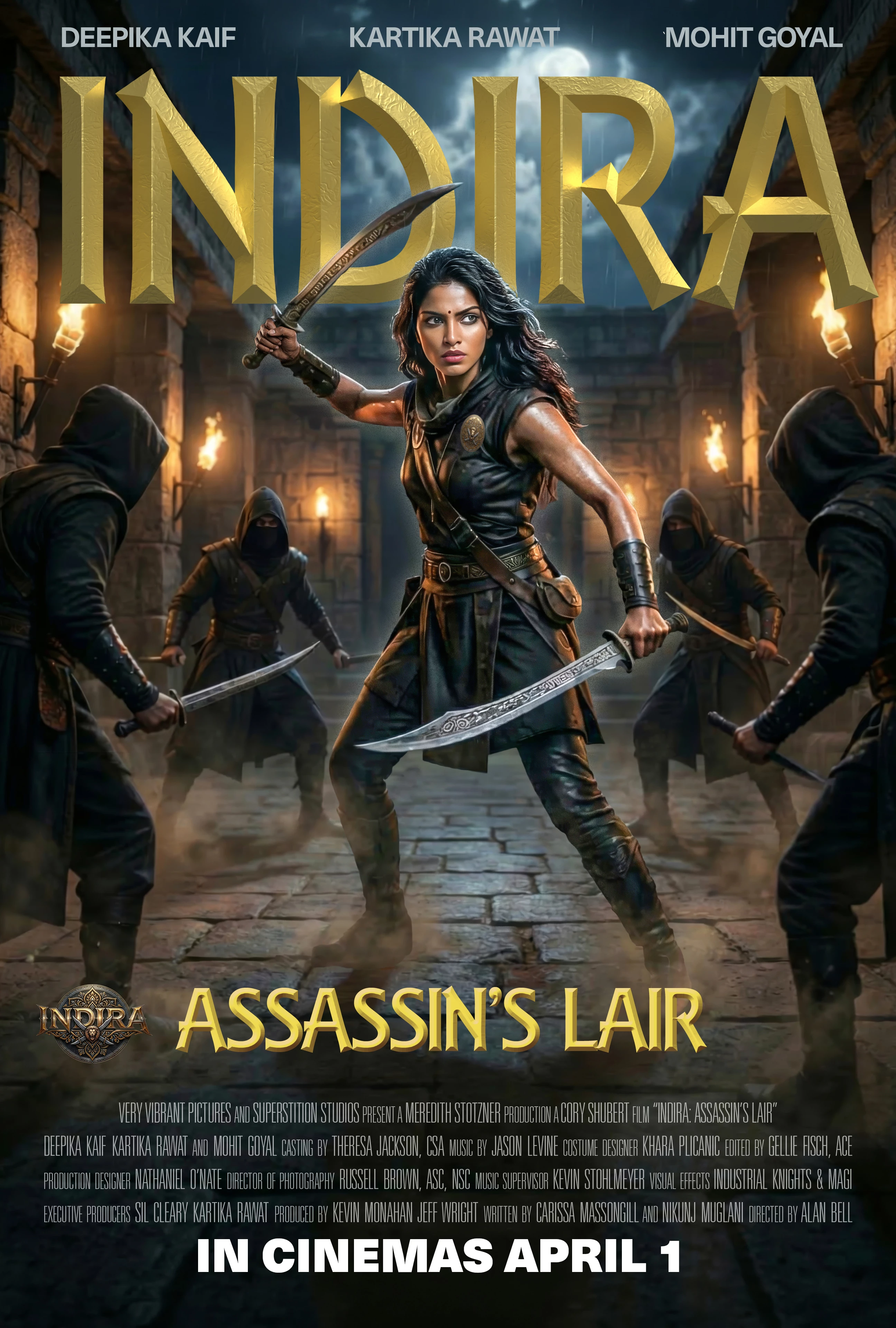
This poster starts with the main image, “split” in Photoshop so that the Indira hero is on a separate layer from the background. Generative Expand in Photoshop extended the image to the correct 27x40 aspect ratio and I used the Camera Raw filter to adjust the lighting, contrast, color, and sharpness of the Indira character. The Indira character is a little too small in the AI-generated original, so I also enlarged her. The Indira “franchise” logo is from Nano Banana.

I made the main title in Illustrator using 3D and Substance material for the gold foil, and put everything together in InDesign, including all of the typography. The credits are set in Univers 39 Ultra Compressed, but any skinny font will do the job. (Hint: The Easter eggs are mostly in the credits.)

    30 replies

    lambiloon
    Community Expert
    Community Expert
    March 23, 2026


    Charracter created with Firefly rest done with Photoshop

    Ali Sajjad / Graphic Design Trainer / Freelancer / Adobe Certified Professional
    Christelle RD
    Community Expert
    Community Expert
    March 22, 2026

    I used two assets of Adobe stock : a unicorn and a sculpture - both were in a lush nature. I used Ps to blend them. I generated the warrior on Firefly and enjoyed the rotate tool on Ps Beta to place her perfectly. I used Ai for the title and the logo - I generated the butterfly on Ai and again enjoyed the rotate tool - from a flat butterfly it gave me a butterfly with flying wings. Amazing. Then, back to Ps, I harmonized, define a graphic style to generate with Gemini a cohesive work and used camera raw as a final touch.


    Ness, the Unicorn Girl

    Introduction to the story:
    In the near future, almost all humans have been turned to stone by a dragon seeking to seize their lands and riches.
    The Great Architect decides to raise Atlantis from the depths and asks Jasmine, a powerful unicorn, to defeat the dragon and save what remains of humanity. Jasmine travels to the ancient lands and defeats the dragon, who had just turned a young mother to stone but hadn’t had time to do the same to the baby. Wounded, Jasmine decides to return to Atlantis with the baby, whom she names Ness and raises as her own daughter. She then suggests to Ness that she continue the work she started, for there are still humans on the ancient lands above water; most are enslaved by those who have seized power on each of the continents, and nature is being increasingly mistreated... The adventure begins: there is much to do, and she must find allies... 

    Community Expert
    March 23, 2026

    I love it! :-) 

    Christelle RD
    Community Expert
    Community Expert
    March 23, 2026

    Thank you Patrick!

    AlanGilbertson
    Community Expert
    Community Expert
    March 22, 2026

    I made two posters for this challenge before choosing the one that started this thread. This is the one that didn’t make the cut.

    It is slightly more complicated under the hood, because I had to add the bloom (glare) of the sunlight in front of the title to match the bloom spilling onto her hair. (It’s a single soft large brush spot in a yellow picked from the scene and converted to “Screen” blend mode.) The process otherwise is almost identical.


    Christelle RD
    Community Expert
    Community Expert
    March 22, 2026

    Love the grainy vibe and the warmth the the tittle brings!
    I’m sorry I don’t know everyone mentioned in the text. As for those I do know, the role suits them perfectly 😊

    AlanGilbertson
    Community Expert
    Community Expert
    March 23, 2026

    Thanks, Christelle. There’s a lot of Camera Raw filter involved! What was interesting with this project was using Nano Banana to create a bunch of different images all with the same hero character, something that has not been possible with the Firefly models.

    lambiloon
    Community Expert
    Community Expert
    March 22, 2026


    Promt:

    Create a movie poster for an original action-adventure film. The hero is a male adult resembling Bruce Lee with martial arts skills. Her secret weapon is a wooden armour with magical powers. 

    Then

    All work done in photoshop

    Ali Sajjad / Graphic Design Trainer / Freelancer / Adobe Certified Professional
    tonks_the_auror
    Community Expert
    Community Expert
    March 22, 2026


    tonks_the_auror
    Community Expert
    Community Expert
    March 22, 2026

    I wrote up my process and then I got an error message and lost it all.

    FIREFLY:
    Prompt 1: Create a movie poster for an original action-adventure film called “Lord Voldemort vs. the Daleks.”
    Prompt 2: Create an image of the Hogwarts castle at night
    Prompt 3: Merge these two images so the Hogwarts castle is in the background on the left and the spaceships are firing on the castle.

    PHOTOSHOP:
    Expanded the canvas to the correct size and used Content Aware Fill to fill in the edges.
    Used select subject to copy the Voldemort character, paste onto a new layer, and add a drop shadow.
    Saved as .psd.

    InDesign:
    Imported the psd. Sampled the colors from the image and added them to my swatches palette.
    Added the text, chose the fonts, sizes, and colors.
    Played around with effects on the text--drop shadow and Bevel and Emboss.
    Exported to JPG.

    AlanGilbertson
    Community Expert
    Community Expert
    March 22, 2026

    Awesome, Michele! I’m a big Doctor Who fan who remembers when the Daleks first appeared (1963-ish) and became an instant hit. Half the UK was saying, “Exterminate!” and cracking up.

    Thanks for the details, too. We all learn from each other!

    Participant
    March 20, 2026

    Here’s my adorable attempt. LOL 


    AlanGilbertson
    Community Expert
    Community Expert
    March 21, 2026

    Nice concept!. Tell us about your process: Which products did you use to get your final product, and how did you use them?

    fbeaume
    Community Expert
    Community Expert
    March 20, 2026

    Happy to hear the cross-product challenges are back!

    GeekyGirlRex7295714
    Community Expert
    Community Expert
    March 20, 2026

    SO happy to have these back.

    Writer | Developer | Facilitator | Geek!
    GeekyGirlRex7295714
    Community Expert
    Community Expert
    March 20, 2026

    Original prompt in Firefly: Create a movie poster for an original action-adventure film. The hero is a female toddler resembling Pippi Longstocking with red hair and prominent freckles. Her secret weapon is a pair of gray-and-white kittens with magical powers. She saves nervous speakers from failing.

    Added the words in Photoshop Online.


    Writer | Developer | Facilitator | Geek!
    AlanGilbertson
    Community Expert
    Community Expert
    March 20, 2026

    Awesome! Suitable for International Toddlers’ Month, wouldn’t you say? I love the kitty super powers. 😁🎉

    What about that 27:41 aspect ratio? Targeting PInstaTok? 😉

    Kevin Stohlmeyer
    Community Expert
    Community Expert
    March 20, 2026

    Great subject Alan!


    I went down the vintage/retro rabbit hole with this one. 

    The background image was originally created in Google Gemini 3.1. I then combined the character output with my head shot to create the main character. 

    From there it was all Photoshop. I expanded the output to match the poster dimensions, then added typography, and sourced era-specific logos. 

    I added in some halftone effects throughout the poster, but not in the entire image as it overwhelmed. 

    Coming soon to a theater near you. 


    AlanGilbertson
    Community Expert
    Community Expert
    March 20, 2026

    That’s brilliant. The retro concept is perfect, and you picked yourself a great pair of co-stars!  Gemini is great with cultural references, but it’s those extra details, like the period logos, that make the final product special. You’d love spending a few hours at “History for Hire” in Hollywood They have the best collection of period props ever.

    Kevin Stohlmeyer
    Community Expert
    Community Expert
    March 23, 2026

    Yeah Id get lost there. I used to love the old studio backlot tours just for spotting vintage props just lying about. 

    creative explorer
    Community Expert
    Community Expert
    March 20, 2026

    @AlanGilbertson that’s a tough act to follow with your ‘poster!’

    m
    AlanGilbertson
    Community Expert
    Community Expert
    March 20, 2026

    Well, hey, ya know, that might be why it’s called a “challenge.” 😉

    I challenged myself on this one, pushing the AIs for everything I could squeeze out of them and exercising Photoshop. Getting things right takes work, but that’s what makes it so enjoyable. (And that’s what makes it hard for me to put a project down and say, “Okay, I’m done!”) When a project stretches you a bit, you learn skills that stay with you and carry over into your paid work. Play is one of the best ways to learn!