


Community Manager
June 18, 2025

Feature Focus: Quick Offset: stagger your layers just by dragging them

  • June 18, 2025
  • 17 replies
  • 13621 views

Edit: Aug 17, 2025 — Quick Offset is now released in the official release of After Effects 25.4

Great news for After Effects users! Starting with version 25.4. build 50 of After Effects Beta, we're excited to introduce Quick Offset - an efficiency feature that makes staggering your layers and keyframes in your timeline much easier.


What's New 

Quick Offset makes it easy to move each layer in your selection — and keyframes across multiple layers with just a simple keyboard-modified drag. Just select several layersor keyframes on different layers and hold down CMD+OPT on Mac / CTRL+ ALT on PC while you drag your selection in the timeline to watch as your layers (or keyframes) distribute themselves across the timeline under your mouse cursor.  Creating cascading and overlapping animations was much more work than it needed to be, Quick Offset makes it much simpler now. 


What it does: 

Layer offsetting: Select multiple layers in the order you want to offset, hold CMD+OPT (Mac) or CTRL+ALT (PC), and drag left or right to move the last layer selected. All the other selected layers in between will distribute themselves in between in the order that you selected them — that's it! 


Get Creative with Selection Order: 
Selecting layers in a random order can quickly add interest and variation to your timeline!
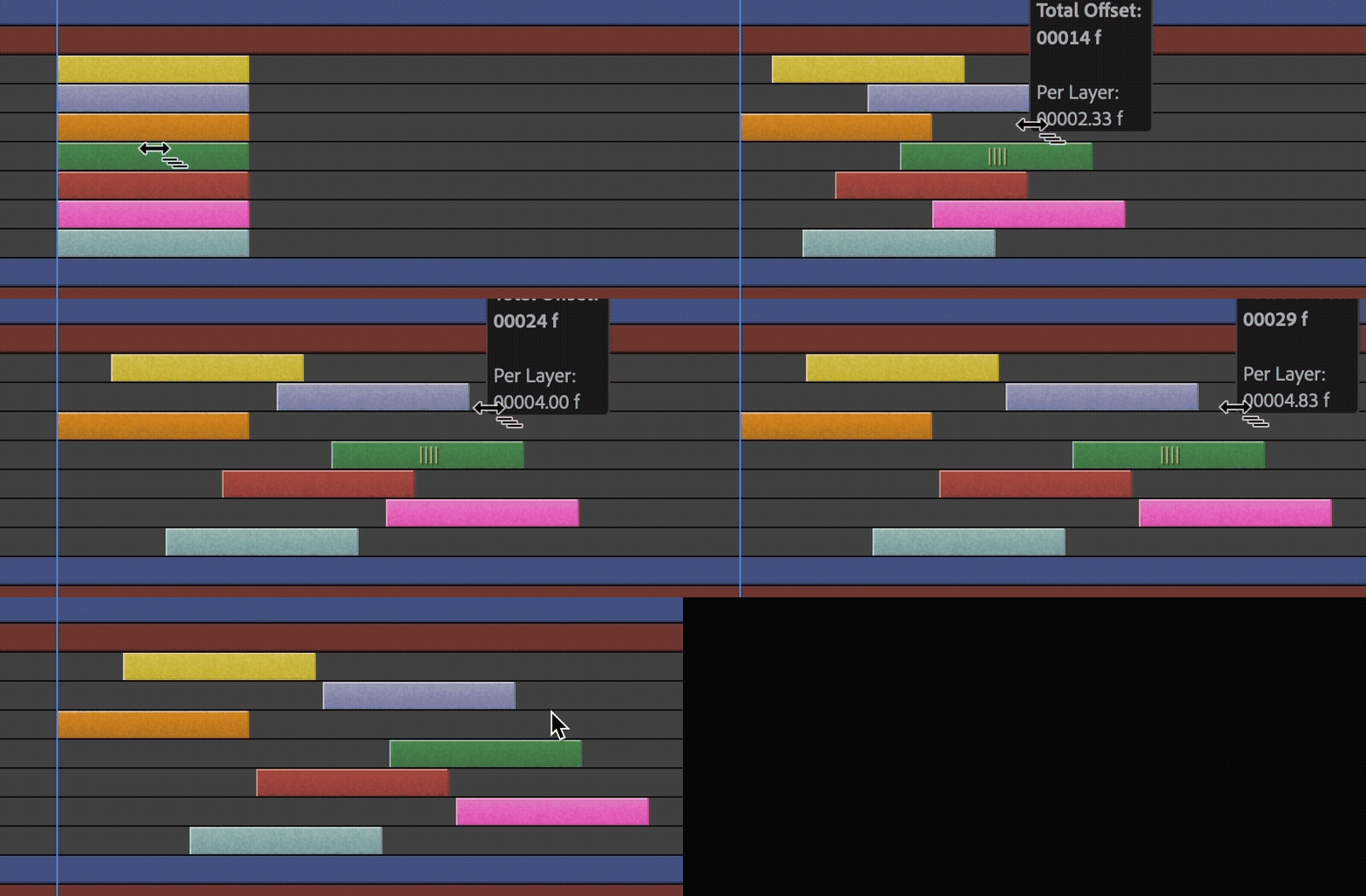


Works with keyframes too: Offset keyframe timing while keeping your animations intact. Groups of keyframes on each layer will stick together as you stagger them across the timeline.
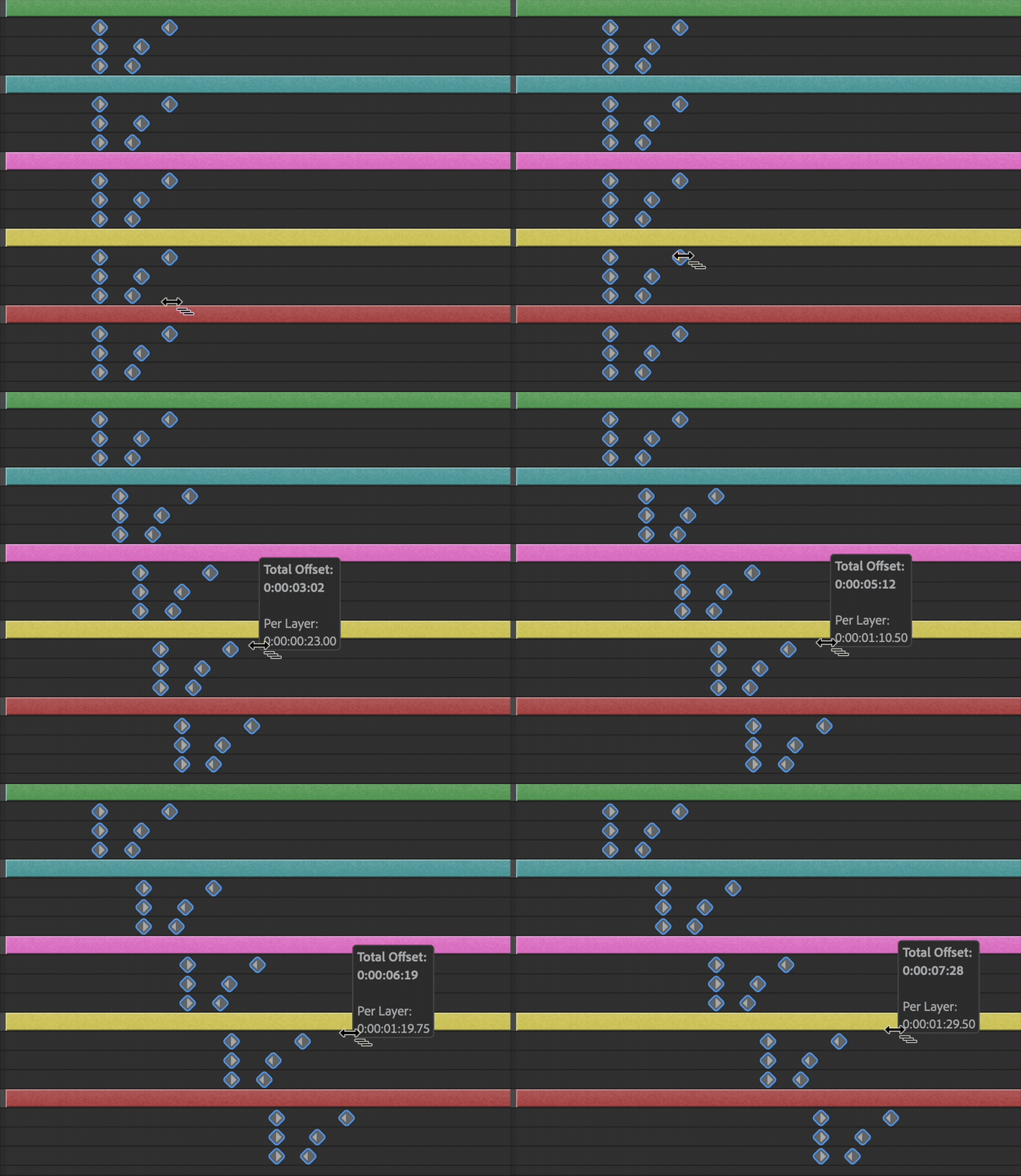
  • Visual feedback: See exactly how much you're offsetting as you drag.
  • Any selection order: Pick layers in whatever order works for your animation.
  • Precise timing: Fine-tune beyond whole frames for smoother results.


We Want Your Feedback 

Quick Offset is all about making your daily work a little easier. We'd love to hear how it's working for you: 

  • Is it saving you time on staggered animations? 
  • What situations are you finding it most useful for? 
  • Any ideas for making it even easier to use? 
  • Are you satisfied with the way the layers are timed in the composition after using Quick Offset? 

Drop your thoughts in the comments — your feedback helps us make After Effects better!


Known Issues and Feature Limitations 

  • Only linear offsets are currently supported, each layer will be offset in time by the same amount. 
  • If you marquee a selection of keyframes, the offset order will not consider the direction you selected them; it will just use the layer order in the composition. 
  • To make extremely smooth animations, staggered layers and keyframes will start on subframes. 

Try Quick Offset with these other features currently in Beta

Alt/Opt+Drag to Duplicate Layers

Set keyframes on a layer, Alt+Drag on PC / Opt+Drag on Mac to create duplicates all over your comp, then use Quick Offset to stagger them to quickly create a cascade of animations.

Quick Set Anchor to snap anchor points

Select one or more layers, and click the Anchor Point icon in the Properties Panel to reveal a Quick Set Anchor dialog to snap the anchor point to the corner or center point of your layers, or use the shortcut Shift+Tab to bring up the dialog right under your mouse!


We can't wait to hear what you think of Quick Offset!


    17 replies

    Atay32410
    Participant
    January 27, 2026

    how can i fill enpty spaces between those layers

    Participant
    August 31, 2025

    how about if also from rather just dragging the user could click the layers after invoking the keyboard shortcut and then a dialog winddow would popup asking for values. That way one could specify how many seconds/frames they want to offset. Could. also have offest order and randomness set here. More than anything I think that would vastly improve the random method of selecting layers randomly, espeically if you have a ton of layers. 

    Inspiring
    September 15, 2025

    This ^^^ add more of the rift funcitonality into some sort of dialog or even an panel. 

    Roland Kahlenberg
    Legend
    October 27, 2025

    Hi Scott, this isn't meant as a reply directed specifically at you - I'm just too lazy to scroll up. :-DI think lots of great ideas but there is something fundamentally awkward and in fact, wrong to be asking the AE Team to work on low-value tasks - it's like going to a Michelin star restaurant and ordering a Big Mac. 

    The AE Team have scientists - literally! We should be asking for Gassian Splatting, AI-Outpainting, built-in Prompting for 3D Assets, Auto-Reframing, AI-Resizing, AI-FrameRate Helper - all the tools you need to stay relevant for the next 5 to 10 years. You/We/aLotOfUs are now competing against Gen-AI and for stuff like Rift/Sortie can be written by an LLM - I can teach you how to prompt for these within 8, 3 hour lessons. But even then, it costs a pittance to purchase them. 

    So, it serves you and other users well if you aim big when you put in an FR to the AE Team. Think about what you need not only for the Now but for the next 2-5 years. Speed/Automation and intelligent tools are going to be critical for us; moving forward in this era. 

    I'd like to see the 3D Rendering Engine improve its speed for Preview/Renders improve by 5X-20X. It's almost unusable for me - could be my lack of patience but it's also because it's just not sufficiently quick to make 3D a relevant part of my output. 

    I'd like to see the AE Team really put heads together with the aim of saving jobs of their users as a main goal - we live in strange and dangerous times. Goals have to be recalibrated, every decision has to be fixed and aim far and wide and BIG. 


    Very Advanced After Effects Training | Adaptive & Responsive Toolkits | Intelligent Design Assets (IDAs) | MoGraph Design System DEV
    Participating Frequently
    July 30, 2025

    I'm having trouble getting this feature to work. After selecting the order of the layers i want staggered I press ctrl + alt and all the layers move at once. not sure if I'm missing a step. 

    Is there a special way to select the layers??

    Community Manager
    July 30, 2025

    Hi there! There are no other steps you're missing. It's possible you're using a version that does not include Quick Offset. Can you please check which version of After Effects you're using by clicking About After Effects? On Windows this is in the help menu, on Mac it's in the "After Effects" menu.

    This feature is currently only in the Beta version of After Effects, and only after 25.4 build 50. If you don't have the Beta version installed you can download the Beta version from Creative Cloud in the Apps > Beta section. The Beta version and the Release version can both be installed on the same system.

    sora kota
    Participant
    July 7, 2025

    Hello! Thanks for the fantastic work. This improvement will reduce overtime for all possible motion designers.


    May I suggest one thing?

    Currently it is possible to offset between multiple layers, but it would be helpful if it is possible to offset on the same layer. For example, it would be fantastic if we could use this feature to move text sequentially when we convert a text layer to a shape layer and then add individual bounce animations.


    Looking forward to it!

    Bruno Quintin
    Inspiring
    September 14, 2025

    Indeed, it's a shame that we can't shift keys within the same layer. Typically in the animation of shapes within the same shape layer. Or shift the animation of the puppet tool.

    sskaz
    Inspiring
    September 15, 2025

    I just ran into this the other day. Extra confusing because the mouse cursor changes to the new one when you hold command-option while hovering over keyframes. I didn’t realize you need multiple layers selected and can’t offset keyframes in a single layer. 


    Now that this is out of beta and in stable, I guess we need to start a new thread in the non-beta community to request it…

    Participating Frequently
    June 27, 2025

    Loved this update! I have two suggestions:

    1. It would be great if we could also randomize the selection of layers or keyframes automatically, instead of having to select them manually in a specific order. When dealing with a lot of layers, manually picking each one just to get a randomized result can be a lot of work

    2. It would also be nice to have a button that forces the offset to go strictly frame by frame. I think right now it seems to behaves the same as when holding Ctrl and Alt to stretch or shrink keyframes, which often creates keyframes between frames and can be pretty annoying.

    Thanks again for this new feature!

    Participating Frequently
    June 27, 2025

    holding ALT*** sorry,
    you don't to hold ctrl to stretch/shrink keyframes hahah

    Participant
    June 24, 2025

    I combined this with a scriplet I wrote that selected layers in a random order.

    In the scriplet I gave the layer index range (I had about 200) and then used this feature. The power of these two tools combined saved SO MUCH TIME!

    Roland Kahlenberg
    Legend
    June 23, 2025

    Do we get to offset more layers with one of these? 

    😄

    Very Advanced After Effects Training | Adaptive & Responsive Toolkits | Intelligent Design Assets (IDAs) | MoGraph Design System DEV
    Inspiring
    June 20, 2025

    "Select in the order you want to offse"

    next I need a keyboardbutton to reverse it while dragging.

    But really nice feature over all!

    Participant
    June 19, 2025

    It's funny how new features in After Effects are just plugins or scripts from years ago. 3d inside AE? Element3d. Change anchor point? Motion. Quick offset? Rift. Can't wait to see a lockdown-like feature in 8 years inside AE.

    Valentin Robert
    Participating Frequently
    June 20, 2025

    3d inside AE started 13y ago with AE CS6 with the raytracer engine.
    Unfortunately, you had to own a (compatible) Nvidia card and the engine was pretty slow.


    Participating Frequently
    June 23, 2025

    ok then *Useable, functional 3D* 

    Participant
    June 19, 2025

    YES!!