



Action required: Enable Transcript API access in Microsoft Teams to restore Acrobat AI meeting summaries
TL;DR
If the AI Assistant in Acrobat for Microsoft Teams has stopped generating meeting summaries, or the transcript list in the Acrobat Teams Personal App is empty, a likely cause is a Microsoft Teams admin setting called Transcript API access. Microsoft now ships this setting off by default, which blocks Acrobat, along with any other third-party app, from reading Teams meeting transcripts through Microsoft Graph. This is a Microsoft-side change, and Adobe cannot enable it for you. Your organization's Microsoft 365 or Teams admin needs to enable it.
Who this affects
- Organizations using Acrobat for Microsoft Teams (web connector or Teams Personal App)
- Anyone relying on the AI Assistant to summarize Teams meeting transcripts in Acrobat
- If your tenant already has Microsoft Graph access enabled for the transcript API in the Teams admin center, no action is needed
What Changed
Microsoft added a new admin control, Transcript API access, that governs whether any third-party app, not just Acrobat, can read Teams meeting transcripts through Microsoft Graph. It is off by default at the tenant level. Because this control is managed in Microsoft's admin center, it must be enabled by your Microsoft 365 or Teams admin.
How your admin fixes it
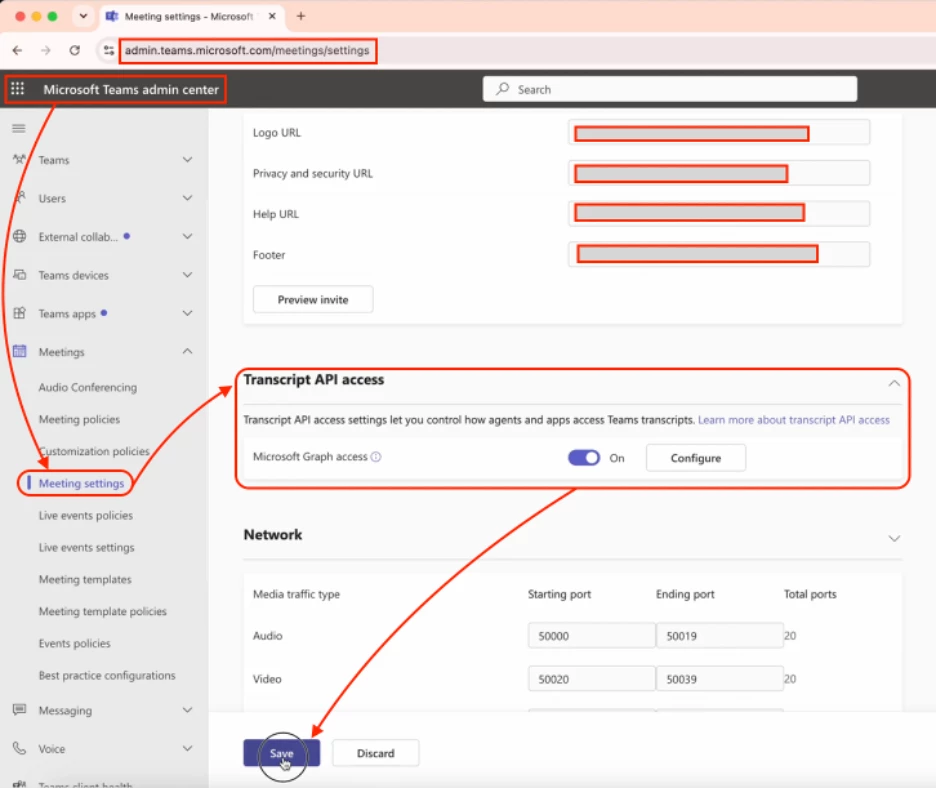
- Go to Microsoft Teams Admin Center
- Navigate to Meetings > Meeting settings
- Under Transcript API access, turn the Microsoft Graph access toggle ‘On’
That's it, no Adobe side configuration is required once this is enabled.
Note: Loop in your Teams admin If the toggle isn't visible; it may require admin role.
More questions? Start a conversation | Catch up on all updates: ICYMI
 AdChoices